• Which the release of FS2020 we see an explosition of activity on the forun and of course we are very happy to see this. But having all questions about FS2020 in one forum becomes a bit messy. So therefore we would like to ask you all to use the following guidelines when posting your questions:

    • Tag FS2020 specific questions with the MSFS2020 tag.
    • Questions about making 3D assets can be posted in the 3D asset design forum. Either post them in the subforum of the modelling tool you use or in the general forum if they are general.
    • Questions about aircraft design can be posted in the Aircraft design forum
    • Questions about airport design can be posted in the FS2020 airport design forum. Once airport development tools have been updated for FS2020 you can post tool speciifc questions in the subforums of those tools as well of course.
    • Questions about terrain design can be posted in the FS2020 terrain design forum.
    • Questions about SimConnect can be posted in the SimConnect forum.

    Any other question that is not specific to an aspect of development or tool can be posted in the General chat forum.

    By following these guidelines we make sure that the forums remain easy to read for everybody and also that the right people can find your post to answer it.

Lights in MSFS too bright

Messages
8
Country
unitedkingdom
Hello guys,

I would like to ask you. I came back to development for MSFS, however I am struggling with exporting the object with correct light settings.

This is how it looks like in the sim:
1683367644021.png


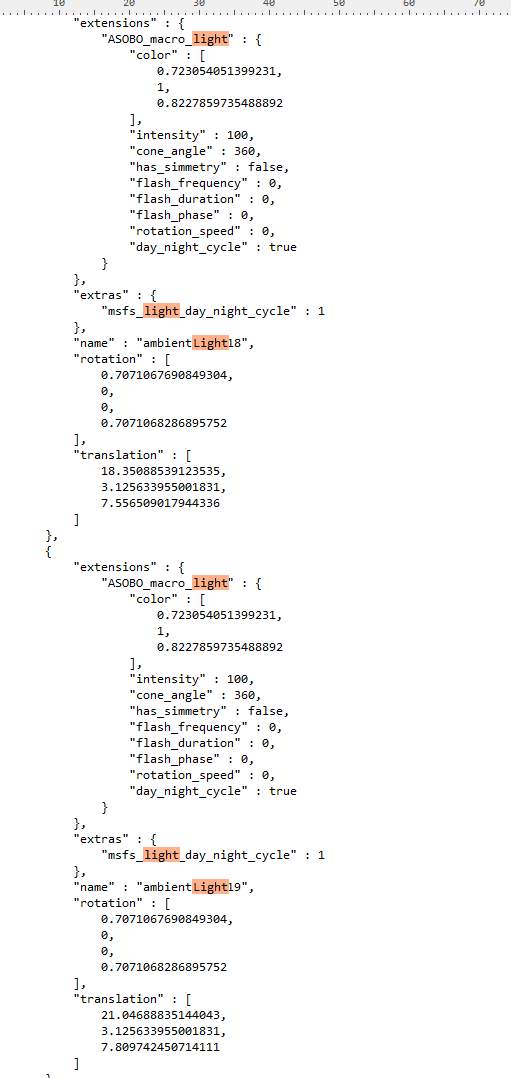
however this is what I have in the gltf file:
1683367679554.png
'
no matter if I change it anywhere, it is still this way bright.
Do you have any suggestion? I am using Blender 3.1 and the blender 3.4 wasn't able to export lights at all.

Thanks for your help!

Filip
 
Also, if I change the value of "intensity" nothing changes after building and replacing the object or even giving the object new GUID and replacing it.
 
Also, if I change the value of "intensity" nothing changes after building and replacing the object or even giving the object new GUID and replacing it.
The DevMode doesn't show changes well. Save the scenery, close the project, open the project, and the changes should show.
in Blender:
Untitled.png

5W will end up as an intensity of 5.
 
Okay, so I have tried completely different approach to this issue. I have created new model called TerminalA (so it doesn't associate with the old model) and now it works. :)
 
There's a quite comprehensive page in the Blender manual regarding lights and the power of it, stating:

'The power of sun lights is specified in Watts per square meter. The power of point lights, spot lights, and area lights is specified in Watts. But this is not the electrical Watts that consumer light bulbs are rated at. It is Radiant Flux or Radiant Power which is also measured in Watts. It is the energy radiated from the light in the form of visible light.'

I've found that the wattage stated under Power of Lights work pretty well in MSFS with a little tweaking here and there.
 
Back
Top