

- Messages
- 18
- Country

Hi! I'm having issues getting CDI to work correctly for a plane I'm building. It's the localizer needle that is giving me a headache...
I'm using standard Asobo templates (similar to the one on the Cessna 152).
The model XML looks like this:
The animation in my model is 254 frames long and is named INSTRUMENT_CDI_Needle_Localizer_1 (both as required by the standard template).
Now it seems like msfs recognizes the animation, but the range is limited and the needle swing seems to be offset to the left.
The pictures below show the leftmost, center and rightmost position of the needle in MSFS:


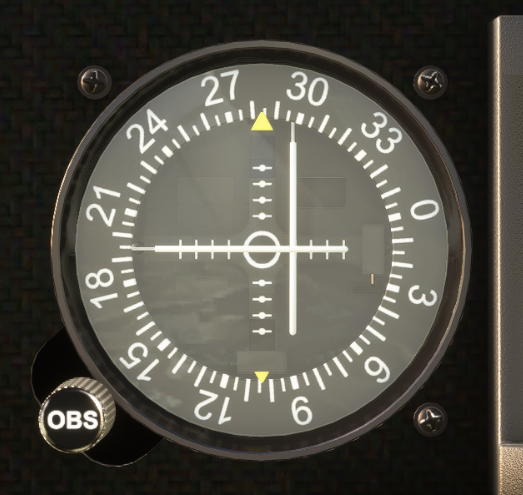
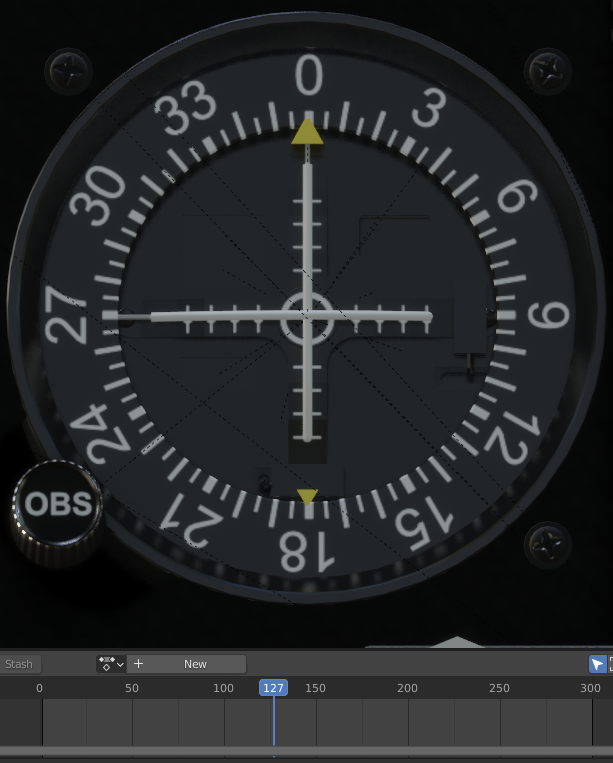
The pictures below show the same animation extremities in Blender at frames 0, 127 and 254:


I hope anybody can help me out with this...
I'm using standard Asobo templates (similar to the one on the Cessna 152).
The model XML looks like this:
XML:
<Component ID="INSTRUMENTS_CDI">
    <DefaultTemplateParameters>
        <IS_AVIONICS_ON>(A:CIRCUIT ON:11, Bool)</IS_AVIONICS_ON>
    </DefaultTemplateParameters>
    <UseTemplate Name="ASOBO_INSTRUMENT_CDI_Template">
        <ID>1</ID>
        <NO_GPS_DEPENDENCY>True</NO_GPS_DEPENDENCY>
        <KNOB_HIGHLIGHT_NODE_ID>INSTRUMENT_CDI_Knob_Course_OnlyVisual_1</KNOB_HIGHLIGHT_NODE_ID>
    </UseTemplate>
</Component>
The animation in my model is 254 frames long and is named INSTRUMENT_CDI_Needle_Localizer_1 (both as required by the standard template).
Now it seems like msfs recognizes the animation, but the range is limited and the needle swing seems to be offset to the left.
The pictures below show the leftmost, center and rightmost position of the needle in MSFS:
The pictures below show the same animation extremities in Blender at frames 0, 127 and 254:
I hope anybody can help me out with this...

