

arwasairl
Resource contributor
- Messages
- 39
- Country

Hey all,
As you all know, MakeMDL has a 1200 animation limit. However, the sim supports more than 1200 animations, so to get around this, I patched MakeMDL.
In the below example, I have this object which contains 2496 animation records in total. Unpatched MakeMDL will not compile this and give an error.
However, with patched MakeMDL, the model will compile and will even render and animate correctly in sim.
Due to the questionable legality of the rehosting of copyrighted MakeMDL files, I am unable to post the already patched EXE, but you can patch it yourself relatively easily with these instructions:
First, expand the PE by adding a new section called .patch. I am using PE-bear to do this. Set the raw size and virtual size to 1000 and ensure that the section is at the end after the .rsrc section. Save this as a new executable, this will be the one we will use to patch.
Next, create a new animation table and patch all instructions to use the new one. The reason we cannot expand the old one is that the old code initializes an array 1200 indices long, since it is explicitly defined in memory, we cannot change this value easily. This new method instead dynamically allocates the table in the heap.
The address I am using are all in VA. Raw file offsets can be calculated by subtracting the VA address by the base image address (0x400000).
To create a new animation table, navigate to 00502000 and paste this code at the start. This code is already assembled and can be used without creating a flat binary:
53 51 52 57 8B D9 A1 A4 20 50 00 85 C0 0F 84 0C 00 00 00 39 1D A0 20 50 00 0F 84 35 00 00 00 89 1D A0 20 50 00 68 00 40 00 00 E8 91 45 F0 FF 85 C0 0F 85 08 00 00 00 8D 43 04 E9 15 00 00 00 A3 A4 20 50 00 8B F8 33 C0 B9 00 10 00 00 F3 AB A1 A4 20 50 00 5F 5A 59 5B C3 90 90 90 90 90 90 90 50 52 8B CE E8 97 FF FF FF 5A 59 89 0C 90 FF 06 E9 0E B4 F2 FF 90 90 90 90 90 90 90 90 90 90 90 50 E8 7A FF FF FF 8B E8 58 8B 75 00 E9 12 C0 F2 FF 90 90 90 90 90 90 90 90 90 90 90 90 90 90 90 00 00 00 00 00 00 00 00 00 10 00 00 00 00 00 00 00 00 00 00 00 00 00 00 00 00 00 00 00 00 00 00 89 F9 E8 39 FF FF FF 89 C6 3B 1F 7D 48 8B 0C 9E 85 C9 74 37 81 F9 00 00 50 00 72 2F 81 F9 00 00 FF 7F 73 27 8B 01 3D 00 00 40 00 72 1E 3D 00 00 47 00 73 17 8B 50 14 81 FA 00 10 40 00 72 0C 81 FA 00 B0 44 00 73 04 6A 01 FF D2 C7 04 9E 00 00 00 00 43 EB B4 E9 B3 B2 F2 FF 90 90 90 90 90 90 90 90 90 90 90 90 90 90 90 90 90 90 90 90 90 90 90 90 90 90 90 90 90 90 90 90 90 90 90 90 90 90 90 90 90 90 90 90 90 90 90 90 90 90 90 90 90 90 90 90 90 90 90 90 90 90 90 90 90 90 90 90 90 90 90 90 90 90 90 90 90 90 90 90 90 90 90 90 90 90 90 90 90 90 90 90 90 90 90 90 90 90 90 90 90 90 90 90 90 90 90 90 90 90 90 90 90 90 90 90 90 90 90 90 90 90 90 90 90 90 90 90 90 90 90 90 90 90 90 90 90 90 90 90 90 90 90 90 90 90 90 90 90 90 90 90 90 90 90 90 90 90 90 90 90 90 90 90 90 90
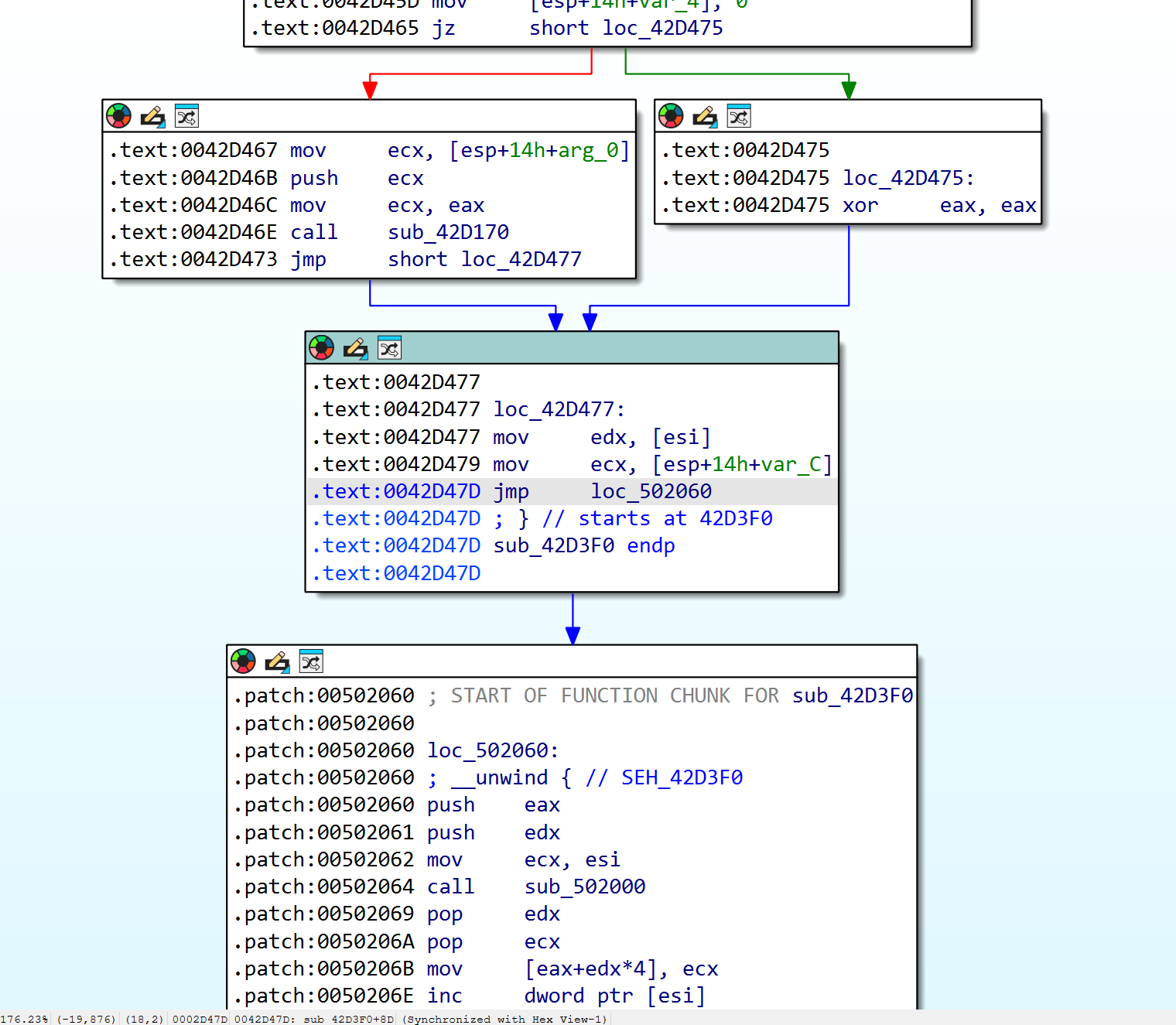
You now must hook into old animation table calls to use the new one. There are 3 locations where this call must be hooked, at 0042D47D, 0042E09D, and, 0042D3AD. Additionally, we need to patch 2 checks to go above 1200 animations, at 0042D409 and 0042D42A.
For the patch at: 0042D47D, change bytes to:
E9 DE 4B 0D 00 90
For the patch at: 0042E09D, change bytes to:
E9 DE 3F 0D 00 90
For the patch at: 0042D3AD, change bytes to:
E9 0E 4D 0D 00
This covers the calls and our new subroutine will now hook the old table pointers.
Finally, patch the two animation checks at 0042D409 and 0042D42A.
For the patch at: 0042D409, change bytes to:
81 3E 00 10 00 00
For the patch at: 0042D42A, change bytes to:
68 00 10 00 00
Save and assemble your changes. You can now use MakeMDL with up to 4096 animations. It is worth noting that I am not sure what the exact "hard limit" of animations there are for FS9, but it is certainly a lot higher than 1200.
Below are disassemblies for each patch.



Thank you for reading
As you all know, MakeMDL has a 1200 animation limit. However, the sim supports more than 1200 animations, so to get around this, I patched MakeMDL.
In the below example, I have this object which contains 2496 animation records in total. Unpatched MakeMDL will not compile this and give an error.
However, with patched MakeMDL, the model will compile and will even render and animate correctly in sim.
Due to the questionable legality of the rehosting of copyrighted MakeMDL files, I am unable to post the already patched EXE, but you can patch it yourself relatively easily with these instructions:
First, expand the PE by adding a new section called .patch. I am using PE-bear to do this. Set the raw size and virtual size to 1000 and ensure that the section is at the end after the .rsrc section. Save this as a new executable, this will be the one we will use to patch.
Next, create a new animation table and patch all instructions to use the new one. The reason we cannot expand the old one is that the old code initializes an array 1200 indices long, since it is explicitly defined in memory, we cannot change this value easily. This new method instead dynamically allocates the table in the heap.
The address I am using are all in VA. Raw file offsets can be calculated by subtracting the VA address by the base image address (0x400000).
To create a new animation table, navigate to 00502000 and paste this code at the start. This code is already assembled and can be used without creating a flat binary:
53 51 52 57 8B D9 A1 A4 20 50 00 85 C0 0F 84 0C 00 00 00 39 1D A0 20 50 00 0F 84 35 00 00 00 89 1D A0 20 50 00 68 00 40 00 00 E8 91 45 F0 FF 85 C0 0F 85 08 00 00 00 8D 43 04 E9 15 00 00 00 A3 A4 20 50 00 8B F8 33 C0 B9 00 10 00 00 F3 AB A1 A4 20 50 00 5F 5A 59 5B C3 90 90 90 90 90 90 90 50 52 8B CE E8 97 FF FF FF 5A 59 89 0C 90 FF 06 E9 0E B4 F2 FF 90 90 90 90 90 90 90 90 90 90 90 50 E8 7A FF FF FF 8B E8 58 8B 75 00 E9 12 C0 F2 FF 90 90 90 90 90 90 90 90 90 90 90 90 90 90 90 00 00 00 00 00 00 00 00 00 10 00 00 00 00 00 00 00 00 00 00 00 00 00 00 00 00 00 00 00 00 00 00 89 F9 E8 39 FF FF FF 89 C6 3B 1F 7D 48 8B 0C 9E 85 C9 74 37 81 F9 00 00 50 00 72 2F 81 F9 00 00 FF 7F 73 27 8B 01 3D 00 00 40 00 72 1E 3D 00 00 47 00 73 17 8B 50 14 81 FA 00 10 40 00 72 0C 81 FA 00 B0 44 00 73 04 6A 01 FF D2 C7 04 9E 00 00 00 00 43 EB B4 E9 B3 B2 F2 FF 90 90 90 90 90 90 90 90 90 90 90 90 90 90 90 90 90 90 90 90 90 90 90 90 90 90 90 90 90 90 90 90 90 90 90 90 90 90 90 90 90 90 90 90 90 90 90 90 90 90 90 90 90 90 90 90 90 90 90 90 90 90 90 90 90 90 90 90 90 90 90 90 90 90 90 90 90 90 90 90 90 90 90 90 90 90 90 90 90 90 90 90 90 90 90 90 90 90 90 90 90 90 90 90 90 90 90 90 90 90 90 90 90 90 90 90 90 90 90 90 90 90 90 90 90 90 90 90 90 90 90 90 90 90 90 90 90 90 90 90 90 90 90 90 90 90 90 90 90 90 90 90 90 90 90 90 90 90 90 90 90 90 90 90 90 90
You now must hook into old animation table calls to use the new one. There are 3 locations where this call must be hooked, at 0042D47D, 0042E09D, and, 0042D3AD. Additionally, we need to patch 2 checks to go above 1200 animations, at 0042D409 and 0042D42A.
For the patch at: 0042D47D, change bytes to:
E9 DE 4B 0D 00 90
For the patch at: 0042E09D, change bytes to:
E9 DE 3F 0D 00 90
For the patch at: 0042D3AD, change bytes to:
E9 0E 4D 0D 00
This covers the calls and our new subroutine will now hook the old table pointers.
Finally, patch the two animation checks at 0042D409 and 0042D42A.
For the patch at: 0042D409, change bytes to:
81 3E 00 10 00 00
For the patch at: 0042D42A, change bytes to:
68 00 10 00 00
Save and assemble your changes. You can now use MakeMDL with up to 4096 animations. It is worth noting that I am not sure what the exact "hard limit" of animations there are for FS9, but it is certainly a lot higher than 1200.
Below are disassemblies for each patch.
Thank you for reading
Last edited:


