• Which the release of FS2020 we see an explosition of activity on the forun and of course we are very happy to see this. But having all questions about FS2020 in one forum becomes a bit messy. So therefore we would like to ask you all to use the following guidelines when posting your questions:

    • Tag FS2020 specific questions with the MSFS2020 tag.
    • Questions about making 3D assets can be posted in the 3D asset design forum. Either post them in the subforum of the modelling tool you use or in the general forum if they are general.
    • Questions about aircraft design can be posted in the Aircraft design forum
    • Questions about airport design can be posted in the FS2020 airport design forum. Once airport development tools have been updated for FS2020 you can post tool speciifc questions in the subforums of those tools as well of course.
    • Questions about terrain design can be posted in the FS2020 terrain design forum.
    • Questions about SimConnect can be posted in the SimConnect forum.

    Any other question that is not specific to an aspect of development or tool can be posted in the General chat forum.

    By following these guidelines we make sure that the forums remain easy to read for everybody and also that the right people can find your post to answer it.

FSXA Mapping techniques

Messages
1,749
Country
unitedstates
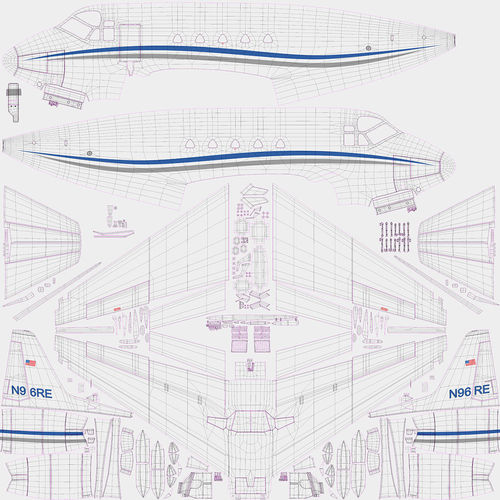
I noticed some texture mapping that wraps the top and the bottom of the fuselage while still attached to the side. i figure they use a cylinder projection. But i have tried this in the past and the nose and tail section will distort and not hold to scale. Can someone explain how to do this or post a tutorial link.


sabreliner.jpg


This post i should have put in modeling.
 
Last edited:
Spent all day trying many methods including relax. Even the default aircraft have this layout. What is the secret!:rolleyes:

This pic above might not be to scale as i have not tested it yet. But the default aircraft look better if you take a look at those.
 
Whatever the above model is, swap the diffuse texture with a uniform chequered pattern and see how even - or distorted - the mapping really is. The secret to effective mapping is the same as quality modelling: a lot of hard work. Whether you cylindrical map the whole fuselage at once or planar map in sections, there's going to be some tedious hand-editing to get the result above.

Unless you go the automatic unwrap and procedural material texturing route. Then the finished work can look fab in the sim, but be hideous to repaint because the mapping is a collection of odd-shaped blobs on the texture sheet.
 
I never found a way of obtaining such a mapping in gMax... last thing I did was planar map for sides and top/bottom... I just made sure that all chunks were perfectly aligned vertically for ease of re-painting...
 
I agree i bet the above pic is not holding scale. So far the best method seems to be to unwrap with box projection. But even this method stretches as the fuselage is curved.
So i found if you have a fuselage that is close to round you can use the cylinder projection and then near the nose and tail you can remap the bad areas.
if your fuselage is more square then just unwrap with a box projection.

When using the cylinder projection i go to the front view rotate 90 degrees right then slightly rotate left until the map balances out the projections. Then you can split in half and remap bad areas. you end up with 4 to 6 maps.

I just thought since i bought 3DS there may be a secret method to mapping the fuselage that i did not know about. I still wonder how they mapped the default aircraft as they seem to be at scale. So still wondering if there is even a better method than the i mentioned.
 
DG, the mapping image you posted was, in all likelihood, done with the pelt mapping tools. This is an excellent way of unwrapping complicated objects but does make it more difficult to maintain uniform scale between related objects. This makes it a little bit more difficult for repainters.
 
I agree. I even tried using pelt and no matter what i did when using pelt the mapping did not even come close to the pic above. Also when i first setup pelt the projection was a 3D of the fuselage and not aligned at all which made me wonder why pelt would start like this.
 
I agree. I even tried using pelt and no matter what i did when using pelt the mapping did not even come close to the pic above. Also when i first setup pelt the projection was a 3D of the fuselage and not aligned at all which made me wonder why pelt would start like this.
The trick with pelt mapping is deciding where to cut the seams. I like the fact that you can cut a seam for one section, pelt it, then cut another section and pelt it, etc until the entire object is mapped.
 
The trick with pelt mapping is deciding where to cut the seams. I like the fact that you can cut a seam for one section, pelt it, then cut another section and pelt it, etc until the entire object is mapped.

I've never had any luck with the Pelt Mapping tool...The closest I've come to getting a fuselage all perfectly laid out in one piece is by breaking off the nose and tail sections, using Relax to flatten out most of the center fuselage, then doing the same for the other sections and welding them back on. Then I would go up and down the whole thing and "Relax" each row of polys, vertically aligning edge loops that I know are perfectly vertical in hopes that they would act as sort of a "reference" for the next loop of edges. VERY time consuming, because I would have to do this multiple times until it looked perfect.

...Then I spent 3 days to finish laying out everything else on that same map only to find out that I still couldn't paint a straight lateral stripe...ARGH! This really makes me wonder because a lot of Carenado fuselages (notably the Phenom 100) have very distorted UV unwraps but still manage to paint near-perfect stripes and decals on those surfaces. They probably use different map channels to achieve this, like having the distorted-but-still-flattened channel for the final texture, but paint their lines and logos on a different channel with planar mapping. They either do this or use some high end 3D painting program like Surface Painter or something similar.

(No wonder it's nearly impossible to repaint Carenado planes...)
 
Personally I prefer planar mapping for the external surfaces, fuselage, wings, etc. This allows a uniform scale so rivets and seams can have the same pixel size, much easier for painting. For curved surfaces such as the fuselage I'll make cuts for planar mapping either at 22.5 or 45 degrees which ever gives the best results. On the wings I'll use two planar maps, top and bottom then hand manipulate the leading edge vertices in the UVW editor to eliminate distortion. I find the pelt mapping tools much easier to use for mapping complicated objects that will not require uniform scaling such as landing gear and cockpit components. This also allows for a nice unwrapping for the generation of AO maps.
 
Like Paul, I prefer going the planar route when mapping the outside, it's way easier for repainters. Sometimes I apply a relax/peel over each UV island and re-streighten the edges after that, with the help of a checkered texture. For small objects and VC parts it's flatten all the way, then stitching UV islands, occasionaly using peel for complex shapes. For some reason pelt mapping gives me horrible results, with peel at least you can shape your island in real time and keep straight edges when needed.
Ozzy might be onto something using different UV channels and projecting them onto the distorted base or straight decaling in a 3d paint program (Substance Painter, Mari).
 
Back
Top