• Which the release of FS2020 we see an explosition of activity on the forun and of course we are very happy to see this. But having all questions about FS2020 in one forum becomes a bit messy. So therefore we would like to ask you all to use the following guidelines when posting your questions:

    • Tag FS2020 specific questions with the MSFS2020 tag.
    • Questions about making 3D assets can be posted in the 3D asset design forum. Either post them in the subforum of the modelling tool you use or in the general forum if they are general.
    • Questions about aircraft design can be posted in the Aircraft design forum
    • Questions about airport design can be posted in the FS2020 airport design forum. Once airport development tools have been updated for FS2020 you can post tool speciifc questions in the subforums of those tools as well of course.
    • Questions about terrain design can be posted in the FS2020 terrain design forum.
    • Questions about SimConnect can be posted in the SimConnect forum.

    Any other question that is not specific to an aspect of development or tool can be posted in the General chat forum.

    By following these guidelines we make sure that the forums remain easy to read for everybody and also that the right people can find your post to answer it.

Material base color does not display in MSFS2020

Messages
1,821
Country
australia
I have created two separate scenery objects with Blender (v3.6) and some faces I have assigned a 'base color' material which do not display correctly in MSFS2020.
One object, a ramp (see image below) has the walkway as near black which either displays as white or no color in MSFS2020. Yet in the same object the hand rails also have a 'base color' material set to a mid gray colour which does display correctly.
The other object has a life buoy with base color mid red and the 'hanger' for it with a base color of black also both display as white or no color.
What am I doing wrong?
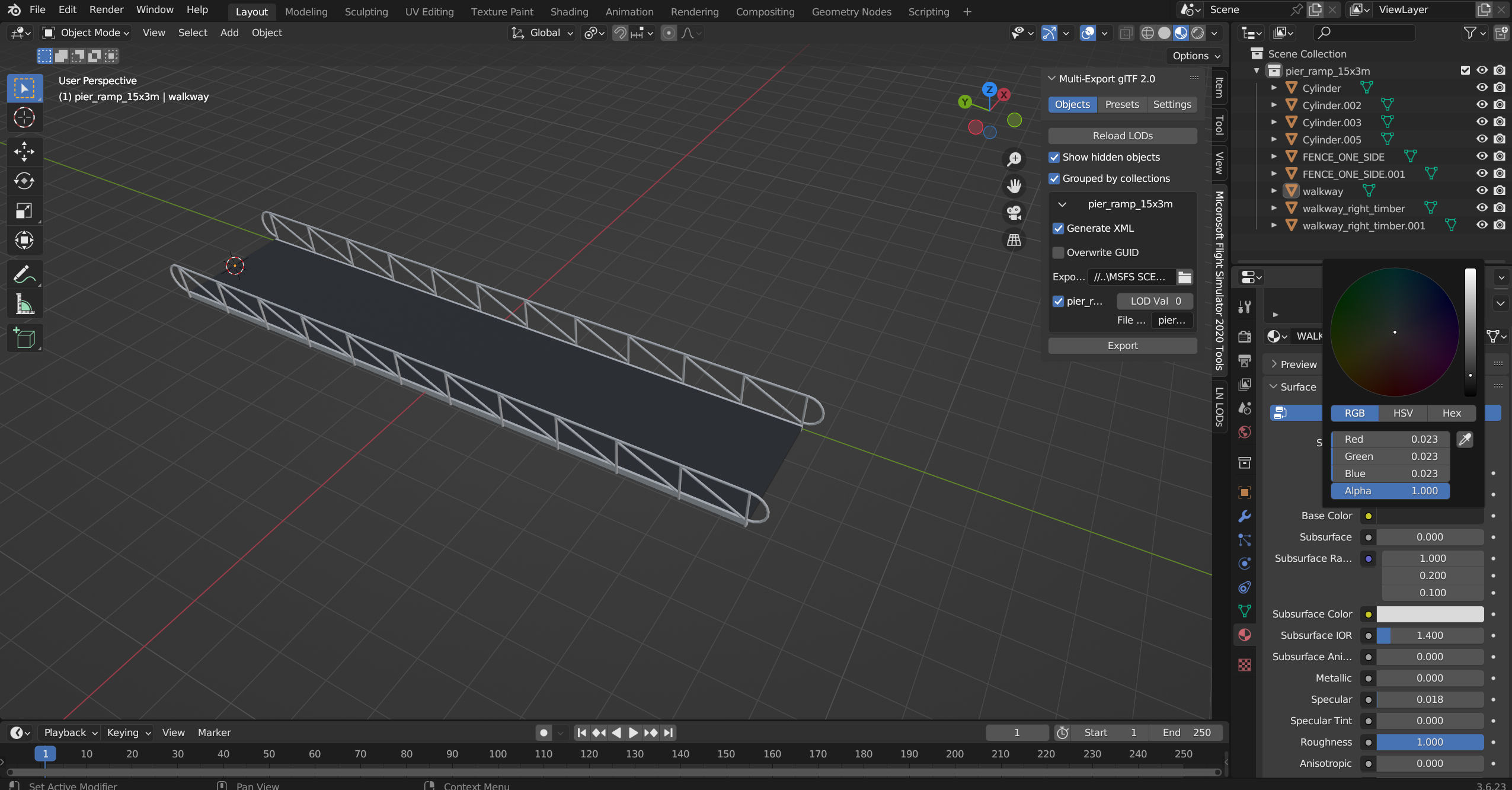
blender_no_colour.jpg
 
Last edited:
maybe delete those materials and try using the MSFS Materials section in the asobo plugin tab ?

I cant say why one works and the other doesnt tbh, but I am pretty sure your not really suppose to be using those blender surface colors settings

having said that, ive not tried using the surface colors in blender 4.2.x or 4.5.x, they did use to work in 3.6.x but ....
blender 4.x and newer has new shaders that may not be directly recognized by the game so who knows
 

Attachments

  • 2026-05-05 04_43_00-_ (Unsaved) - Blender 4.2.15 LTS.png
    2026-05-05 04_43_00-_ (Unsaved) - Blender 4.2.15 LTS.png
    200.2 KB · Views: 25
  • 2026-05-05 04_46_01-_ (Unsaved) - Blender 4.2.15 LTS.png
    2026-05-05 04_46_01-_ (Unsaved) - Blender 4.2.15 LTS.png
    292.9 KB · Views: 29
Last edited:
I concur with ExRyder. I discovereed ( the hard way ) that the Blender colours do not survive the export to MSFS2020. If you scroll down to MSFS Materials, select "Standard" and use their dialogue to configure your colour it will render as expected in the sim. Be aware however that occasionally the MSFS Materials do not survive if, for example, you manipulate your exported model in MCX. In that circumstance you have to go back and re-create your colours as above.
 
Thanks. I was thinking later after posting that I would try adding a base color with MSFS Standard material. I guess when exporting for MSFS one should always only use the MSFS material panel.
Although last year I didn't have problems with the same object.
Thanks again.
 
Back
Top