• Which the release of FS2020 we see an explosition of activity on the forun and of course we are very happy to see this. But having all questions about FS2020 in one forum becomes a bit messy. So therefore we would like to ask you all to use the following guidelines when posting your questions:

    • Tag FS2020 specific questions with the MSFS2020 tag.
    • Questions about making 3D assets can be posted in the 3D asset design forum. Either post them in the subforum of the modelling tool you use or in the general forum if they are general.
    • Questions about aircraft design can be posted in the Aircraft design forum
    • Questions about airport design can be posted in the FS2020 airport design forum. Once airport development tools have been updated for FS2020 you can post tool speciifc questions in the subforums of those tools as well of course.
    • Questions about terrain design can be posted in the FS2020 terrain design forum.
    • Questions about SimConnect can be posted in the SimConnect forum.

    Any other question that is not specific to an aspect of development or tool can be posted in the General chat forum.

    By following these guidelines we make sure that the forums remain easy to read for everybody and also that the right people can find your post to answer it.

FSX Max 9 - Configuration

First of all, load the "3DSM9\Plugins" folder into Max (Configure System Paths), not 3DSM7... And then let's get started.

Hey Felix,

Roger that. Would I simply rename the folder or is that a download somewhere?


Bill
 
I renamed it and that took out a few of the warnings. Now the Cloud and GUID tools load up.

Still two message popups.
 
Last edited:
Hey Felix,

Roger that. Would I simply rename the folder or is that a download somewhere?


Bill

No, sir. It's in the SDK. "\Microsoft Flight Simulator X SDK\SDK\Environment Kit\Modeling SDK\3DSM9" right next to 3DSM7. Did you rename the folder itself or did you simply change the path in Max manually? And did you restart Max after changing the path? It does not reload plugins automatically... :edit: Of course you did...:tapedshut
 
Last edited:
Your first warning (Getpluginpath) comes from FSToolsMenu.ms, which is located in the Gmax Gamepack and should really not be there! Check your SDK structure in Explorer.
 

Attachments

  • max9_folder.jpg
    max9_folder.jpg
    47.1 KB · Views: 515
the second warning is also from the gmax Gamepack (AttachTool.ms)! Make sure the Path in your "3rd Party Plugins" points to "\Modeling SDK\3DSM9\Plugins\" and check that folder in explorer (see attachment).
 

Attachments

  • max9_folder2.jpg
    max9_folder2.jpg
    49.9 KB · Views: 430
  • max9_folder3.jpg
    max9_folder3.jpg
    52.3 KB · Views: 479
Last edited:
Success! (mostly)

That's because "AcesScriptsFolder" is "\3DSM7\Scripts" for both versions (see SetupAcesRoot.ms). The 3DSM7\Scripts\FSXMaterialIO.ms is referenced from \3DSM9\Scripts\FSXShaderTool.ms. And I guess it works because Maxscript is the most backwards compatible part of the package...

I spent a lot of time sorting through all of the scripts and plugins, and do understand what Mike was intending for them to do...

...but using the MaxScript "Listener Window" I discovered that the default scripts were NOT creating the correct path for "acesScriptsFolder..."

Even after uninstalling Max9, cleaning out all the Registry entries, deleting the folder in C:\Users\Bill\AppData\Local\Autodesk, and deleting the folder in C:\Users\Bill\Documents\3dsmax...

...then reinstalling Max9 and configuring the ..\3DSM9 folder...

Not only do the FSX Tools not work, the FSX Material definition wouldn't load...

So! What I wound up doing is this:

1. Copy/pasted all of the .ms scripts from the 3DSM7 folder after deleting all of the ones in the 3DSM9 folder:

Directory of E:\FSX_SDK\SDK\Environment Kit\Modeling SDK\3DSM9\Scripts

AttachPointTool.ms
AttachTool.ms
CloudTool.ms
ExportAndLOD.ms
FSXShaderTool.ms
LODandNameTool.ms
openFileCallback.ms
UVSuiteDeluxe.ms
WheelsSetupTool.ms
[Startup]
9 File(s) 152,016 bytes

Directory of E:\FSX_SDK\SDK\Environment Kit\Modeling SDK\3DSM9\Scripts\Startup

AcesDocumentation.ms
AcesMatToDxShader.ms
DefineObjList.ms
ExportPlacementRollout.ms
FSLODTool.ms
FSTools.ms
FSXAnimation.ms
GUIDAndFriendlyRollout.ms
LODFunctions.ms
ModelVerifyFunction.ms
VerifyModelRollout.ms
XportModelRollout.ms

14 File(s) 181,953 bytes

2. Deleted all files from ..\3DSM9 folder except the Max9 specific files highlighted in red below, then copy/pasted all of from the ..\3DSM7 folder except the FSModelExp.dle, MaxUtils.gup and MaxXML.gup files that're compiled for Max7/8.

I also had to add a copy of modeldef.xml here as Max9 bitched about not finding it...

Directory of E:\FSX_SDK\SDK\Environment Kit\Modeling SDK\3DSM9\Plugins

[.]
[..]
BaseTypes.dll
FSToolsMenu.ms
FSXAnimation.ms
FSXMaterial.ms
Managed_CrashTree.dll
Managed_Lookup_Keyword.dll
Managed_RiffMapper.dll
Max9_FSModelExp.dle
Max9_MaxUtils.gup
Max9_MaxXML.gup

MdlScan.exe
MdlScan.exe.config
modeldef.xml
XToMdl.exe

14 File(s) 1,972,926 bytes

3. Finally, I found I needed to place copies of FSXMaterial.ms and FSXMaterialIO.ms here in order to force Max9 to load/configure the FSX Material support.

C:\Autodesk\3dsMax9\Scripts\Startup

4. One of the surprising benefits of doing all of the above is that now I get to enjoy all[/]b of the "new tools" that Mike wrote for Max7/8 that he never got around to writing for Max9, such as:

Wheel animation tool
FSX Shaders
Verify Model
etc.

While the end result may be "mongrelized," IT WORKS! (and that is what is important)
 
Hey Felix,

Roger that. Would I simply rename the folder or is that a download somewhere?

Bill, you won't have a ..\3DSM9 folder unless you've installed either SDK SP2 or SDK Acceleration...

I've got mine working now. Let me test a few things more, and modify the FSTools.ms script to load the additional "tools" and I can then zip up my "mongrelized" ..\3DSM9 folder and email it to you. :D
 
Hey Bill,

Roger that, I do not have Accelleration nor SP2. I did but on two previous computers, it did havoc to my computer.

Thanks for sending it over.

well.. . a thousand thanks...


Bill
 
I spent a lot of time sorting through all of the scripts and plugins, and do understand what Mike was intending for them to do...

...but using the MaxScript "Listener Window" I discovered that the default scripts were NOT creating the correct path for "acesScriptsFolder..."

That must be something between MaxUtils and your OS... I get a clean
Code:
acesscriptsfolder
[COLOR="Blue"]"C:\Programme\Microsoft Games\Microsoft Flight Simulator X SDK\SDK\Environment Kit\Modeling SDK\3DSM7\Scripts"[/COLOR]

n4gix said:
Even after uninstalling Max9, cleaning out all the Registry entries, deleting the folder in C:\Users\Bill\AppData\Local\Autodesk, and deleting the folder in C:\Users\Bill\Documents\3dsmax...

...then reinstalling Max9 and configuring the ..\3DSM9 folder...

Not only do the FSX Tools not work, the FSX Material definition wouldn't load...
Truly odd. But you did reinstall the SDK after your XToMdl-path-surgery, right?

n4gix said:
4. One of the surprising benefits of doing all of the above is that now I get to enjoy all[/]b of the "new tools" that Mike wrote for Max7/8 that he never got around to writing for Max9, such as:

Wheel animation tool
FSX Shaders
Verify Model
etc.

While the end result may be "mongrelized," IT WORKS! (and that is what is important)


Glad to hear that. Could you report if all the tools work (Especially UVSuiteDeluxe, always wondered what it does)? I would like to test that. But before I even think about touching my config...:p

Cheers
 
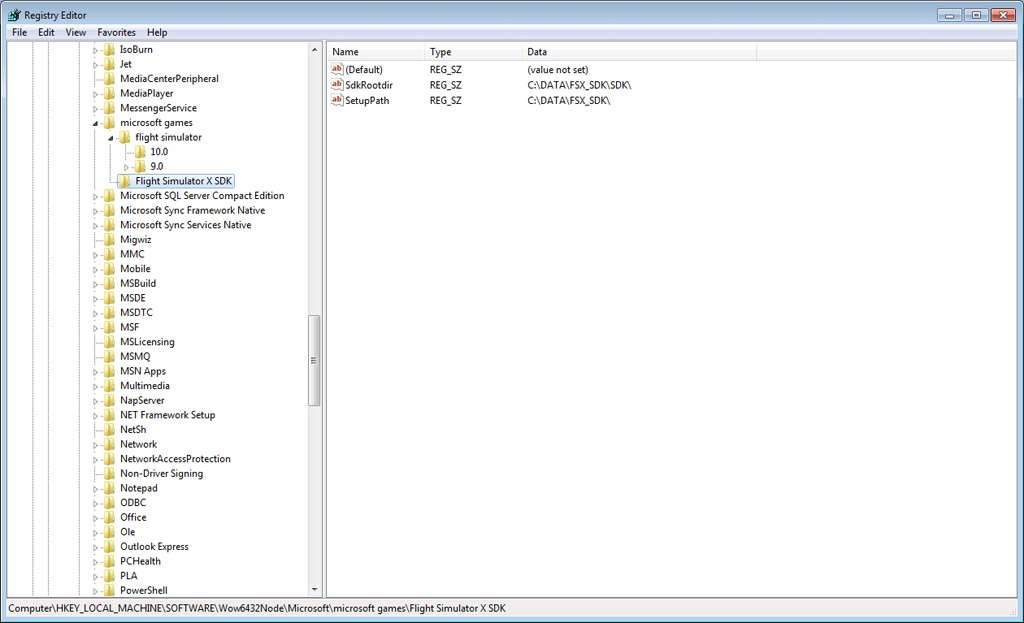
Well, this morning while answering a question from another post regarding how to use the SDK on a machine that does NOT have FSX installed...

...I discovered to my amazement that the Registry on my dev machine had somehow LOST the entries for the FSX SDK!

Fortunately the entries aren't complicated at all and I've now added them back into the Registry. I'm going to archive my existing "mongrelized/bastardized" ..\3DSM9 folder, restore a copy of the original and resume testing... :D

The image below shows the entries on my FS machine. Only the absolute paths are different on my dev machine, which does NOT have FSX installed at all.

esdgglobalexpress000003.jpg
 
Back
Top