• Which the release of FS2020 we see an explosition of activity on the forun and of course we are very happy to see this. But having all questions about FS2020 in one forum becomes a bit messy. So therefore we would like to ask you all to use the following guidelines when posting your questions:

    • Tag FS2020 specific questions with the MSFS2020 tag.
    • Questions about making 3D assets can be posted in the 3D asset design forum. Either post them in the subforum of the modelling tool you use or in the general forum if they are general.
    • Questions about aircraft design can be posted in the Aircraft design forum
    • Questions about airport design can be posted in the FS2020 airport design forum. Once airport development tools have been updated for FS2020 you can post tool speciifc questions in the subforums of those tools as well of course.
    • Questions about terrain design can be posted in the FS2020 terrain design forum.
    • Questions about SimConnect can be posted in the SimConnect forum.

    Any other question that is not specific to an aspect of development or tool can be posted in the General chat forum.

    By following these guidelines we make sure that the forums remain easy to read for everybody and also that the right people can find your post to answer it.

MCX 01-09 export issues

Messages
98
Hi Arno,

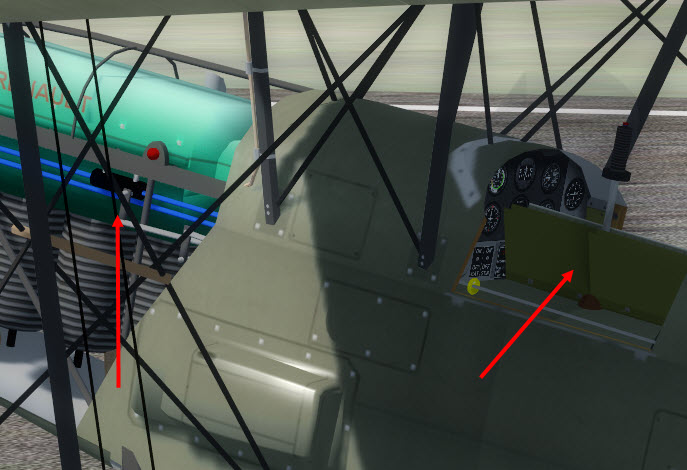
With the latest version of MCX, (from 01-09-2019) the export of mdl no longer gives good results.
The engine hoods have become invisible and the side doors and the lever stick are no longer in the right positions.
I had to go back to the version of 28-08 that I had previously downloaded.

Event log file attached

Best

Jean
2019-09-01_09-59-32.jpg
 

Attachments

Hi,

I haven't changed anything in mdl exporting, so this surprises me. I fixed a bug in the xanim file and added an additional animation mapping. Let me check if that might be related.
 
Another concern with animations:
In the drop-down list there are 4 animations for the doors:
door_0 to door_3, which is fine.
However, there is no match in the "mouse rectangle" section.
In this section we find:
lever_door_emergency
lever_door_open
lever_exit_open1
lever_exit_open2
Which does not allow to independently control the 4 animations with the mouse.
Can you tell me how to trigger the animation of the front doors (door_0), the rear doors (door_1) and the engine hoods (door_2)?

Best
 
I get:
8:23 AM MDLXReader Error Invalid section length for section PROP
as an error after compiling a model with the new version and cannot reload the newly created model
 
Yes, I also had the same type of error :

"MDLXReader Error Invalid section length for section RUDD"
 
Those other errors seem to indicate the mdl file is not valid. I'll try to revert the xanim fix asap.
 
Another concern with animations:
In the drop-down list there are 4 animations for the doors:
door_0 to door_3, which is fine.
However, there is no match in the "mouse rectangle" section.
In this section we find:
lever_door_emergency
lever_door_open
lever_exit_open1
lever_exit_open2
Which does not allow to independently control the 4 animations with the mouse.
Can you tell me how to trigger the animation of the front doors (door_0), the rear doors (door_1) and the engine hoods (door_2)?

Best

Those drop-downs are filled from the modeldef.xml file, I don't know if more door definitions should be in there.
 
Than you Arno.

1/ For invalid mdls, they were created by MCX and these errors did not exist with the old version. The compilation to P3D 4.5 goes well with the previous August version.

2 / Indeed, these "mouse rectangle" do not exist in the modeldef of the SDK. I will try to find a way to create them with a GUID to add them to the SDK.

Best
 
If the model you load has definitions for them, MCX will read them on import for you. You can view them in the modeldef editor in that case.
 
Yes Arno, I am trying to make new "mouse rectangles" in modeldef.xml for matching all doors animations.
 
When you get those error importing the MDL file, what kind of models had you exported before? Aircraft, scenery, virtual cockpit? I tried to reproduce them here, but I can't succeed with that yet.
 
A new development release will be online in about 10 minutes that will revert the bug fix that causes these issues (I hope). So let me know if that one works again.

Then I need to figure out why the bug fix in the XANIM file has these unexpected effects elsewhere.
 
I had exported aircraft mdl "exterior" and "interior" .
Your new release is working properly again.

Best regards
Jean
 
I tried with some default FS aircraft, but there I can't get the errors you mention when I export/import them.

Can you tell me which model has the problem, then I can try to reproduce it here?
 
This is a plane that is not yet distributed based on a Stampe originally created for FS9, modified for FSX by A.F Scrube and greatly improved by a small team.
I can send you by e-mail, the external mdl which had badly compiled, not being able to put it on line at the moment.
 
If you can send it in private, I might be able to debug easier.
 
Back
Top