

- Messages
- 34,558
- Country

Over the last months I have been working on improving the FS2004 aircraft MDL export from ModelConverterX. While working on this I have made some changes that affect the general usage of ModelConverterX as well, so I want to give an overview of them in this post.
Attachpoint orientation
While making sure that landing lights and taxi lights of FS2004 aircraft export correctly, I have refactored the way the X file are writen by ModelConverterX. While working on this I have also double check that all attached effects, attached library objects and attached platforms are still working correctly in both FS2004, FSX and P3D. Everything is working consistently now.
But there is one change and that is that for some objects the orientation is now shown differently in MCX. For most attached objects the Z axis is the upward direction. For example an attached smoke stack will flow in the direction of the Z axis. But for landing lights and spot lights the direction of the light is different, they shine along the -Y axis. Before this used to by the +Y axis, so be aware that you need to position your lights differently now inside ModelConverterX.
Representations
FS2004 stores the virtual cockpit representation in the same MDL file as the external representation, while in FSX and P3D these are stored as two separate MDL files. To be able to export these representations to FS2004 correctly I have made a change to the internal representation that ModelConverterX uses for the objects. It is now possible to store different object representations and you can also select which one you want to render in the preview with a dropdown box. ModelConverterX supports the following representations:
The image below (which comes from the updated ModelConverterX manual btw), shows an example of the external and internal representation for an aircaft model.
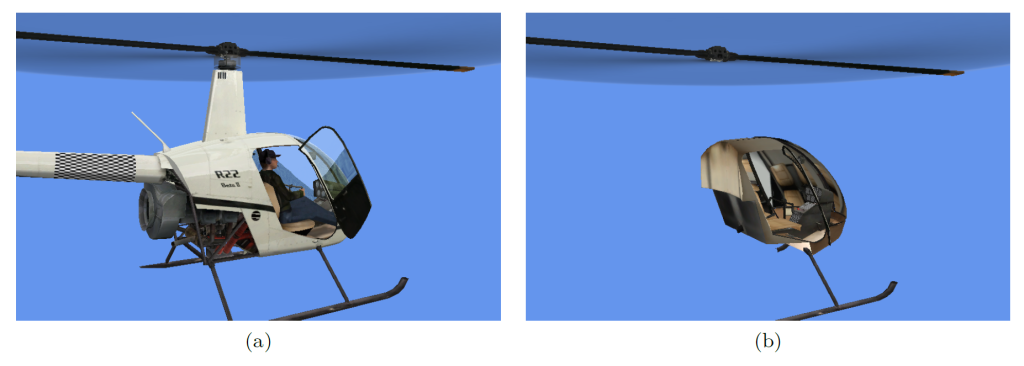
When reading FS2004 aircraft MDL files or when reading aircraft using the aircraft.cfg file for FSX (or the sim.cfg file for P3D) ModelConverterX will now read the different representations into one object. If you just load a MDL of a specific FSX representation you only get the representation that you have loaded.
On export the FS2004 aircraft MDL exporter will write both representations to the MDL file when present. For all other exporters it depends on a new setting in the exporter settings. You can set them to either:
Found any bugs?
I have spend quite some time on testing all these changes, but I do also realize that they have a relative big impact on ModelConverterX as well whole. So if you encounter any issues or weird things with the current development release, please let me know by posting it on the forum. And I will make sure to look at them as soon as possible.
Continue reading...
Attachpoint orientation
While making sure that landing lights and taxi lights of FS2004 aircraft export correctly, I have refactored the way the X file are writen by ModelConverterX. While working on this I have also double check that all attached effects, attached library objects and attached platforms are still working correctly in both FS2004, FSX and P3D. Everything is working consistently now.
But there is one change and that is that for some objects the orientation is now shown differently in MCX. For most attached objects the Z axis is the upward direction. For example an attached smoke stack will flow in the direction of the Z axis. But for landing lights and spot lights the direction of the light is different, they shine along the -Y axis. Before this used to by the +Y axis, so be aware that you need to position your lights differently now inside ModelConverterX.
Representations
FS2004 stores the virtual cockpit representation in the same MDL file as the external representation, while in FSX and P3D these are stored as two separate MDL files. To be able to export these representations to FS2004 correctly I have made a change to the internal representation that ModelConverterX uses for the objects. It is now possible to store different object representations and you can also select which one you want to render in the preview with a dropdown box. ModelConverterX supports the following representations:
- External.
- Internal (for virtual cockpit).
- Shadow (used for custom shadow model, at the moment this representation can only be read from file and not yet exported).
The image below (which comes from the updated ModelConverterX manual btw), shows an example of the external and internal representation for an aircaft model.
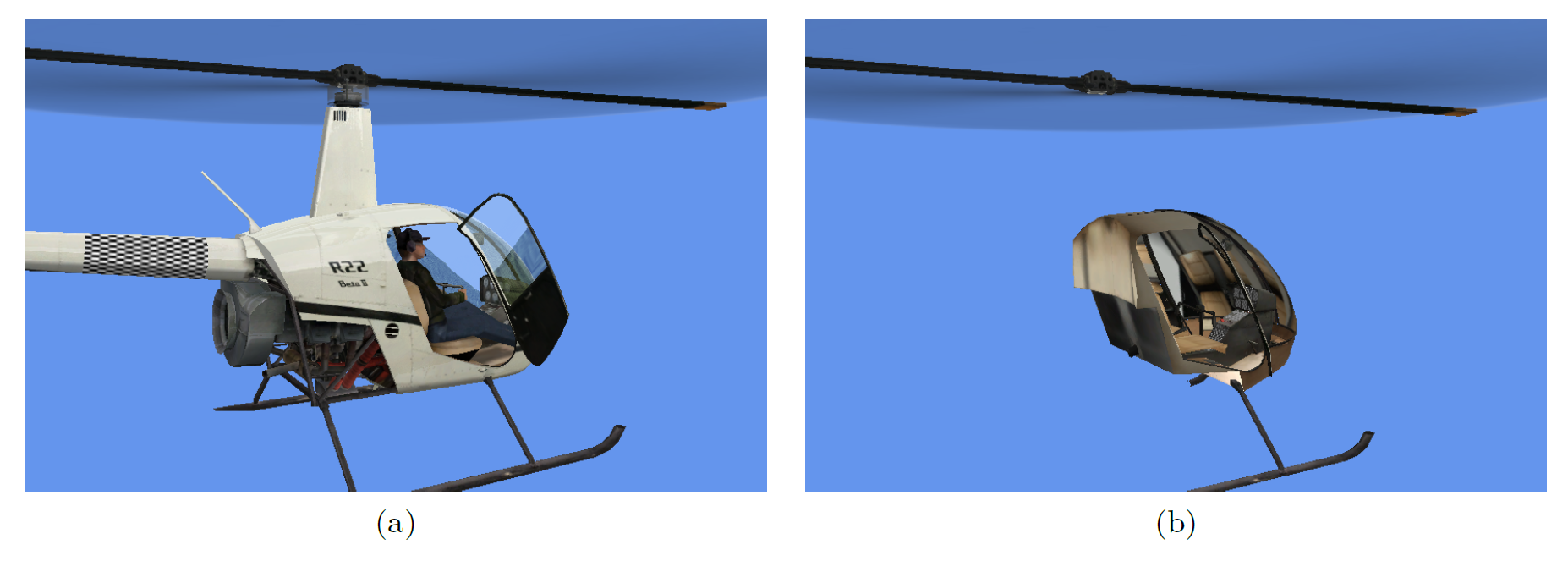
When reading FS2004 aircraft MDL files or when reading aircraft using the aircraft.cfg file for FSX (or the sim.cfg file for P3D) ModelConverterX will now read the different representations into one object. If you just load a MDL of a specific FSX representation you only get the representation that you have loaded.
On export the FS2004 aircraft MDL exporter will write both representations to the MDL file when present. For all other exporters it depends on a new setting in the exporter settings. You can set them to either:
- Give preference to the external representation and only write that one when present (this is the default value).
- Give preference to the internal representation and only write that one when present.
- Write separate files for each representation.
Found any bugs?
I have spend quite some time on testing all these changes, but I do also realize that they have a relative big impact on ModelConverterX as well whole. So if you encounter any issues or weird things with the current development release, please let me know by posting it on the forum. And I will make sure to look at them as soon as possible.
Continue reading...


