• Which the release of FS2020 we see an explosition of activity on the forun and of course we are very happy to see this. But having all questions about FS2020 in one forum becomes a bit messy. So therefore we would like to ask you all to use the following guidelines when posting your questions:

    • Tag FS2020 specific questions with the MSFS2020 tag.
    • Questions about making 3D assets can be posted in the 3D asset design forum. Either post them in the subforum of the modelling tool you use or in the general forum if they are general.
    • Questions about aircraft design can be posted in the Aircraft design forum
    • Questions about airport design can be posted in the FS2020 airport design forum. Once airport development tools have been updated for FS2020 you can post tool speciifc questions in the subforums of those tools as well of course.
    • Questions about terrain design can be posted in the FS2020 terrain design forum.
    • Questions about SimConnect can be posted in the SimConnect forum.

    Any other question that is not specific to an aspect of development or tool can be posted in the General chat forum.

    By following these guidelines we make sure that the forums remain easy to read for everybody and also that the right people can find your post to answer it.

FSX:SE Mouse rectangle works - animation does not?

Messages
45
Country
australia
Hi all,

I've been scratching my head over this problem for a couple of days now.

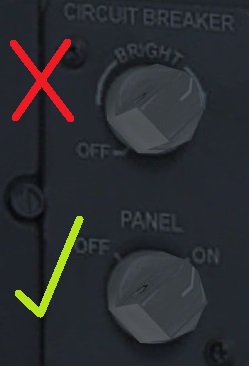
I'm editing the default FSX 737 virtual cockpit and I have separated the Panel Lights knob and the Circuit Breaker knob. I've created animations for both knobs which when tested in MCX rotate as desired.
Code:
  <Anim name="switch_panel_light" guid="291d4355-100b-449d-a7bb-c54dafb8e025" length="100.000" type="Sim" typeParam="AutoPlay" typeParam2="switch_panel_light">
    <AnimStream name="Rotation" id="0" partName="node1107" length="50.000">
      <Keyframe time="0.000" type="Quaternion" data="0;-0.171141;-0.342282;0.92388"/>
      <Keyframe time="50.000" type="Quaternion" data="0;0.171141;0.342282;0.92388"/>
    </AnimStream>
  </Anim>
 
  <Anim name="switch_circuit_breaker" guid="632fce65-8426-46cb-bae2-b4f79d8037ec" length="100.000" type="Sim" typeParam="AutoPlay" typeParam2="switch_circuit_breaker">
    <AnimStream name="Rotation" id="0" partName="node1108" length="50.000">
      <Keyframe time="0.000" type="Quaternion" data="0;-0.413171;-0.826343;0.382683"/>
      <Keyframe time="50.000" type="Quaternion" data="0;0.171141;0.342282;0.92388"/>
    </AnimStream>
  </Anim>

Animation.jpg


I've created the Part Info entries in the modeldef.xml and both mouse rectangles work, toggling the panel lights and avionics master switches respectively (tested by compiling the model and testing within FSX).

Code:
<Animation name="switch_panel_light" guid="291d4355-100b-449d-a7bb-c54dafb8e025" length="50" type="Sim" typeParam2="switch_panel_light" typeParam="AutoPlay" />

<Animation name="switch_circuit_breaker" guid="632fce65-8426-46cb-bae2-b4f79d8037ec" length="50" type="Sim" typeParam2="switch_circuit_breaker" typeParam="AutoPlay" />

    <PartInfo>
        <Name>switch_panel_light</Name>
        <AnimLength>50</AnimLength>
        <Animation>
            <Parameter>
                <Sim>
                    <Variable>LIGHT PANEL</Variable>
                    <Units>bool</Units>
                    <Scale>50</Scale>
                </Sim>
                <Lag>400</Lag>
            </Parameter>
        </Animation>
        <MouseRect>
            <Cursor>Hand</Cursor>
            <HelpID>HELPID_GAUGE_LIGHT_SWITCH_PANEL</HelpID>
            <TooltipID>TOOLTIPTEXT_LIGHT_SWITCH_PANEL</TooltipID>
            <CallbackCode>(&gt;K:PANEL_LIGHTS_TOGGLE)</CallbackCode>
        </MouseRect>
    </PartInfo>

    <PartInfo>
        <Name>switch_circuit_breaker</Name>
        <AnimLength>50</AnimLength>
        <Animation>
            <Parameter>
                <Sim>
                    <Variable>AVIONICS MASTER SWITCH</Variable>
                    <Units>bool</Units>
                    <Scale>50</Scale>
                </Sim>
                <Lag>400</Lag>
            </Parameter>
        </Animation>
        <MouseRect>
            <Cursor>Hand</Cursor>
            <HelpID>HELPID_GAUGE_AVIONICS_SWITCH</HelpID>
            <TooltipID>TOOLTIPTEXT_AVIONICS_SWITCH</TooltipID>
            <EventID>TOGGLE_AVIONICS_MASTER</EventID>
        </MouseRect>
    </PartInfo>

However, the animation works for the Panel Lights switch, but not for the Circuit Breaker switch?

I'd really appreciate someone reviewing the code above and letting me know if I'm missing anything really obvious?

Thank you!

Trent
 
Hi all,

As a follow up, I tried the revised code below. No joy. :(


Code:
    <PartInfo>
        <Name>switch_circuit_breaker</Name>
        <AnimLength>50</AnimLength>
        <Animation>
            <Parameter>
                <Sim>
                    <Variable>AVIONICS MASTER SWITCH</Variable>
                    <Units>bool</Units>
                    <Scale>50</Scale>
                </Sim>
                <Lag>400</Lag>
            </Parameter>
        </Animation>
        <MouseRect>
            <Cursor>Hand</Cursor>
            <HelpID>HELPID_GAUGE_AVIONICS_SWITCH</HelpID>
            <TooltipID>TOOLTIPTEXT_AVIONICS_SWITCH</TooltipID>
            <CallbackCode>(&gt;K:TOGGLE_AVIONICS_MASTER)</CallbackCode>
        </MouseRect>
    </PartInfo>
 
Are you sure you want to use "avionics master switch" as an input variable?
It's usually occupied by the radios, etc.
 
Good point Heretic.

I implemented a 2D Master Avionics switch in the overhead panel some months back. It seems to work ok for my purposes so I wanted to try to implement a VC option.

This may be a temporary solution as I want to play with the various other 'display control' options available in the VC and see if I can't further customise specific avionics display options. But that's for down the track.

For now I just can't figure out my my 'simple' or 'blunt' solution won't work! Well at least the animation part of it. It's toggling the avionics just fine.
 
Ok!

I've isolated the problem. It lies in the quarternion animation data for my switch_circuit_breaker.

When I replaced that with the same quarternion data from the switch_panel_light, the animation works. Just not with the range of rotation I'd like. So it's a starting point.

I just need to figure out why FSX doesn't like that quarternion data, when it works just fine in MCX. A few more days of head scratching to come me thinks...
 
All animation controllers should be linear, not Quaternion.
 
Are you sure you have enough keyframes for that knob? FSX and later need quite a few.
 
All animation controllers should be linear, not Quaternion.

No matter if from MCX or 3ds Max or else, animations end up as quaternions in the XANIM file.

See this entry from a 3ds Max export:
Code:
  <Anim name="A320_Engine_Mode_Sel" guid="7fbb0a3c-57c8-4c9a-a34d-3058d381a116" length="50.000000"
        type="Sim" typeParam="AutoPlay" typeParam2="A320_Engine_Mode_Sel">
    <AnimStream name="Rotation" id="0" partName="ENG_Ignition_Selector" length="50.000000">
      <Keyframe time="0.000000" type="Quaternion" data="0.000000;0.000000;-0.000000;1.000000"/>
      <Keyframe time="25.000000" type="Quaternion" data="0.000000;-0.000000;-0.537300;0.843391"/>
      <Keyframe time="50.000000" type="Quaternion" data="-0.000000;0.000000;0.906309;-0.422618"/>
    </AnimStream>
  </Anim>
 
Tom, you were spot on!

Not enough Keyframes for FSXs liking. A rookie mistake I suspect. I added another two and the Circuit Breaker knob is now acting as a Defacto Master Avionics Switch and rotating beautifully!

Thank you all for your help!

My next task will be getting the VC DC Volts selector knob working like the 2D Overhead Panel one does, and trying to add a new panel gauge to the VC. I suspect I'll be back here asking some more rookie questions in the next couple of weeks. :)
 
Tom, you were spot on!

Not enough Keyframes for FSXs liking. A rookie mistake I suspect. I added another two and the Circuit Breaker knob is now acting as a Defacto Master Avionics Switch and rotating beautifully!
To understand why you need at least three set keyframes for all rotating objects is quite simple. If you only have two keyframes set for the beginning and end, the sim won't know which direction the object is supposed to rotate! By adding one keyframe in the middle of the rotation, you've provided just enough information for the sim to determine the direction of the desired rotation.

It truly is just that simple. :teacher:
 
Back
Top