

- Messages
- 234
- Country

I'm trying a put 2 different objects I designed (flags) in a custom airport I'm designing. Normal objects work fine. I followed some instructions in the flag topic and managed to get an animated flag reacting to the wind into the sim. However I created a second model - identical but with a different flag and smaller, because Scenery Editor but where it would not remember flag scale for some reason until I clicked on it, then forget it again. So i can't get the second model to show up in the list, or actually its model to show up in the "package" folder after compiling. It's not clear on what I am doing wrong, please advise.
Based on how a single model worked I tried to devise a way for the second one, apparently wrong. Here is what I have now:
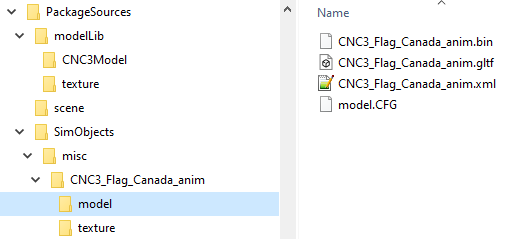
Here is my file structure:

This is where the second model file set is added now - 3 more files: CNC3_Flag_anim.gtlf .xml and .bin in addition to these:
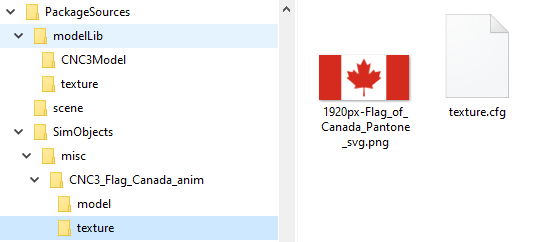
Texture has the second flag texture added here:
sim.cfg:
model.CFG
texture.cfg
PackageDefinitions\romandesign-airport-cnc3.xml
CNC3_Flag_Canada_anim.xml - that is the first object that works fine:
CNC3_Flag_anim.xml - this is the object that doesn't show up in package or simobjects list:
Any advice? I tried creating a second SimObjects asset group, but that wouldn't open at all. so I tried adding second object into the same directory and in cfg files, but while there are no compilation errors, it doesn't get built.
Based on how a single model worked I tried to devise a way for the second one, apparently wrong. Here is what I have now:
Here is my file structure:
This is where the second model file set is added now - 3 more files: CNC3_Flag_anim.gtlf .xml and .bin in addition to these:
Texture has the second flag texture added here:
sim.cfg:
Code:
[VERSION]
Major=1
Minor=0

[fltsim.0]
title=CNC3_Flag_Canada_anim
model=
texture=

[fltsim.1]
title=CNC3_Flag_anim
model=
texture=

[General]
category=StaticObject
model.CFG
Code:
[models]
normal=CNC3_Flag_Canada_anim.xml
normal=CNC3_Flag_anim.xml
texture.cfg
Code:
[fltsim]
fallback.1=..\..\..\..\scenery\global\scenery\TEXTURE
PackageDefinitions\romandesign-airport-cnc3.xml
XML:
<AssetPackage Name="romandesign-airport-cnc3" ReleaseNotes="PackageDefinitions\romandesign-airport-cnc3\ReleaseNotes.xml" Version="0.1.0">
    <ItemSettings>
        <ContentType>SCENERY</ContentType>
        <Title>CNC3 Brampton Caledon Airport</Title>
        <Manufacturer>RomanDesign</Manufacturer>
        <Creator>RomanDesign</Creator>
    </ItemSettings>
    <Flags>
        <VisibleInStore>false</VisibleInStore>
        <CanBeReferenced>false</CanBeReferenced>
    </Flags>
    <AssetGroups>
        <AssetGroup Name="ContentInfo">
            <Type>Copy</Type>
            <Flags>
                <FSXCompatibility>false</FSXCompatibility>
            </Flags>
            <AssetDir>PackageDefinitions\romandesign-airport-cnc3\ContentInfo\</AssetDir>
            <OutputDir>ContentInfo\romandesign-airport-cnc3\</OutputDir>
        </AssetGroup>
        <AssetGroup Name="MarketplaceData">
            <Type>MarketplaceData</Type>
            <Flags>
                <FSXCompatibility>false</FSXCompatibility>
            </Flags>
            <AssetDir>PackageDefinitions\romandesign-airport-cnc3\MarketplaceData\</AssetDir>
            <OutputDir>MarketplaceData\romandesign-airport-cnc3\</OutputDir>
        </AssetGroup>
        <AssetGroup Name="SimObjects">
            <Type>SimObject</Type>
            <Flags>
                <FSXCompatibility>false</FSXCompatibility>
            </Flags>
            <AssetDir>PackageSources\SimObjects\misc\CNC3_Flag_Canada_anim\</AssetDir>
            <OutputDir>SimObjects\misc\CNC3_Flag_Canada_anim\</OutputDir>
        </AssetGroup>
        <AssetGroup Name="mymodellib">
            <Type>ArtProj</Type>
            <Flags>
                <FSXCompatibility>false</FSXCompatibility>
            </Flags>
            <AssetDir>PackageSources\modelLib\</AssetDir>
            <OutputDir>scenery/global/scenery\</OutputDir>
        </AssetGroup>
        <AssetGroup Name="myscene">
            <Type>BGL</Type>
            <Flags>
                <FSXCompatibility>false</FSXCompatibility>
            </Flags>
            <AssetDir>PackageSources\scene\</AssetDir>
            <OutputDir>scenery/world/scenery\</OutputDir>
        </AssetGroup>
    </AssetGroups>
</AssetPackage>
CNC3_Flag_Canada_anim.xml - that is the first object that works fine:
XML:
<?xml version="1.0" ?>


    <ModelInfo guid="{2adf63bb-1c12-4de6-4b4f-3a3964099279}" version="1.1">

        <LODS>

            <LOD MinSize="2" ModelFile="CNC3_Flag_Canada_anim.gltf"/>

        </LODS>

        <Animation guid="21a27969-811d-4fba-8eb2-abfc2d6e0d0f" name="boneweave" type="Standard" typeParam="Autoplay"/>

        <Animation guid="31a27969-811d-4fba-8eb2-cbfc2d6e0d0f" length="360" name="pole" type="Sim" typeParam="AutoPlay" typeParam2="pole"/>

        <PartInfo>

            <Name>pole</Name>

            <AnimLength>360</AnimLength>

            <Animation>

                <Parameter>

                    <Code>(A:AMBIENT WIND DIRECTION, Degrees)</Code>

                </Parameter>

            </Animation>

        </PartInfo>
CNC3_Flag_anim.xml - this is the object that doesn't show up in package or simobjects list:
XML:
<?xml version="1.0" ?>


    <ModelInfo guid="{2adf93bb-2c12-9de6-4b4f-9a3964099279}" version="1.1">

        <LODS>

            <LOD MinSize="2" ModelFile="CNC3_Flag_anim.gltf"/>

        </LODS>

        <Animation guid="21a27969-911d-4fba-9eb2-abfc9d6e0d0f" name="rafweave" type="Standard" typeParam="Autoplay"/>

        <Animation guid="31a27969-911d-4fba-9eb2-cbfc9d6e0d0f" length="360" name="rafpole" type="Sim" typeParam="AutoPlay" typeParam2="rafpole"/>

        <PartInfo>

            <Name>rafpole</Name>

            <AnimLength>360</AnimLength>

            <Animation>

                <Parameter>

                    <Code>(A:AMBIENT WIND DIRECTION, Degrees)</Code>

                </Parameter>

            </Animation>

        </PartInfo>

    </ModelInfo>
Any advice? I tried creating a second SimObjects asset group, but that wouldn't open at all. so I tried adding second object into the same directory and in cfg files, but while there are no compilation errors, it doesn't get built.


