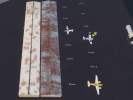
• Which the release of FS2020 we see an explosition of activity on the forun and of course we are very happy to see this. But having all questions about FS2020 in one forum becomes a bit messy. So therefore we would like to ask you all to use the following guidelines when posting your questions:

    • Tag FS2020 specific questions with the MSFS2020 tag.
    • Questions about making 3D assets can be posted in the 3D asset design forum. Either post them in the subforum of the modelling tool you use or in the general forum if they are general.
    • Questions about aircraft design can be posted in the Aircraft design forum
    • Questions about airport design can be posted in the FS2020 airport design forum. Once airport development tools have been updated for FS2020 you can post tool speciifc questions in the subforums of those tools as well of course.
    • Questions about terrain design can be posted in the FS2020 terrain design forum.
    • Questions about SimConnect can be posted in the SimConnect forum.

    Any other question that is not specific to an aspect of development or tool can be posted in the General chat forum.

    By following these guidelines we make sure that the forums remain easy to read for everybody and also that the right people can find your post to answer it.

PBR vs Texturing

Messages
195
Country
us-california
Well I am not sure which way to go. I am attaching a picture of same model done both ways. The textured model is all planes and had an a/o bake that was overlaid in the graphics editor when coloring out the texture. It has the windows overlaying the texture for reflection but allows the color under to come through.
The PBR is still in blender so the albedo is kinda raw, haven't baked it for export yet. Note. The PBR has the windows from the dev kit, the image in them is from the first texture of the buildings interior and is not sitting behind them.
PBR - fast but still needs hand work That image will require about 8 texture files (after baking).
The bottom one has three albedo/half-baked normal (materialized it)/emmissive

What do you guys think, is PBR worth it for such small buildings? I will attach a small hanger PBR it has the touch ups I would include on this building. Thanks for your input!

PBR VS TEXTURE.png


shed_03.png
 
well here is the result of two work flows, the one on the left is pbr done in blender and then the albedo is doctored up in gimp for dirt etc. The one on the right is the same model painted in Quixel then imported back in to blender for final export. the opnly dring was the sign done in gimp (easier than mask painting and faster for the one object else i would have texture painted it.
Screenshot (340).png


roofs
Screenshot (341).png

under the roofs
Screenshot (342).png
 
Interesting experiment. Just to make sure I understand: the PBR in Blender used nodes and then you baked your textures with Cycles. Did you do the rust-effect on the roof in Blender or in Gimp? I am not familiar with Quixel but I understand that it is competitor to Substance Painter. I assume you baked your texture in Quixel? So, with both workflows, once you had your textures, it was the same process of assigning MSFS Materials and exporting.

Were you trying to achieve the same result ? Obviously, they look similar. The left is more yellow and the one on the right is more worn. The scale of the siding/roof textures in Quixel looks off.

Which workflow did you prefer and why?
 
Hi, specifaclly, the one in blender (the left) I used extreme pbr within Blender to texture the model. You should see the noodle mess it makes. Baked albedo and a/o in cycles, imported those to Materialize to then make rgb and normal maps. then it’s back To blender to use blender2msfs for the mapping for export. Doctored the albedo along the way in art program. The other way is faster for me, make model, join, Uv unwrap and color surfaces with sigle colors. Using simply bake export that albedo And save us map. Export model as wavefront object. Open Quixel and import model and albedo, texture till hell freezes over. The one in the right has over 15 textures. Export three maps, albedo (added signage with art program, took all of two minutes), rgb and normal. Plugged maps into the model using Blender2msfs and exported model.

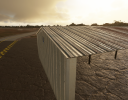
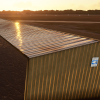
i prefer the Quixel method, for me it is way more creative and easy. In there I used a different panel to match the real world one, why they may look off. The model on the left has the standard corrugated up down up down same scale texture. The real world bldg. (see pictures) has panels with ridges every 6 to 8 inches. Also after Checking the rl model was not yellow like all the other buildings. Of note, I can make any style panel in Quixel if I can’t find a texture for it. The Above picture doesn’t really do it justice as the lines get lost in the rust due the sun angle.

IRL 3107C8F2-D170-4E7A-AFE8-26BE58733024.jpeg VS COMPLETED PLANE SHED 01.png fine tuned the normals a bit COMPLETED PLANE SHED 04.png
 
Last edited:
Well I have what I think is the fastest and most realistic given the time. I have done two buildings and a fuel object this way. Build in blender, export as wavefront to quixel and texture the model. Export albedo, normal and rgb. Tweak albedo with paint software for signage and make emissive texture using that as a mask. Then wrap a low poly model of that object in blender with files linked and export to MSFS with the blender2 MSFS plugin. Example below. FYI this was my first model shown at the beginning of this post. I let it sit a while while I figured everything out.
Latest rendition
04576C6A-DD33-4EB0-90DC-21D2DEE6291C.png


Night

E93D6163-228F-4CF5-8F3C-DD65290D92F5.png
 
Last edited:
Fastest workflow is creating the normal in Photoshop then using the intrinsic Blender settings to adjust roughness and metallic thereby avoiding the comp texture process entirely. The result (on avg) is not quite as good as say downloading a professionally created comp / PBR set and modifying a pre-done professional texture, but you can get similar results depending what you are doing.
 
I hear what you’re saying, just a for me, to build textures from scratch and/or copy and paste in Photoshop or gimp then make normals, seems to take quite a long time. In quixel I can do it in a matter of minutes. Textures dirt cracks fading everything. Even the glass was done there and it quite reflective and doesn’t require using the MSFS glass node tree and separate objects.
That last rendition of the building (shown above), not modeling, but making the color of, exporting to quixel, texturing, exporting back to blender the finished 3 maps all done automatically except of adding signs, about 5 minutes and placing in the sim took about an hour and a half. Translation, for me a simple model ( hanger or single story building, I can go from start to finish in about 2 1/2 hours and probably less as I get better.
 
I'll check out Quixel, that is true the Albedo texture is a lot more trouble in Photoshop than if using 100% pre-fab expert ones, but I am usually a mix of techniques. I'm about the same speed 2-3 hours, but it depends on how picky I am with the texture and if I'm using pre-fab like from Textures.com.

Things that are slowing me down tend to be certain colors, I despise light tan and yellow colored textures, I love white and concrete textures as they are the simplest.Chrome is super easy as well, some things are just easier to do than others, but I'll try Quixel. The hardest part about texturing is definitely the corrugated metal, and dirtying it up.
 
You have to watch the you tube video on creating your own corrugated metal, awesome. When you drive around check out all the different types on commercial builds, being able to make your own, can be useful when needed. Where Quixel does shine is in its special layers where the weathering and chipping is implemented and you tweak it for your look. You are right though, in some buildings it still takes that personal tweak to make it legit. That is where I am either in Gimp or Xara. Still the game changer in the whole deal is Blender without a doubt, after I learned it could never go back to sketchup!
 
I hear what you’re saying, just a for me, to build textures from scratch and/or copy and paste in Photoshop or gimp then make normals, seems to take quite a long time. In quixel I can do it in a matter of minutes. Textures dirt cracks fading everything. Even the glass was done there and it quite reflective and doesn’t require using the MSFS glass node tree and separate objects.
That last rendition of the building (shown above), not modeling, but making the color of, exporting to quixel, texturing, exporting back to blender the finished 3 maps all done automatically except of adding signs, about 5 minutes and placing in the sim took about an hour and a half. Translation, for me a simple model ( hanger or single story building, I can go from start to finish in about 2 1/2 hours and probably less as I get better.
So, to understand this process correctly: You created the 3 PBR maps for the building using Quixell (I use ArmorPaint, but the process is the same). What resolution do you use?
I am asking because I noticed that signs are hard to read if I bake them into the textures too, just because signs are small relative to i.e. the roof faces and thus the UV faces are also small and have little amount of pixels. Signs are nearly unreadable.
How do you handle that?
 
I use 4096 if there’s going to be signage and I actually use my paint program to paste the signs in on the texture map. My long building is 2048 by 4096 here is the whole airport
D09E38FF-5569-48DE-9BFC-837252957AD5.png
1E0FCD0A-358F-45CB-86D1-6497CD128C81.png
 
Oh and yes I use up to four maps. Albedo, (emissive/ if lighting needed), normal and RGB (roughness-metallic-ambient) those are exported in Quixel. In the graphics program I paste the signage onto a flat surface in the mapping so it is possible to incorporate it after the maps have been exported. This is just most critical on objects that have a bumpy surface in the normal map. If you don’t use a flat surface it makes the sign look pasted on!
 
Back
Top