• Which the release of FS2020 we see an explosition of activity on the forun and of course we are very happy to see this. But having all questions about FS2020 in one forum becomes a bit messy. So therefore we would like to ask you all to use the following guidelines when posting your questions:

    • Tag FS2020 specific questions with the MSFS2020 tag.
    • Questions about making 3D assets can be posted in the 3D asset design forum. Either post them in the subforum of the modelling tool you use or in the general forum if they are general.
    • Questions about aircraft design can be posted in the Aircraft design forum
    • Questions about airport design can be posted in the FS2020 airport design forum. Once airport development tools have been updated for FS2020 you can post tool speciifc questions in the subforums of those tools as well of course.
    • Questions about terrain design can be posted in the FS2020 terrain design forum.
    • Questions about SimConnect can be posted in the SimConnect forum.

    Any other question that is not specific to an aspect of development or tool can be posted in the General chat forum.

    By following these guidelines we make sure that the forums remain easy to read for everybody and also that the right people can find your post to answer it.

MSFS20 Problem with some frequencies when I change them (ATIS ...)

Messages
318
Hi all

I modeled an airport. But I've a problem with the frequencies :
- The ATIS doesn't work, even I set it manualy on the radio
- The ground frequency appears in duplicate, 2 times

when i created the airport, I set tyhe properties on "delete all frequency" and I manually added the good frequencies in the airport XML

Here some screens :

1- My xml


2- The frequencies in the airport selection
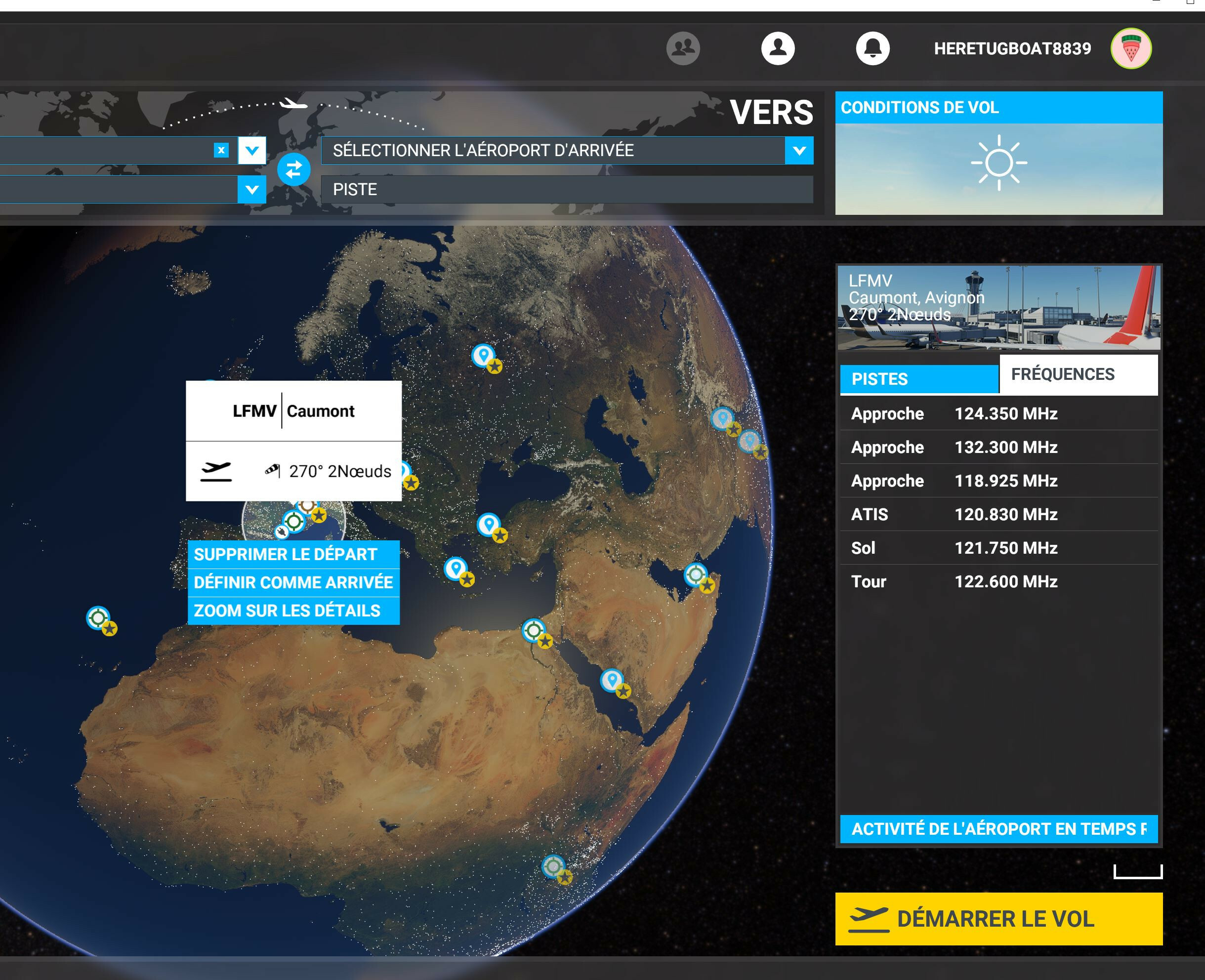

3- The ingame ATC menu
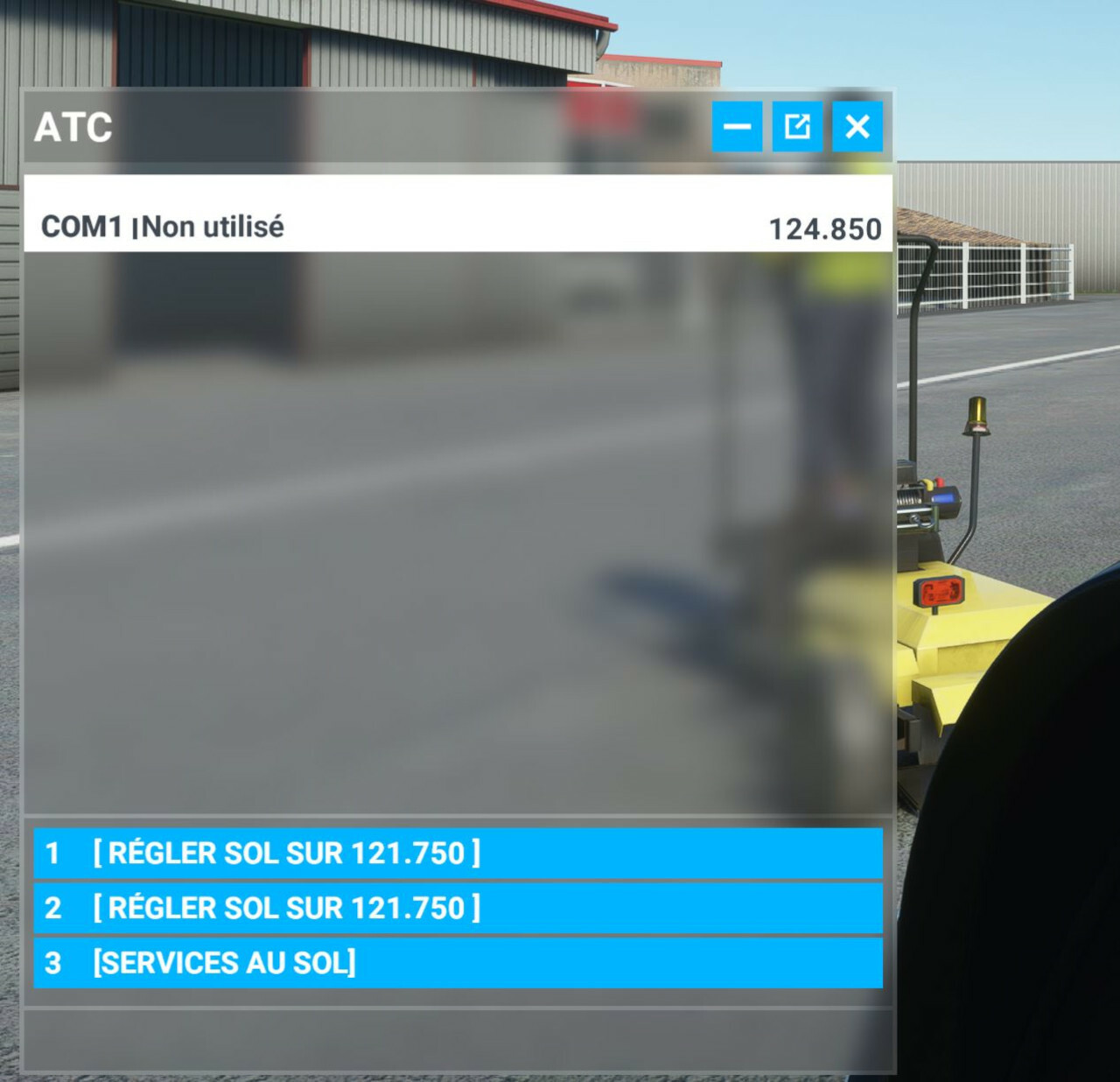

Can some help me to solve this ?

Thank you guys :)
Luc
 
If I remember rightly the ATIS name has to be an ICAO.

I don't know why you have two ground frequencies.
 
1- My xml
The name has to match an ATCCOM.AGENT_NAME listed in the localization packs (Official/OneStore/fs-base/*.locpak).

In the locpak I found those entries for you (text: what's displayed in the ATC window, tts: vocal text-to-speech, i.e. "what you hear"):
Code:
      "ATCCOM.AGENT_NAME AVIGNON.0.text": "Avignon",
      "ATCCOM.AGENT_NAME AVIGNON.0.tts": "Avignon",
(then, farther in the file:)
      "ATCCOM.AGENT_NAME ORANGE.0.text": "Orange",
      "ATCCOM.AGENT_NAME ORANGE.0.tts": "Orange",
(then, farther on:)
      "ATCCOM.AGENT_NAME PROVENCE.0.text": "Provence",
      "ATCCOM.AGENT_NAME PROVENCE.0.tts": "Provence",

So re-write your com names accordingly, just stating "AVIGNON", "ORANGE" or "PROVENCE" instead of "AVIGNON ATIS/SOL/TOUR", "ORANGE APPROCHE" & "PROVENCE APPROCHE". The type element will tell the sim to add "APPROACH", "GROUND", etc to the callsign, according this these entries in the locpak (here the french one):
Code:
      "ATCCOM.AGENT_APPROACH.0.text": "Approche",
      "ATCCOM.AGENT_APPROACH.0.tts": "Approach",
      "ATCCOM.AGENT_CENTER.0.text": "Centre",
      "ATCCOM.AGENT_CENTER.0.tts": "Center",
      "ATCCOM.AGENT_CLEARANCE.0.text": "Autorisation accordée",
      "ATCCOM.AGENT_CLEARANCE.0.tts": "Clearance Delivery",
      "ATCCOM.AGENT_CTAF.0.text": "Trafic",
      "ATCCOM.AGENT_CTAF.0.tts": "Traffic",
      "ATCCOM.AGENT_DEPARTURE.0.text": "Départ",
      "ATCCOM.AGENT_DEPARTURE.0.tts": "Departure",
      "ATCCOM.AGENT_FSS.0.text": "Radio",
      "ATCCOM.AGENT_FSS.0.tts": "Radio",
      "ATCCOM.AGENT_GROUND.0.text": "Sol",
      "ATCCOM.AGENT_GROUND.0.tts": "Ground",

You may edit those AGENTs in you locpak, as replacing "ATCCOM.AGENT_GROUND.0.tts": "Ground" by "ATCCOM.AGENT_GROUND.0.tts": "Sol" to hear it in french, but be warned:
- you may edit stock files at your own risk (they will be overwrited at each MSFS update anyway)
- such changes to ATCCOM.AGENTs will be applied globally, not only at your local airport.
 
Hi all

I modeled an airport. But I've a problem with the frequencies :
- The ATIS doesn't work, even I set it manualy on the radio
- The ground frequency appears in duplicate, 2 times
Sorry I misread your questions.
For duplicate ground freq, I'm having the same at airports that don't have a dedicated clearance freq. I think it's an MSFS bug, displaying once the ground freq for normal usage and once more in place of clearance freq.
Don't know about the ATIS.
 
Thank you, Superspud and Mottoth for your answers and the informations.

With the default airport there is no problem with ATIS. I hope somebody know the problem :)
 
Hello.
I come back with this problem, not solved for now.
Nobody know why the ATIS doesn't work when we modify the com frequencies of an airport ?
Thank for your help :)
 
Hi Luc,
Sorry that I do not have a solution, but I can confirm this behaviour. Even using the atccom agent name did not solve this issue. For now as a workaround I did not exclude the default frequencies in my airport. This works as the frequencies match the AIRAC. Maybe this is an option for you.

Regards
Jörg
 
The ATIS name has to match the ICAO Code of your airport - at least this works for me. So only the 4 letters as the name.
 
Thanks. But

Try with ICAO Code:
<Com frequency="123.78" type="ATIS" name="LSZR"/> or
<Com frequency="123.780" type="ATIS" name="LSZR"/> or
<Com frequency="123.7800" type="ATIS" name="LSZR"/> or

Try with ATC Agent definitions:
<Com frequency="123.780" type="ATIS" name="ST GALLEN"/>
<Com frequency="123.780" type="ATIS" name="ST GALLEN ATIS"/>

all did not work.

Always showing up in the starting screen but not working in the sim.
Message in the ATC window "COM1 INot in use 123.780

No further idea what could be the syntax here. ASOBO could provide an entry window for the airport frequencies to be replaced. Would make the life much easier for developers.
 
Just one thing I experienced: I also saw the frequencies not working at my airport and gave up. Then I just "used" my airport with those frequencies so I just flew around a little bit - And suddenly the frequencies started working. They did not work as long as I never started a "flight". So I jsut always spawned at the parking position / runway and it did not work. But as soon I was in the air, it worked.
Just an idea..
 
Karlo, you're right.
For the ATIS, we must use the ICAO code, not the name of the airport.
For the others frequencies, the name work very well.
It's a little particularity that we had to find :)
 
I'm having the same problem with non-towered airport KPSF. Frequencies do not show in the Free Flight flight planning screen nor in the ATC window once in the flight:

<Com frequency="128.600000" type="CLEARANCE" name="Albany"/>
<Com frequency="135.375000" type="ASOS" name="KPSF"/>
<Com frequency="122.700000" type="CTAF" name="Pittsfield"/>
<Com frequency="132.824999" type="APPROACH" name="Albany"/>
<Com frequency="132.824999" type="DEPARTURE" name="Albany"/>
<Com frequency="122.700000" type="UNICOM" name="Pittsfield"/>
<Com frequency="122.300000" type="FSS" name="Burlington"/>
<DeleteAirport deleteAllApproaches="FALSE" deleteAllApronLights="FALSE" deleteAllAprons="FALSE" deleteAllFrequencies="TRUE" deleteAllHelipads="FALSE" deleteAllRunways="TRUE" deleteAllStarts="TRUE" deleteAllTaxiways="TRUE" deleteAllVectorPlacement="FALSE" deleteAllBoundaryFences="FALSE" deleteAllJetways="FALSE" deleteAllControlTowers="FALSE" deleteAllDepartures="FALSE" deleteAllArrivals="FALSE" deleteAllPaintedElements="TRUE" deleteAllLightSupports="FALSE" deleteAllTaxiwaySigns="TRUE" deleteAllILSs="FALSE" deleteAllTerminalWaypoints="FALSE" deleteAllTerminalNDBs="FALSE"/>

Any solution?
 
Back
Top