• Which the release of FS2020 we see an explosition of activity on the forun and of course we are very happy to see this. But having all questions about FS2020 in one forum becomes a bit messy. So therefore we would like to ask you all to use the following guidelines when posting your questions:

    • Tag FS2020 specific questions with the MSFS2020 tag.
    • Questions about making 3D assets can be posted in the 3D asset design forum. Either post them in the subforum of the modelling tool you use or in the general forum if they are general.
    • Questions about aircraft design can be posted in the Aircraft design forum
    • Questions about airport design can be posted in the FS2020 airport design forum. Once airport development tools have been updated for FS2020 you can post tool speciifc questions in the subforums of those tools as well of course.
    • Questions about terrain design can be posted in the FS2020 terrain design forum.
    • Questions about SimConnect can be posted in the SimConnect forum.

    Any other question that is not specific to an aspect of development or tool can be posted in the General chat forum.

    By following these guidelines we make sure that the forums remain easy to read for everybody and also that the right people can find your post to answer it.

FSX Question about the order textures are applied to objects

Messages
52
Country
us-pennsylvania
So I am completely new to creating objects for FSX and after many, MANY hours I have finally managed to create my first scenery object. I used FSDS to apply the textures to the model and I noticed that the top view texture seems to project through an overhang and on to the surface below it. Is there a set order that textures are applied to a model or can you choose the order that textures are applied.

In the same line of thought, if textures are projected through a surface, how do you have textures on the inside and outside of an object like a hangar?

Thanks!

(Here's my very first scenery object...the control tower for Rosecrans Memorial Airport (KSTJ))
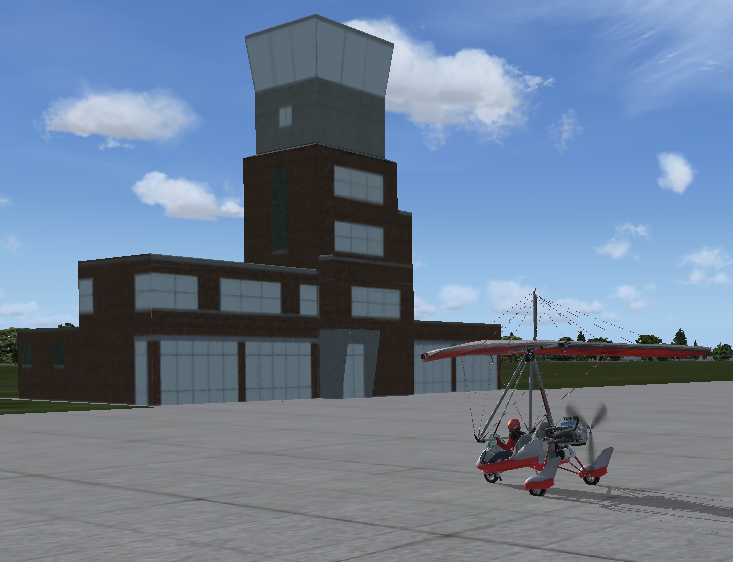
FSX KSTJ Tower.png
 
Hi,

Textures are not projected onto or through surfaces. When you model your object you can assign a texture to each surface yourself and you can map which part of the texture is shown on that surface. So I am not sure what you mean with the top view texture projects through an overhang.
 
Since I'm new to this, I have no idea of is/isn't possible with texture mapping. I'm using FSDS and it allows me to map front, back, left, right, top and bottom.

In the below image you can see the bump out I have circled. If I only apply the front, back, left and right textures, that bump out is completely dark like you can see in the circled area of the front view texture (top right). When I apply the top texture for the roof (bottom right), it seems to override/overlap the textures for the front, back, left and right.

I hope I am explaining this in a way that makes sense.

Texture mapping projection.png
 
You appear to be describing "inside out" geometry, which implies the normals are reversed. When normals are reversed, the faces that are normally on the outside of the model are on the inside. Now, if you imagine a cube, the closest face to you, will be eclipsed by the image of the farthest face, which is, of course, on its "inner" face. As you rotate the cube in relation to your view, you will always see the farthest face, it will rotate to a side face, oddly but as you expect, then the far face will eclipse it.

MCX has a function to reverse all normals, which is helpful, but invariably faces that had been previously hidden, that had been untextured, are revealed by reversal and still need to be textured. Usually it is more productive to orient and texture the faces during the modeling process.
 
This seems to be how FSDS applies the textures to the model by projecting them. It must be 20 years ago that I used fsds myself, so can't really help with how to map textures in it.
 
Last edited:
It's just a limitation of FSDS. All polygons with that orientation will be textured using that bitmap. You can't change that.

The way to avoid that is to separate the polygons in that area so those overhangs are a separate part. Then you can texture it separately. Select that part. Then go into polygon mode (triangle button). Then use the N or P keys to cycle through the polygons. When you get to a polygon that is part of the overhang, press the space bar to select it. Once the entire overhang is selected, use Part/Split Part to separate them.

Hope this helps,
 
It's just a limitation of FSDS. All polygons with that orientation will be textured using that bitmap. You can't change that.

The way to avoid that is to separate the polygons in that area so those overhangs are a separate part. Then you can texture it separately. Select that part. Then go into polygon mode (triangle button). Then use the N or P keys to cycle through the polygons. When you get to a polygon that is part of the overhang, press the space bar to select it. Once the entire overhang is selected, use Part/Split Part to separate them.

Hope this helps,
That helps a great deal, thank you very much!
 
Back
Top