• Which the release of FS2020 we see an explosition of activity on the forun and of course we are very happy to see this. But having all questions about FS2020 in one forum becomes a bit messy. So therefore we would like to ask you all to use the following guidelines when posting your questions:

    • Tag FS2020 specific questions with the MSFS2020 tag.
    • Questions about making 3D assets can be posted in the 3D asset design forum. Either post them in the subforum of the modelling tool you use or in the general forum if they are general.
    • Questions about aircraft design can be posted in the Aircraft design forum
    • Questions about airport design can be posted in the FS2020 airport design forum. Once airport development tools have been updated for FS2020 you can post tool speciifc questions in the subforums of those tools as well of course.
    • Questions about terrain design can be posted in the FS2020 terrain design forum.
    • Questions about SimConnect can be posted in the SimConnect forum.

    Any other question that is not specific to an aspect of development or tool can be posted in the General chat forum.

    By following these guidelines we make sure that the forums remain easy to read for everybody and also that the right people can find your post to answer it.

SketchUp Req. input on design options - raised and lower panels - textures or modelled?

Messages
410
Country
norway
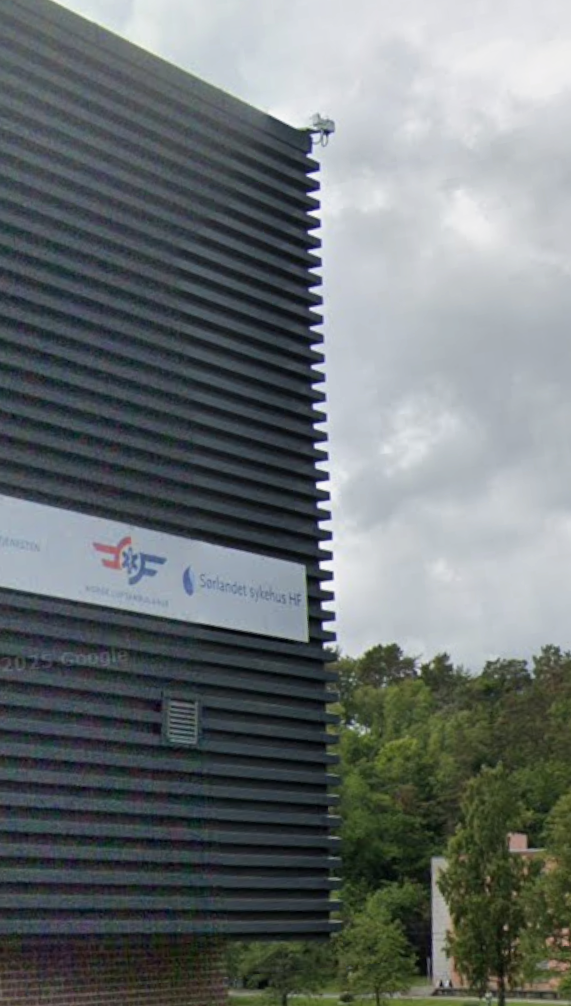
Hello. I need some advice on my approach towards modelling a building with raised and lowered horizontal panels in regards to performance and practical use.

In my previous object the panels were directed vertically so I could easily use a texture to mimic the wall. However on this one the edges are very obvoius with clear seperation between the panels.

I am thinking about modelling the panels, but I believe there are several issues regarding this:
Cons:
  • I assume negative effect on performance due to a more complex model?
  • I assume shimmering effects?
  • I assume complex UV-editing?
Pro:
  • More realistic look in regards to modelling
  • More realistic look in regards to lighting and AO?
Any input is greatly appreciated

Screenshot 2026-04-03 105036.png
 
It seems you wish to take advantage of the MSFS options to display PBR on each - and among all- "raised panel" 3D objects.


In FS2Kx that is a FPS killer, plagued by Moire' graphics anomalies with LODs, and may best be done with baked AO and transparent 3D model edges.

BTW: I would consider that method for MSFS lower LODs of a building's 3D model to avoid graphical distortion (but decimation would mangle it).


Perhaps a "shell" could be used for the ribs with transparency in mapped textures of the 3D model to simulate physical edges of ribs in lower LODs ?

Perhaps even using Colors or even Vertex colors rather than PBR texture images for the (very dark) ribs in lower LODs ?


Fortunately for MSFS, Asobo recently implemented SimPropContainers, so you could make (1) "raised panel"object.

Then clone and stack "procedural instances" of it into position on top of each other like Sketchup Component arrays ...with little increase of complexity.

https://docs.flightsimulator.com/ms...nstance_Objects.htm?rhhlterm=simpropcontainer


https://docs.flightsimulator.com/msfs2024/html/2_DevMode/Scenery_Editor/Objects/SimPropContainer_Objects.htm?rhhlterm=simpropcontainer simpropcontainers

https://docs.flightsimulator.com/msfs2024/html/3_Models_And_Textures/Modeling/Landscape/Modeling_SimPropContainers.htm?rhhlterm=simpropcontainers simpropcontainer

https://docs.flightsimulator.com/msfs2024/html/5_Content_Configuration/Environment/SimProp_Containers/SimPropContainer_XML_Properties.htm?rhhlterm=simpropcontainer simpropcontainers

https://docs.flightsimulator.com/ms...el_Files_Setup.htm?rhhlterm=simpropcontainers

https://docs.flightsimulator.com/ms...Landscape/LODs.htm?rhhlterm=simpropcontainers

https://docs.flightsimulator.com/msfs2024/html/5_Content_Configuration/Environment/SimProp_Containers/SimProp_Container_Object_Examples.htm?rhhlterm=simpropcontainer simpropcontainers


https://www.google.com/search?q=site:+www.fsdeveloper.com+SimPropContainer&sca_esv=3023facb97bb4816&source=hp&ei=ibnPaYGhK4bw0PEPloKfgAY&iflsig=AFdpzrgAAAAAac_HmdKflo0mfDM90ykS39HDuViiXPMB&ved=0ahUKEwjBidaG3tGTAxUGODQIHRbBB2AQ4dUDCBY&uact=5&oq=site:+www.fsdeveloper.com+SimPropContainer&gs_lp=Egdnd3Mtd2l6IipzaXRlOiB3d3cuZnNkZXZlbG9wZXIuY29tIFNpbVByb3BDb250YWluZXIyBRAhGKABMgUQIRigATIFECEYoAEyBRAhGKABSMaeAlAAWIuFAnAAeACQAQCYAXqgAdMGqgEDNS40uAEDyAEA-AEC-AEBmAIDoAKSA8ICBRAAGO8FwgIIEAAYiQUYogTCAggQABiABBiiBJgDAJIHAzAuM6AH_g6yBwMwLjO4B5IDwgcHMi0xLjEuMcgHLoAIAQ&sclient=gws-wiz


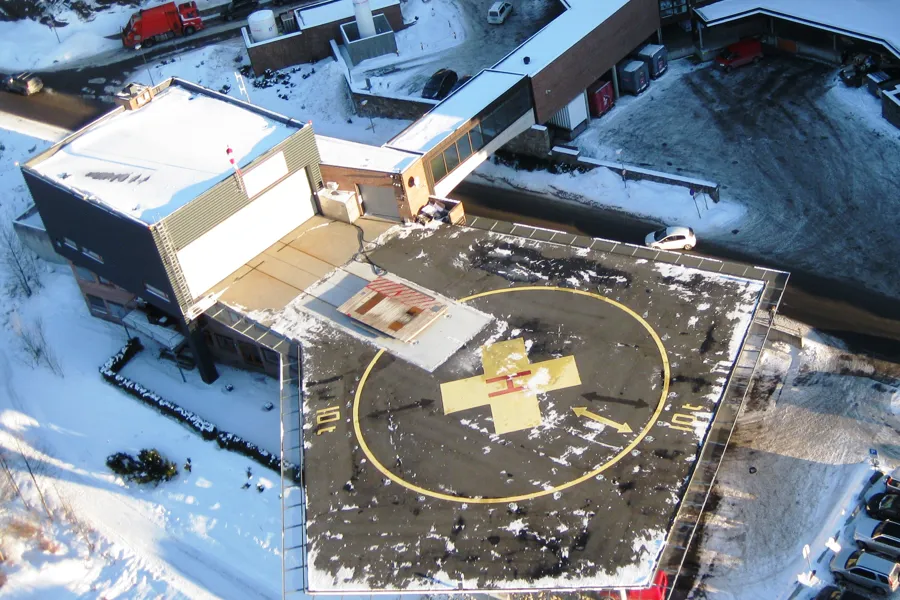
PS: It is not easy to find images of that building except indirectly via Google Earth link icons: :scratchch

Sørlandet sykehus HF - Prehospitale tjenester (PTSS) - Ambulansestasjon Arendal


Sørlandet sykehus HF - Prehospitale tjenester (PTSS) - Ambulansestasjon Arendal - Ambulance service
helipad
Dydens vei 18 (below
4838 Arendal
Norway

Looks like another challenging- but fascinating to learn- MSFS project; I'm confident it will look great when you release it. :)

It will be interesting to see seasonal snow display on top of each rib (not just SimObjectContainers, but SimObjects with visibility variables). :p

https://www.luftambulanse.no/basene-vare/luftambulansebasen-i-arendal/

helikopterbase20arendal.jpg


But, to be merciful, probably we would not see in flight IRL from above, any snow on top of the ribs because the ribs are so close together. :duck:

[EDITED]

IIUC, there are 40 - ~6 inch panels with a ~6 inch inset gap between each pair of them on the Faces of the Arendal Sorlandet Sykehus Helibase FBO.

When I get a rough 3D model made in Sketchup using Google Street View imagery, I'll take a look at the geometry statistics.

It would be a good test of what Sketchup and MCX show for geometry statistics compared to Blender and MSFS SDK.

I wonder if MSFS SDK will show accurate statistics for SimPropContainer "instanced" library objects if used for the panels ? :scratchch


AFAIK, if they are true "instances" from a SimPropContainer library, they are 'virtual'.

Thus, IIUC, they should not add to geometry statistics of the 15 Meter x 18 Meter core Helibase hangar FBO building.

[END_EDIT]


More site references, some with linked photos (checkout the links in "References":

https://grokipedia.com/page/arendal_heliport_hospital


GaryGB
 
Last edited:
It seems you wish to take advantage of the MSFS options to display PBR on each - and among all- "raised panel" 3D objects.


In FS2Kx that is a FPS killer, plagued by Moire' graphics anomalies with LODs, and may best be done with baked AO and transparent 3D model edges.

BTW: I would consider that method for MSFS lower LODs of a building's 3D model to avoid graphical distortion (but decimation would mangle it).


Perhaps a "shell" could be used for the ribs with transparency in mapped textures of the 3D model to simulate physical edges of ribs in lower LODs ?

Perhaps even using Colors or even Vertex colors rather than PBR texture images for the (very dark) ribs in lower LODs ?


Fortunately for MSFS, Asobo recently implemented SimPropContainers, so you could make (1) "raised panel"object.

Then clone and stack "procedural instances" of it into position on top of each other like Sketchup Component arrays ...with little increase of complexity.

https://docs.flightsimulator.com/ms...nstance_Objects.htm?rhhlterm=simpropcontainer


https://docs.flightsimulator.com/msfs2024/html/2_DevMode/Scenery_Editor/Objects/SimPropContainer_Objects.htm?rhhlterm=simpropcontainer simpropcontainers

https://docs.flightsimulator.com/msfs2024/html/3_Models_And_Textures/Modeling/Landscape/Modeling_SimPropContainers.htm?rhhlterm=simpropcontainers simpropcontainer

https://docs.flightsimulator.com/msfs2024/html/5_Content_Configuration/Environment/SimProp_Containers/SimPropContainer_XML_Properties.htm?rhhlterm=simpropcontainer simpropcontainers

https://docs.flightsimulator.com/ms...el_Files_Setup.htm?rhhlterm=simpropcontainers

https://docs.flightsimulator.com/ms...Landscape/LODs.htm?rhhlterm=simpropcontainers

https://docs.flightsimulator.com/msfs2024/html/5_Content_Configuration/Environment/SimProp_Containers/SimProp_Container_Object_Examples.htm?rhhlterm=simpropcontainer simpropcontainers


https://www.google.com/search?q=site:+www.fsdeveloper.com+SimPropContainer&sca_esv=3023facb97bb4816&source=hp&ei=ibnPaYGhK4bw0PEPloKfgAY&iflsig=AFdpzrgAAAAAac_HmdKflo0mfDM90ykS39HDuViiXPMB&ved=0ahUKEwjBidaG3tGTAxUGODQIHRbBB2AQ4dUDCBY&uact=5&oq=site:+www.fsdeveloper.com+SimPropContainer&gs_lp=Egdnd3Mtd2l6IipzaXRlOiB3d3cuZnNkZXZlbG9wZXIuY29tIFNpbVByb3BDb250YWluZXIyBRAhGKABMgUQIRigATIFECEYoAEyBRAhGKABSMaeAlAAWIuFAnAAeACQAQCYAXqgAdMGqgEDNS40uAEDyAEA-AEC-AEBmAIDoAKSA8ICBRAAGO8FwgIIEAAYiQUYogTCAggQABiABBiiBJgDAJIHAzAuM6AH_g6yBwMwLjO4B5IDwgcHMi0xLjEuMcgHLoAIAQ&sclient=gws-wiz


PS: It is not easy to find images of that building except indirectly via Google Earth link icons: :scratchch

Sørlandet sykehus HF - Prehospitale tjenester (PTSS) - Ambulansestasjon Arendal


Sørlandet sykehus HF - Prehospitale tjenester (PTSS) - Ambulansestasjon Arendal - Ambulance service
helipad
Dydens vei 18 (below
4838 Arendal
Norway

Looks like another challenging- but fascinating to learn- MSFS project; I'm confident it will look great when you release it. :)

It will be interesting to see seasonal snow display on top of each rib (not just SimObjectContainers, but SimObjects with visibility variables). :p

https://www.luftambulanse.no/basene-vare/luftambulansebasen-i-arendal/

helikopterbase20arendal.jpg


But, to be merciful, probably we would not see in flight IRL from above, any snow on top of the ribs because the ribs are so close together. :duck:


More site references, some with linked photos (checkout the links in "References":

https://grokipedia.com/page/arendal_heliport_hospital


GaryGB
I have a couple of reference images to work from, and I live relatively close by so I hope this will be a good one.

Seasonal snow is something very interesting to me. However I have yet to explore this option yet due to the xml.editing.

I was thinking either to model the building with the raised panels, or just make the "box" flat and texture it with raised panels. The last option will certainly remove the special details regarding the buildings corner and looking at it along one side. But if it is a performance killer to model it and texture in substancepainter it really is not an option. Than I would just go ahead with making the box flat and give it a raised panels texture instead.
 
I was thinking either to model the building with the raised panels, or just make the "box" flat and texture it with raised panels. The last option will certainly remove the special details regarding the buildings corner and looking at it along one side. But if it is a performance killer to model it and texture in substancepainter it really is not an option. Than I would just go ahead with making the box flat and give it a raised panels texture instead.
Hi!
I faced the same question as you in a recent project. I decided to model the wood panels instead of "just" applying a flat texture:

3d_design_details.jpg
3d_design_details_2.jpg


Ultimately, it will come down to the amount of effort involved, but if it's manageable, then I would always emphasize the details. It gives your 3D model more depth, which becomes visible in combination with light and shadow. Ultimately, it's these details that give a 3D model more authenticity, three-dimensionality, and the finishing touch:)
 
Hi!
I faced the same question as you in a recent project. I decided to model the wood panels instead of "just" applying a flat texture:

View attachment 99556 View attachment 99557

Ultimately, it will come down to the amount of effort involved, but if it's manageable, then I would always emphasize the details. It gives your 3D model more depth, which becomes visible in combination with light and shadow. Ultimately, it's these details that give a 3D model more authenticity, three-dimensionality, and the finishing touch:)
Thanks for your input Christian. I really appreciate it.

I agree that it looks very good indeed. I do not have an issue doing the work now with learning the different "shortcuts" of Sketchup with repeated work. In that regard I have only been worried about performance and looks, but if you do not experience either in a negative way I do not mind doing the work modelling those kinds of details
 
This will be a fun test of using the Sketchup "Array" feature to clone a panel into position on a Guide / Construction line pre-positioned 6 inches away (x39).


After a single Panel surrounds the core building and is 'Grouped':

* With the Move tool active: Press+hold <Ctrl> key as you Left Mouse Click the grouped panel (this initializes a "Copy+Move" function)

NOTE: Watch for a tiny "+" character adjacent to the grouped panel that you click when you do this properly. ;)


* Release the <Ctrl> key, and with the Move tool, Left Mouse Click+hold+drag the grouped panel Edge into position on the Guide / Construction line.

* Immediately type X39, and then press <Enter> key

You should promptly see Sketchup render in its workspace, (40) total of the grouped panels aligned precisely at 6 inch intervals apart. :wizard:


Sketchup Menu > Window > Model Info statistics shows total geometry even if Components were used.

AFAIK, that total for geometry 'should' be different with SimPropContainer Library "Instancess".

GaryGB
 
Last edited:
This will be a fun test of using the Sketchup "Array" feature to clone a panel into position on a Guide / Construction line pre-positioned 6 inches away (x39).


After a single Panel surrounds the core building and is 'Grouped':

* With the Move tool active: Press+hold <Ctrl> key as you Left Mouse Click the grouped panel (this initializes a "Copy+Move" function)

NOTE: Watch for a tiny "+" character adjacent to the grouped panel that you click when you do this properly. ;)


* Release the <Ctrl> key, and with the Move tool, Left Mouse Click+hold+drag the grouped panel Edge into position on the Guide / Construction line.

* Immediately type X39, and then press <Enter> key

You should promptly see Sketchup render in its workspace, (40) total of the the grouped panels aligned precisely at 6 inch intervals apart. :wizard:


Sketchup Menu > Window > Model Info statistics shows total geometry even if Components were used.

AFAIK, that total for geometry 'should' be different with SimPropContainer Library "Instancess".

GaryGB
Thanks Gary. I used the extrusion tool to extrude multiple panels outwards. Happy with the result, but I am a bit unsure on how to manage the UV to not make the faces too small for texturing in detail 🤔

Screenshot 2026-04-04 180017.png
 
Thanks Gary. I used the extrusion tool to extrude multiple panels outwards. Happy with the result, but I am a bit unsure on how to manage the UV to not make the faces too small for texturing in detail 🤔
[EDITED]

A 3D modeling method to deal with such issues involves scaling a small object up 10x to 1000x, then scaling it back down when finished. :idea:

[END_EDIT]


Indeed, the Texture Vertex ( aka " T-Vert") count would likely be higher along with having numerous small Faces to be textured.

There are Sketchup plugins able to help with Union and Subtraction issues with "intersecting" geometry.

https://web.archive.org/web/20151025181034/http://help.sketchup.com/en/article/1004163

https://fsdeveloper.com/forum/threads/misaligned-textures.434275/post-713006


NOTE: Sketchup 8 or 2013 (free) can be used to perform Boolean edits with this (free) plugin, and the saved result imported back into Sketchup 2017:

oscarlok: Boolean OSCoolean v2013

Perform boolean operations like intersect, union, cut, trim and split with groups and instances...
Updated for 2013 compatibility. but NOT compatible with >= v2014...

https://sketchucation.com/pluginstore?pln=OSCoolean

https://community.sketchucation.com...coolean-dec-2013-for-su-8-up-free-ver#p112055


Sketchup 8 (original Google installer):

https://www.oldversion.com/windows/google-sketchup/google-sketchup-8-0-4811/


Sketchup 2013 (original Trimble installer):

https://www.afterdawn.com/software/desktop/3d_modeling/google_sketchup.cfm/v13_0_4812


One can reduce the workload by hiding all but a grouped single panel / rib object to more easily access all of its sides, edit it manually, then clone it using the Array procedure described above.

Sorry my Easter holiday preparations have limited my time today for finishing the quick-and-dirty example building 3D model I had planned to use as an illustration of a few suggestions.

In the mean time, here's a Google query on related workflow options for minimizing T-Verts by intersecting a solid block panel object (pre-textured ?) with the separately grouped core helibase hangar building object:

https://www.google.com/search?client=firefox-b-1-m&q=site:+www.fsdeveloper.com+Gary+Sketchup+Union+Subtract+#sbfbu=1&pi=site: www.fsdeveloper.com Gary Sketchup Union Subtract

https://www.google.com/search?q=Ske...rRHCBwYzLTEwLjbIB5wCgAgB&sclient=gws-wiz-serp


Intersection and welding occurs semi-automatically when the 2 grouped (pre-textured?) object types are un-hidden, then their group 'exploded'.

[EDITED]

thomthom's plugin Solid Inspector version 2.x for Sketchup 2014 or newer provides some pertinent functions not offered in Sketchup 2017 Make version (but which are offered in Sketchup Pro and some newer versions).

thomthom: Solid Inspector² v2.5.1

Inspect and repair solid groups and components in SketchUp.

https://sketchucation.com/pluginstore?listtype=1&author=0&category=0&search=solid+inspector&submit=?

[END_EDIT]

GaryGB
 
Last edited:
"Bumped"for my edits above.

Happy Easter. :)

GaryGB
Thanks. I have grouped the hangar so that I easily can assign it one color. I suddenly remembered that i can adjust the texture size within substancepainter, disregarding the panels size when the UV-editing. That is possible by not using UV related texturing, but rather assign a texture based on the model size - which can then be scaled up or down. I think that will work 🤔
 
That works within Sketchup:

https://sketchup.trimble.com/blog/en-US/article/assigning-materials-groups-and-components


https://help.sketchup.com/en/sketchup/editing-materials

"Image options – Add or change an image texture by choosing a 2D image from your file system. Use the fields provided to adjust the size of the texture tile used in the material. When you type in a value, SketchUp will preserve the image's aspect ratio. Click the chain icon (to 'unlock' it) if you need to distort the image texture aspect ratio. You can also edit your texture image in an external editor such as Adobe Photoshop. (Go to Preferences > Applications to designate an image editor)."


However, for FS LOD / MIPMAP rendering performance, all objects in a Scene (ideally) have the same texture Material resolution in Pixels / Meter on Faces.

https://www.fsdeveloper.com/forum/threads/lod-questions-need-clarification.451229/post-872499

https://www.fsdeveloper.com/forum/t...stom-object-texture-sheets.444761/post-817987

https://www.fsdeveloper.com/forum/t...lurry-from-a-near-distance.443581/post-805817

GaryGB
 
Last edited:
Back
Top