• Which the release of FS2020 we see an explosition of activity on the forun and of course we are very happy to see this. But having all questions about FS2020 in one forum becomes a bit messy. So therefore we would like to ask you all to use the following guidelines when posting your questions:

    • Tag FS2020 specific questions with the MSFS2020 tag.
    • Questions about making 3D assets can be posted in the 3D asset design forum. Either post them in the subforum of the modelling tool you use or in the general forum if they are general.
    • Questions about aircraft design can be posted in the Aircraft design forum
    • Questions about airport design can be posted in the FS2020 airport design forum. Once airport development tools have been updated for FS2020 you can post tool speciifc questions in the subforums of those tools as well of course.
    • Questions about terrain design can be posted in the FS2020 terrain design forum.
    • Questions about SimConnect can be posted in the SimConnect forum.

    Any other question that is not specific to an aspect of development or tool can be posted in the General chat forum.

    By following these guidelines we make sure that the forums remain easy to read for everybody and also that the right people can find your post to answer it.

Runway Light inconsistent

Messages
22
Country
southkorea
Hello,

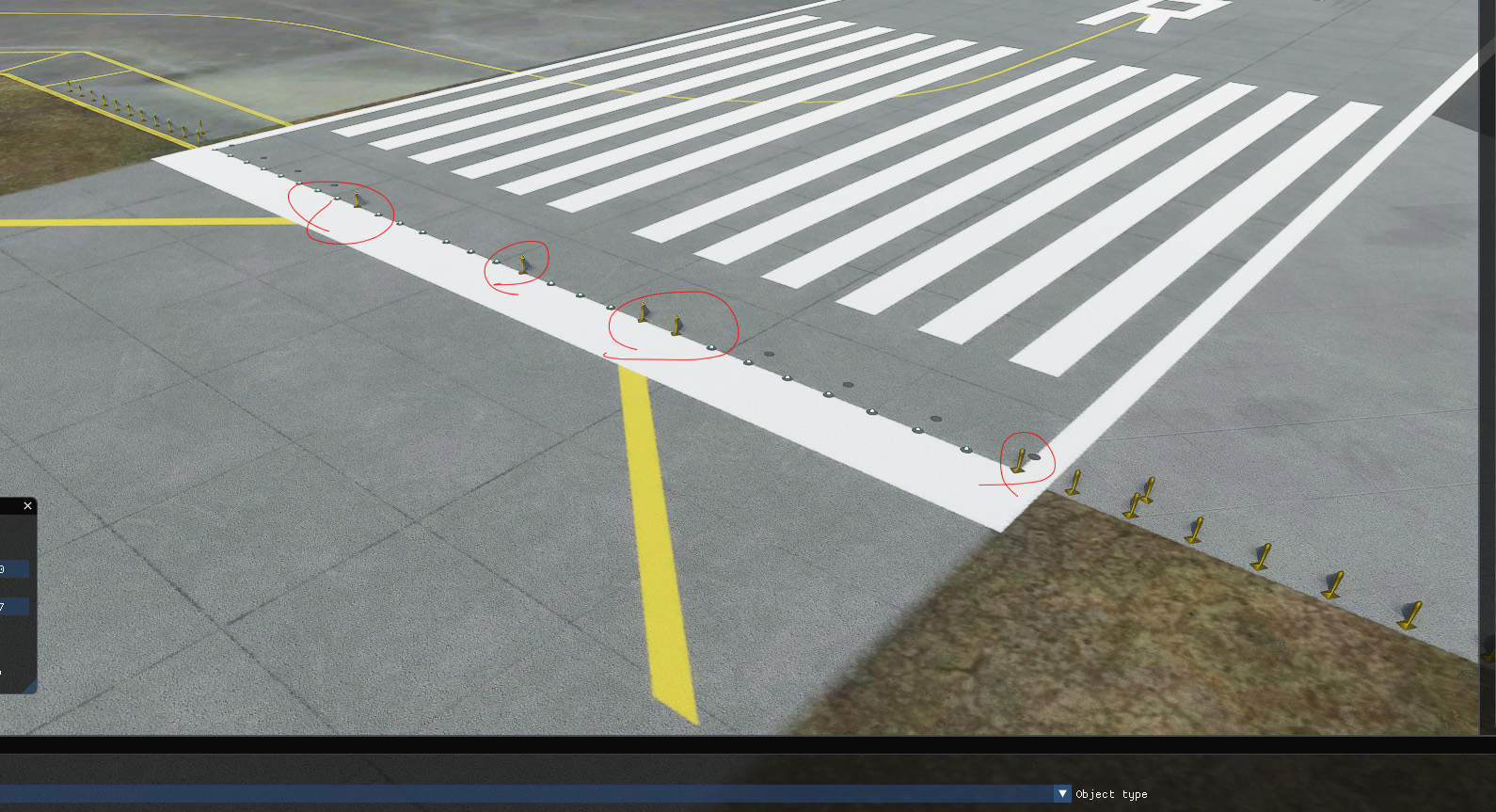
I'm getting the different shaped threshold lights for the runways.

Is there a way to fix this?? It looks ugly at night.

lights.jpg
 
You are lucky to be getting any lights at all !!!

I am thinking particularly Taxiway lighting.

I seem to recall form FSX (been some time ago now), that most of the airport I flew into at night had an abundance of BRIGHT, Blue. & green center line, taxiway lights.

It seem that since then, many of those light have blown bulbs ? and there is no budget to replace them. ?
Either that, or ASOBO did not have the budget to put them in in the 1st place ??

Seriously, in RL, visit any medium to large airport at night, and the runway & taxiways are lit up like a Christmas tree. Amazing sight.

In MSFS, it's as if EVERYONE, including you, the pilot, are wearing those "Regulation Issued" Sun Glasses that all the ground crew seem to be wearing these days, even at night !!

And yes, whats with every airport, even the very small ones, where it never snows, having the same runway side light, up on 2 ft posts ?
Not to mention the occasional white strobe light, placed randomly on some runways, at very questionable positions ...
 
Not only are the runway light inconsistent, I am totally confused in MSFS, when I land and ATC tell me to taxi on Taxiways I do not see on my "Current" Chart.

OK, so MSFS is out of date .. It is what it is, but is there any easy solution to this. ?

I assume updating all the Airport is a massive, never ending task, so how about looking at it from another direction.

Nav data seems to be OK, and I believe it can be update relatively easily, although I do not know how ...

But once on the ground --

Is there any simple way to DUMP/Print a MSFS Airport diagram that at least shows named taxiways, as they are in MSFS ?

Currently, only the AI Pilot seems to know where these outdated or incorrect taxi ways are, so I am forced to let him taxi the aircraft, and he is Totally useless at it !!!
 
Not only are the runway light inconsistent, I am totally confused in MSFS, when I land and ATC tell me to taxi on Taxiways I do not see on my "Current" Chart.
This is because almost all the default airports were created just from aerial photos, there was no access to the taxiway names or designators so they had to make it up.


There's currently no way of reverse-engineering the airport bgls, but people much cleverer than me are working on it so hopefully we'll get it soon.
It's a priority, as at the moment there's no way to change an airport, you have to remove the whole thing and recreate it from scratch - once we can decompile the airports someone can write an application to grab the existing information, change it, and export it back to the sim.
 
Back
Top