Hello:
The SBuilder for FS9 Help file states:
"
Photo Scenery
Scenery Builder can make 2 types of photos scenery - standard resolution scenery (approximately 4.8m/pixel) and higher resolution scenery (2.4m/pixels and 1.2m/pixel). The former is referred to as VTP photo scenery. The latter is a feature introduced in version 2.05. The first part of this section refers to VTP scenery only. Higher resolution photo scenery is addressed at the end of this section.
1 - VTP Photo Scenery
Scenery Builder can take a set of bitmaps and produce photo scenery BGLs. You can use a single bitmap to generate summer photo scenery that will be used in all seasons. Alternatively you can use 6 bitmaps (one for every season and another for a night texture) to have seasonal photo scenery. Finally you can add to the project a 7th bitmap representing a
transparency map. This map must be a grey bitmap with white representing complete opaque and black complete transparent.
This will allow a very good matching between worked and non-worked areas. Scenery Builder generates BGLs and the required bitmaps, adding the alpha channels if necessary. Note that the "sliced" bitmaps are internally generated by SBuilder and not by the MS Resample tool. Completely opaque bitmaps will be of the so called DXT1 type with a size of 43KB. Transparent bitmaps will be of the 8-bit format with alpha type and will have a size of 87KB. Both will have mips.
Tip for creating a transparency map
One tip to generate the alpha bitmap is get a full view of the SBuilder display in Summer season, with the LOD13 grid display ON. The tip consists on copying the display to the Clipboard by pressing "Print Screen" and then pasting to a painting programme as a New Image. Then, with the Pen tool of the painting programme, you draw a line defining the contour of the area that you want to make visible. After this you change your picture to "2 colours": white inside the line and black outside the line. In this process your Summer picture, the LOD13 grids, and the contour line became either white or black. Then you make the picture "several colours" again and you use a "blur" filter to generate shades of grey as in the picture above. Finally you resize the picture to be exactly of the same dimensions as the Summer bitmap and you load it in SBuilder as the Alpha Map.
Defining the tiles
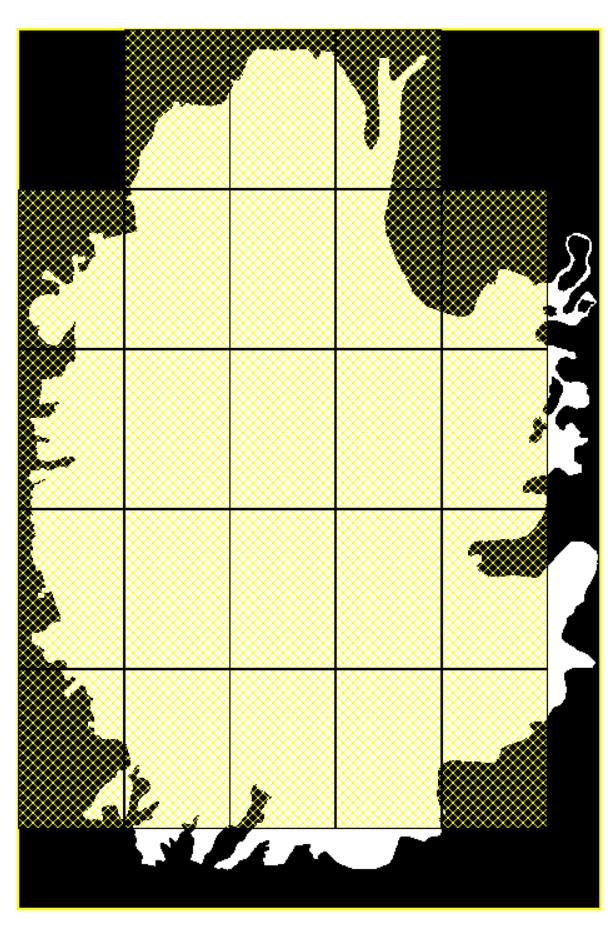
In order to create the photo scenery you press the Photo button in the toolbar and you click the LOD13 squares that you want to define as photo tiles. The display window is like this:
Note 1: your bitmap should cover at least one LOD13 square (one Area).
Note 2: the Check button will test if all photo tiles have a bitmap underneath.
Photo tiles can only be placed on top of bitmaps. If there is no bitmap on a LOD13 location there is no way to generate the photo tile. If you try to place a photo tile in a region with no bitmap, SBuilder will issue an error message. If, by accident, a bitmap is deleted, and the photo tiles left, there could be an error when you compile the project. The Check command verifies if all the photo tiles cover a bitmap. Every photo tile that does not cover a bitmap is deleted. Before each compilation this command is automatically run.
Note 3: if the transparency map for a photo tile is 100% black, SBuilder detects this condition and skips the generation of tile.
Note 4: for VTP Photo scenery it is suggested that a resolution of about 4.8 meter per pixel should be used.
Note 5: at some viewing distances we can notice small gaps between the photo squares. This could be unpleasant in certain cases as, for example, snow regions, where the white textures will show darker gaps between them.
2 - Higher Resolution Scenery
The method described so far generates VTP scenery where the resolution is about 4.8 meter per pixel. If you have photographs of higher resolution you can try to make High Resolution photo scenery. In this method SBuilder builds textured triangles that can follow a mesh. Here are some tips
.
The photo triangles correspond to a "LOD8 mesh". Therefore if you have a LOD9 or LOD10 mesh, it could be useful to generate a set of tilted LWM3 polygons (see the Mesh window). These tilted polygons force a LOD8 mesh! See the LWM section for more information on tilted polygons.
It is useful to generate the VTP photo scenery and the high resolution scenery from the same high resolution bitmap. This will improve the "gap problem of VTP photos".
Unfortunately you can not make AFCAD scenery to show over the high resolution scenery. The only way to solve this is to make a transparent zone at the runway and taxiways locations.
You can control the operation of high resolution scenery using a set of parameters found in the INI file. Here is the list:
[Photo]
HWinterEnd=-1
HWinterStart=-1
WinterEnd=76
WinterStart=356
FallEnd=355
FallStart=263
SpringEnd=169
SpringStart=77
MeshBias=0
FlattenBias=0
Zbias=0
PhotoRange=5000
PhotoCall=LayerCall( :lcall 4 ) |
The Season parameters define the start and end of the seasons. See a tutorial on http://www.scenerydesign.org/ about this.
If you set a non zero value to MeshBias, say 5, then the photo triangles will be 5 meters higher than the mesh.
If you set a non zero value to FlattenBias, say 5, then the photo triangles will be 5 meters higher than the 1st found LWM2 flatten. The reason is that when SBuilder generates the altitudes of the triangles vertices it first reads the mesh. Then it reads any LWM2 (constant altitude) flatten that could exist on the area. If a flatten is found under a vertex, the altitude of the flatten is taken for the vertex and the previous mesh altitude is abandoned. If more than one LWM flatten exist under a given vertex, only the first flatten is taken.
Zbias=0 <<< the normal Zbias parameter (see SCASM or the SDK)
PhotoRange=5000 <<< this is the V1 visibility parameter. The triangles will be displayed when we are in the range of 5000 meters.
PhotoCall=LayerCall( :lcall 4 )
PhotoCall=LayerCall( :lcall 0 )
PhotoCall=PerspectiveCall( :lcall )
These 3 options for the "PhotoCall" parameter can influence the drawing order of ground polygons. You need to refer to SCASM docs if you want to test these options. Unfortunately it is impossible to force FS to draw the VTP polygons in the first place, followed by the high resolution textured polygons and the runway polygons at the end. Normally the second option should produce acceptable results."
Regarding VTP Polygons and textured terrain 'Lines' the SBuilder for FS9 Help file also state
s:
"VTP Scenery - VTP textures for polygons
There are 3 options to declare a VTP texture for a polygon.
The first option is to declare one of the Land Classes textures. We will not refer to these textures anymore as you already have seen them in Land class scenery making.
The second option is to use "named textures".
The third option is to choose from a set of pre-assembled texture names. When you use "named textures" you set a texture for each season. Here is the window to define a "named texture":
You can add a named texture set to the "assembled set of textures". In this way, the next time you need to choose this set you will just pick it up from a list of pre-assembled textures. The assembled texture names are placed at the end of the file
polys.txt found in the Tools folder of SBuilder. The first entries, in this list, are the standard textures used by FS2004 which correspond the standard file TERRAIN.CFG.
You should read the VTP and LWM Terrain SDK for explanations on the Texture types and Effects. The important thing is that for polygon textures, the type is 0. For lines type, should be 1 2 or 3."
The VTP and LWM Terrain SDK's may be downloaded here:
https://www.fsdeveloper.com/forum/resources/scenery-sdk.25/
https://www.fsdeveloper.com/forum/resources/terrain-sdk.21/
https://www.fsdeveloper.com/forum/resources/terrain-sdk.40/
FYI: In addition to the statements you may have already reviewed here:
https://www.fsdeveloper.com/forum/t...l-vtp-texture-issue-with-alpha-channel.13457/
...AFAIK, a DXT3 format BMP is required for variable (aka "gradient") transparency, in contrast to DXT1 simple 'On/Off' transparency.
IIRC, SBuilder9 will use the SCASM compiler for VTP output, which IIRC only maps BMP file types onto VTP Polygons for Terrain.
GaryGB