• Which the release of FS2020 we see an explosition of activity on the forun and of course we are very happy to see this. But having all questions about FS2020 in one forum becomes a bit messy. So therefore we would like to ask you all to use the following guidelines when posting your questions:

    • Tag FS2020 specific questions with the MSFS2020 tag.
    • Questions about making 3D assets can be posted in the 3D asset design forum. Either post them in the subforum of the modelling tool you use or in the general forum if they are general.
    • Questions about aircraft design can be posted in the Aircraft design forum
    • Questions about airport design can be posted in the FS2020 airport design forum. Once airport development tools have been updated for FS2020 you can post tool speciifc questions in the subforums of those tools as well of course.
    • Questions about terrain design can be posted in the FS2020 terrain design forum.
    • Questions about SimConnect can be posted in the SimConnect forum.

    Any other question that is not specific to an aspect of development or tool can be posted in the General chat forum.

    By following these guidelines we make sure that the forums remain easy to read for everybody and also that the right people can find your post to answer it.

FSXA SbuilderX water mask issue

Messages
107
Country
vietnam
Hi all,
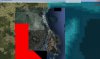
I'm working on photo scenery with SbuilderX . After I created a background and compiled to .BGL file, I edited water mask photo from the background .BMP image then converted it to 8-bit greyscale .TIF . When I compiled again, I loaded the completed .BGL file on TmfViewer, it showed as my attached photo . Going to FSX, the water mask did not show up and what does the red shape stand for ?
:confused::confused::confused:
All comment are welcomed :rolleyes:

Regards,
Trieu
 

Attachments

  • crx_er5.jpg
    crx_er5.jpg
    127.3 KB · Views: 875
  • crx_er4.jpg
    crx_er4.jpg
    490.7 KB · Views: 818
  • crx_er6.jpg
    crx_er6.jpg
    986.4 KB · Views: 991
Last edited:
Hello:

Occasional 'Red' color background anomalies with custom photo-real land class terrain texture masking and FS SDK Resample *.INF file "NullValue" parameter usage ...are discussed in this thread:

http://fsdeveloper.com/forum/showthread.php?t=424797&highlight=NullValue

"Null Values and Blend Masks do not go together very well. If you are using a Blend Mask, do not use a Null Value in your source image. Let the Blend Mask handle the transparency"


Hope this helps ! :)

GaryGB
 
Last edited:
Thanks Gary,
I found the problem since when I created a background from SBuilder, Google map could not load the aerial photo completely so it was exported with some parts show as pure white color . Then I re-created a background again with smaller size and it worked fine ;)
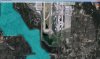
However, I'm in a new trouble, please check the attached photo . My photo scenery does not fit the default terrain, the default water is beneath my photo scenery, how can I extend the terrain to meet my ground parts precisely :confused:
Regards,

Trieu
 

Attachments

  • crx_er7.jpg
    crx_er7.jpg
    184.8 KB · Views: 692
Hi Trieu:

IIUC, you are showing a project area at the South-West end of Cam Ranh International Airport (IATA: CXR, ICAO: VVCR):

http://en.wikipedia.org/wiki/Cam_Ranh_International_Airport

http://www.panoramio.com/photo/57677822?source=wapi&referrer=kh.google.com


Google Earth "jump" coordinates: 1°59′53″N 109°13′10″E


Please post a screen shot of the problem area from a flight in FSX with your custom photo-real land class textures loaded, from this type of viewing angle, and with ex: arrows / labels / explanatory text ...so we can better understand the problem:

fsxgetiltedswviewtonecx.jpg


GaryGB
 
Last edited:
Hi Gary,
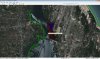
The part of photo scenery I have to figure out is the shore near taxiway and runway 02 (left next to them). In FSX default terrain, my photo scenery is overlapping it but does not fit thoroughly so the water with waves effect is still show under my photo scenery .
I don't know how to extend some parts of terrain to exclude the water parts, so in SBuilderX, I add a polygon with "Exclude all shoreline" and it worked fine as you can see :
272402_589915244360499_1146487606_o.jpg
 

Attachments

  • crx_sbuilder.jpg
    crx_sbuilder.jpg
    189.8 KB · Views: 719
Hi Trieu:

If I understand correctly (aka "IIUC"), you have the FSX default "Living Water" class attribute showing within the area covered by your custom photo-real land class texture of the land and airport.

If that is the case, this is most commonly due to either a need for:


1.) Changing effective transparency of the blend mask gray scale *.TIF file to prevent underlying default water class and/or land class showing through your super-imposed custom photo-real land class texture.


...Or:

2.) Using 24-bit color aerial imagery *.BMPs which AFAIK SBuilderX requires by default for compilation and output via FSX SDK Resample instead of 32-bit *.BMPs


I hope I'm correctly understanding the scenario that you are describing. :o


PS: You may wish to review these threads for additional info on what I believe may be the issue(s) under discussion here:


http://www.fsdeveloper.com/forum/showthread.php?p=222135#post222135


http://www.fsdeveloper.com/forum/showpost.php?p=225217&postcount=23


http://aussiex.org/forum/index.php?/topic/17097-blend-mask-issue/


http://www.ptsim.com/forum/viewtopic.php?p=6215


http://www.fsdeveloper.com/forum/showthread.php?t=220239


http://www.flightsim.com/vbfs/showt...otoreal-scenery-for-FSX&p=1736860#post1736860


http://www.flightsim.com/vbfs/showthread.php?250762-How-to-create-photoreal-scenery-for-FSX


GaryGB
 
Last edited:
Ground polygon problem

Hi Gary,
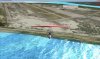
Now I get stuck in new problem, I created a flatten polygon with ADE and set the elevation as the same with airport elevation and runway (12m). Then it appeared like this (attached photo) . The differential elevation between the airport and the water shoreline created the cliff and it looks badly . How can I make a slope smoothly
 

Attachments

  • crx_er9.jpg
    crx_er9.jpg
    184.1 KB · Views: 636
Hi Trieu:

It appears that your airport flatten polygon extends from the center of the airfield to a position very close to the edge of the water. :alert:

If you reduce the extent of that flatten polygon in size so that it does not fully reach the edge of the water, the terrain should slope downwards from the flatten to meet the water level by the shoreline at an angle which is less steep. ;)


FYI: If you need to further fine tune the shape of the shoreline, you may need to add a small band of terrain "skirt" at the edge of the airport flatten.


BTW
: You may wish to review this thread for info on sloped flattens and terrain 'skirts', while making sure that one's vertices align with the coordinates and altitudes of the airport flatten and the surrounding terrain mesh at the ex: shorelines by the waters edge:

http://www.fsdeveloper.com/forum/showthread.php?t=425302&highlight=sloped


PS: I am not certain that the semi-automatic "Snap_To_LOD-21_Grid" feature of SBuilder for FS9 when preparing terrain vertices for FS9 format vector LWM BGLs ...was ever implemented in SBuilderX, to do the same processing of terrain vertices prior to compilation for FSX format CVX vector BGLs. :rolleyes:

http://www.ptsim.com/forum/viewtopic.php?p=446

http://www.ptsim.com/forum/viewtopic.php?p=683

http://www.ptsim.com/forum/viewtopic.php?p=4056

http://www.ptsim.com/forum/viewtopic.php?p=4520


If "Snap_To_LOD-21_Grid" was not implemented in SBuilderX, IMHO, it is advisable to manually align ones vertices for the triangles of detailed sloped flattens with the FS Quad Matrix LOD-21 Grid vertices, in order to minimize demands placed on the terrain rendering system at run time ...especially near detailed airports which will be used by complex aircraft, to allow better overall FSX performance.

Alternatively, one would could pre-process such sloped terrain flatten vertices in SBuilder for FS9 to make use of that version's semi-automatic "Snap_To_LOD-21_Grid" feature, then export them within a *.SBX file to be imported into SBuilderX for final processing and compilation into a FSX CVX vector format BGL. :idea:


Hope this helps ! :)

GaryGB
 
Last edited:
Back
Top