• Which the release of FS2020 we see an explosition of activity on the forun and of course we are very happy to see this. But having all questions about FS2020 in one forum becomes a bit messy. So therefore we would like to ask you all to use the following guidelines when posting your questions:

    • Tag FS2020 specific questions with the MSFS2020 tag.
    • Questions about making 3D assets can be posted in the 3D asset design forum. Either post them in the subforum of the modelling tool you use or in the general forum if they are general.
    • Questions about aircraft design can be posted in the Aircraft design forum
    • Questions about airport design can be posted in the FS2020 airport design forum. Once airport development tools have been updated for FS2020 you can post tool speciifc questions in the subforums of those tools as well of course.
    • Questions about terrain design can be posted in the FS2020 terrain design forum.
    • Questions about SimConnect can be posted in the SimConnect forum.

    Any other question that is not specific to an aspect of development or tool can be posted in the General chat forum.

    By following these guidelines we make sure that the forums remain easy to read for everybody and also that the right people can find your post to answer it.

ScenProc - autogen not visible

Messages
118
Dear Arno,
First of all thank you very much for all software that you have ever produced for our community! Your programs are a strong column for many FS designers.

Unfortunately I need to share with you my problem regarding ScenProc, as I can't find the answer myself. The problem is that I don't get the autogen, but here is what I do step by step:

1. Downloaded shape files for the whole country from Geofabrik
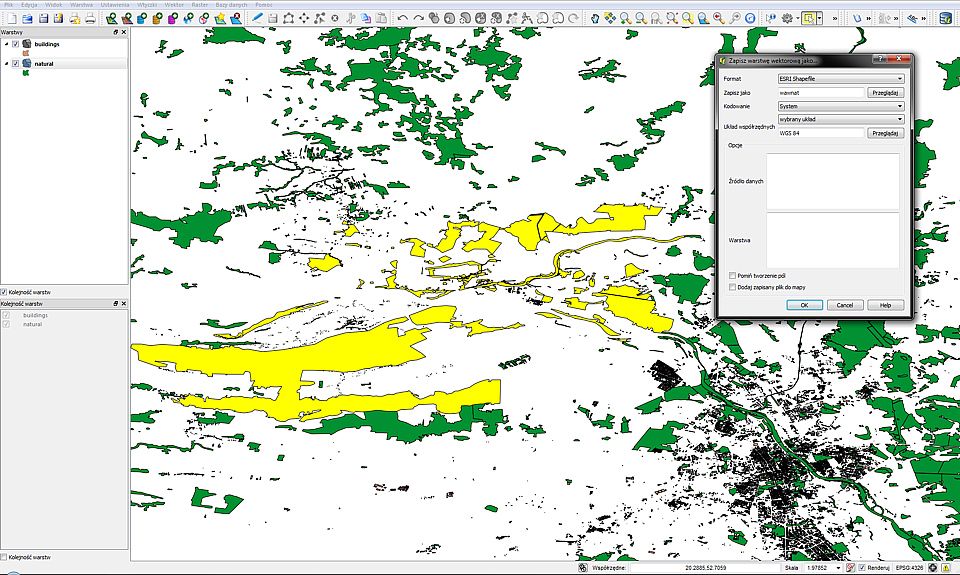
2. Since I need only one city, I have opened the file in QGIS and saved 2 shp files with smaller areas - one with buildings layer and one with vegetation layer. QGIS gave me all shapefiles needed of that smaller area (dbf, prj, qpj, shp, shx, cpg)

3. I have created a simple configuration file for scenProc:

Code:
# Test autogen
 IMPORTSHP|wawnat.shp|NOREPROJ
 IMPORTSHP|wawbui.shp|NOREPROJ
 #
 SPLITGRID|AGN

 #
 CREATEAGNPOLYVEG|FTYPE=POLYGON;type=forest|{e8b937fd-a1f2-4bd5-8548-2c80d30102af}
 CREATEAGNGENBUILD|FTYPE=POLYGON;FROMFILE=wawbui.shp;FWIDTH<20|{5ae04eb6-934c-4f63-bb48-5e7dee601212}|MAXRATIO=2
   CREATEAGNGENBUILD|FTYPE=POLYGON;FROMFILE=wawbui.shp;FWIDTH>20|{6089A0BD-CED1-4c47-9A9E-64CDD0E16983}

 #
 WRITEAGNFILES|D:\FSX\Addon Scenery\Warsaw City 2012\Texture

4. I made sure that in QGIS the WGS84 format is used

5. I have processed the configuration file with scenProc. It gave me 18 autogen files (one of them was an.agn).

6. Seemed to be ok, but after running FSX no autogen was visible. I have made another test trying to manually add some buildings with Annotator and I did succeeded however filenames of that manually added area were different that those made by scenProc, although I was working on the same area:

Manual: 011230312022013an - 011230312022122an
ScenProc: 011230303311123an - 011230312210221an

The scenProc files' size were from 1KB to 33KB.

I guess I am missing something simple, but I can't find the answer to this problem. I will highly appreciate your help in this matter.

Best regards
Stanislaw Drzewiecki
 
Hi,

If you open the agn files scenproc made with annotator do you see some autogen then?

Send from my phone using Tapatalk, so excuse the short sentences and possible typos
 
When I open the bitmap file (I mean the native FSX bgl) in Annotator, only my manually created agn files are visible. But is there a way to view a content of agn files otherwise?
 
Last edited:
Hi,

Normally they should show in Annotator as well.

I get the impression that the position might be wrong, since you also have different names.

Could you maybe send me the SHP files you are using? Maybe I can see something from them.
 
Hello.

Sure. Here are shapefiles of vegetation: https://rapidshare.com/files/334922257/shapefile.zip . The area is around EPMO airport.

Maybe there is something wrong about the way I have extracted those shapefiles from the big file. I have simply used "save vector layer as" after selecting the appropriate area in GIS. This created the complete package of shapefiles.

5b9d7cef.jpg
 
Last edited:
Ok, I'll check. It sounds you saved the data correctly though.

Send from my phone using Tapatalk, so excuse the short sentences and possible typos
 
I am honestly new to QGIS application as well as the ScenProc software so I have possibly missed some configuration step in one of those programs, however I tried to be very attentive. I would very much appreciate your help, Arno.
 
Last edited:
Hi,

It seems something is wrong with the ZIP file, I get an error when I try to extract it.

But I had another look at your SPC file and I think a line is misisng. Can you try to add the line below before making the autogen to see if that helps?

SETAGNBUILDINGHEIGHT|1.0;0.0;0.0;0.0
 
I had to remove that line SETAGNBUILDINGHEIGHT|1.0;0.0;0.0;0.0 beacause it was causing the whole program to crash... However it worked with SETAGNBUILDINGHEIGHT|1,0;0,0;0,0;0,0 (, instead of .). Still result is the same (many AGN files generated, no autogen visible).
 
Last edited:
Hi,

Is your decimal character the dot or comma in windows? I only tested scenproc with dot.

Send from my phone using Tapatalk, so excuse the short sentences and possible typos
 
Hi,

I got the shapefiles now. I'll have a look to see what is going on.

Might take a few days though, as I will be travelling for my work from tomorrow.
 
Hi,

Sorry for the delay. I had a look at your problem. I am not completely sure yet what is going on, but for some reason not all attributes are read from the SHP file. So therefore the attribute forest is missing and the filter type=forest returns no objects to turn into autogen.

If you try with this code, you should get the forest. But this does not work for buidlings and forest. I'll try to find what gives the problem.

Code:
# Test autogen
IMPORTSHP|wawnat.shp|NOREPROJ
EXPORTSHP|*|test
SPLITGRID|AGN
SETAGNBUILDINGHEIGHT|1.0;0.0;0.0;0.0
CREATEAGNPOLYVEG|FTYPE=POLYGON|{e8b937fd-a1f2-4bd5-8548-2c80d30102af}
WRITEAGNFILES|.
 
Yes, this did worked for trees. Could you tell me please what did you actually changed in the code? Would you need shapefiles with buildings as well?
 
Hi,

I only removed the type=forest part in the spc file. Because the type attribute is missing after import.

Send from my phone using Tapatalk, so excuse the short sentences and possible typos
 
Ok, I see it, but this will not work for buildings unfortunately as you say... BTW there are some weird mistakes in that shapefile like forests instead of rivers in some places. I will try to edit that in GIS though.

[edit] Ok, I see it. Some parts of that shapefile have type riverbank. It seems that this should be a river. Some of them have type forest (seems to be properly named). But some of them have type park or even water. In your new cfg file everything is treated as forest, so you can imagine how it looks like in FS. :-)

[edit2] I have also checked my shapefiles made after saving a selected piece from the large shapefile. My file does contain attributes like forest, park or water. It wasn't a problem to remove in GIS everything besides forests and then it looked good in FS. The autogen is not severely dense on the maximum settings but trees are planted in the correct locations.

ef251f91.jpg
 
Last edited:
Hi,

I'll try to fix the problem, so that you can use the filtering again.

For the buildings you might want to filter based on the shapefile the object comes from. That way you can still have buildings and forest. But all polygons from each file will be processed the same until I fixed the filtering.
 
Hi,

I found another library that does not give the problems when reading the attributes. I did a test with it and it seems to work. But I need to do some more testing before I can put it in the tool, so that will be tomorrow.
 
Back
Top