• Which the release of FS2020 we see an explosition of activity on the forun and of course we are very happy to see this. But having all questions about FS2020 in one forum becomes a bit messy. So therefore we would like to ask you all to use the following guidelines when posting your questions:

    • Tag FS2020 specific questions with the MSFS2020 tag.
    • Questions about making 3D assets can be posted in the 3D asset design forum. Either post them in the subforum of the modelling tool you use or in the general forum if they are general.
    • Questions about aircraft design can be posted in the Aircraft design forum
    • Questions about airport design can be posted in the FS2020 airport design forum. Once airport development tools have been updated for FS2020 you can post tool speciifc questions in the subforums of those tools as well of course.
    • Questions about terrain design can be posted in the FS2020 terrain design forum.
    • Questions about SimConnect can be posted in the SimConnect forum.

    Any other question that is not specific to an aspect of development or tool can be posted in the General chat forum.

    By following these guidelines we make sure that the forums remain easy to read for everybody and also that the right people can find your post to answer it.

Scripting a standalone GUI (in Windows)

Messages
141
Country
canada
I’d like to script a standalone tool that would allow users to change some custom aircraft settings.
… something with a nice interface – images, buttons, check boxes, and what-not
…and the ability to write out a file (.xml)

I could do a very crude tool in a batch script.
But there must be a simple way to make a standalone web-page-like UI, and write to a file.
Any suggestions?

Danny
 
Last edited:
What about Visual Basic?
I've just been googling "GUI" to see what I can find.
I've had good luck with Python, but it needs runtime libraries.
So not a great solution for me...I think.
I'm only a very novice prrogrammer :) but I want to learn more.
 
Most novice programmers would be better off starting with C#.

VisualBasic .net is a bit of a cobbled-up tool, as they tried to meld BASIC and the .net environment. C# was built expressly for .net.

Also, there are quite a few examples of C# and SimConnect, but few for VB.net

Dick
 
Thanks for the replies
I forgot about C#, I will do some searching for info online and see what I find.
I see that I have Microsoft.NET\%\csc.exe installed already.
So I think I should be ready to get started ;) (?)

Do I need to download and install an IDE tool?
Is there more than one?
ollyau you recommend Visual Studio...

I have "Visual C++ 2008 Express" already - dumb question, but can I install "VisualC#2010 Express" alongside?
I'm a little worried I'll break my "Visual C++ 2008 Express" (I use it a little for gauges - but not enough to make a GUI)

Danny
 
Last edited:
Yeah, you should be able to install them side by side. In fact, Microsoft even provides an ISO with all the express versions of Visual Studio bundled together. :p

I only suggested Visual Basic because I started there (I've since moved onto C#). I tried C# in the beginning, but found VB.NET more comfortable until I got a handle on things.
 
There is a C# Express version of Visual Studio 2010 that is free. I would look at using that.
 
C# sharp out to get you there but it makes heavy use of MFC. I stick to my good old C++ with Code::Blocks
 
C# sharp out to get you there but it makes heavy use of MFC. I stick to my good old C++ with Code::Blocks

C# - MFC? As I recall MFC relates to C++ and C# uses .NET - but then what do I know :)
 
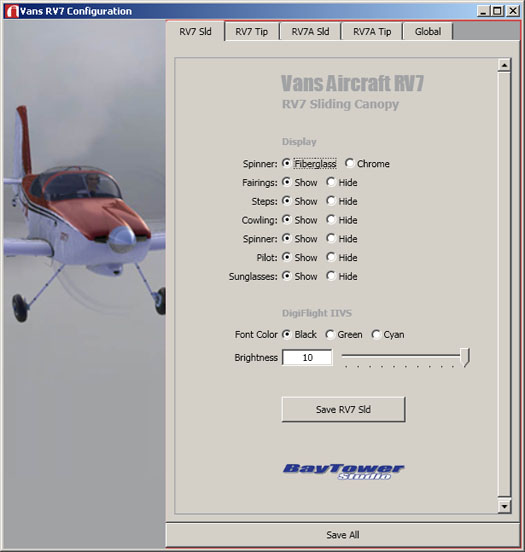
This is what I've made so far...
It uses WPF in C#
The upside - it was easy to build and will be easy to modify.
The downside - I think some XP users will need to upgrade .Net to use it.
Danny

rv7Config2.jpg
 
Last edited:
Back
Top