• Which the release of FS2020 we see an explosition of activity on the forun and of course we are very happy to see this. But having all questions about FS2020 in one forum becomes a bit messy. So therefore we would like to ask you all to use the following guidelines when posting your questions:

    • Tag FS2020 specific questions with the MSFS2020 tag.
    • Questions about making 3D assets can be posted in the 3D asset design forum. Either post them in the subforum of the modelling tool you use or in the general forum if they are general.
    • Questions about aircraft design can be posted in the Aircraft design forum
    • Questions about airport design can be posted in the FS2020 airport design forum. Once airport development tools have been updated for FS2020 you can post tool speciifc questions in the subforums of those tools as well of course.
    • Questions about terrain design can be posted in the FS2020 terrain design forum.
    • Questions about SimConnect can be posted in the SimConnect forum.

    Any other question that is not specific to an aspect of development or tool can be posted in the General chat forum.

    By following these guidelines we make sure that the forums remain easy to read for everybody and also that the right people can find your post to answer it.

MSFS24 SDK/project problems with transition to MSFS2024.

Messages
44
Country
norway
Hi!

With the transition to MSFS 2024 I have noticed a few problems that my MSFS2020 projects now has. Hopefully some of you might have an solution:

- Airports/projects don't show custom made aerial images in MSFS2024. I have tried to build the project with SDK 2024, but no result. Has there been any changes regarding aerials?
- Objects exported from Blender does not show/display lights. I do not get the emissive effect on emissive materials either. I am using the blender exporter made for msfs2024.
- In general, do you know of any changes that has to be done with a MSFS2020 project to get it to work proper in MSFS2024?
 
- I think the custom aerial's now work differently. Not completely sure, but I saw something about it in the official dev forum.

- Lights and emissive are different now. When you want to add a light, use the menu to add in blender (shift+A). At the bottom you'll find MSFS 2024 lights. This is part of the 2024 Asobo addon available in the 2024 SDK installation folder. There's also a button in the top menu to convert 2020 model textures and lights too 2024. You'll still need to manually multiply the light strength or the emissive factor x100.

-You'll have to create several LODs for your objects as the LOD system is more strict

 
to get my project work in 2024 I made all my changes in 2020 and when 99% of the project worked in 2024 I thought it good enough

I recompiled my projected mesh so it will work in 2024
I found out that the light and the LOD are different in 2024, and if you try to bring them back to 2020 the simulator will CTD
so in my opinion I will stick to 2020 and 2024, that way users can use addonlinker to use the same scenery for the two platforms

is I compile my scenery in 2020 and bring it to 2024 the light will work and LOD are fine
the only downside is that you won't get library objects for light objects of the taxiways and runways including the PAPI object, you will see the light effect but not the object
so it's up to you
 
I don't get this...I have the plugin for MSFS2024 installed in Blender and exported the object (an apron mast I made). Still no light and emission in the sim. Even so, the object is lacking materials...shows only one color (white). It is so frustrating that even the Blender add-on they provide does not seem to work....
 
I don't get this...I have the plugin for MSFS2024 installed in Blender and exported the object (an apron mast I made). Still no light and emission in the sim. Even so, the object is lacking materials...shows only one color (white). It is so frustrating that even the Blender add-on they provide does not seem to work....
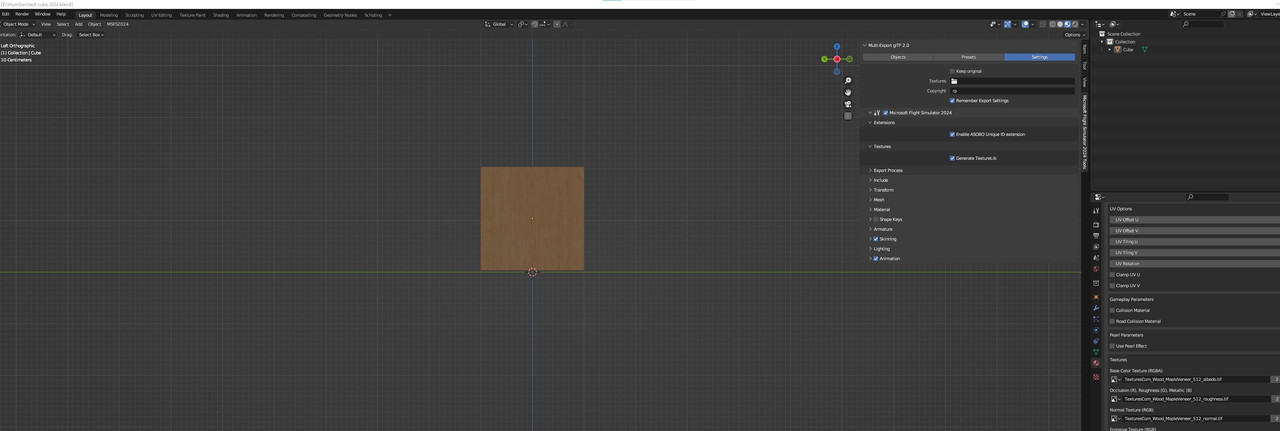
Hello I tried with a simple cube it works , at least for exports and in 3D wiever


Last edited:
I don't get this...I have the plugin for MSFS2024 installed in Blender and exported the object (an apron mast I made). Still no light and emission in the sim. Even so, the object is lacking materials...shows only one color (white). It is so frustrating that even the Blender add-on they provide does not seem to work....
Your resources (materials) have to be in the same folder as your blend file (Relative paths). Also, when exporting use absolute paths.
 
Your resources (materials) have to be in the same folder as your blend file (Relative paths). Also, when exporting use absolute paths.
In MSFS-2020 i had my .blend files in a project directory and textures in a texture folder. When exporting, I had a model-folder that the blender export files ended up in. The textures was put in a common texture folder. Are you telling me that this is completely different now?
 
In MSFS-2020 i had my .blend files in a project directory and textures in a texture folder. When exporting, I had a model-folder that the blender export files ended up in. The textures was put in a common texture folder. Are you telling me that this is completely different now?
Yes. It's different. I'm not sure if it's going to be fixed or left like that. I also had my textures in a common folder.

Also, the resources can't be packed
 
In MSFS-2020 i had my .blend files in a project directory and textures in a texture folder. When exporting, I had a model-folder that the blender export files ended up in. The textures was put in a common texture folder. Are you telling me that this is completely different now?
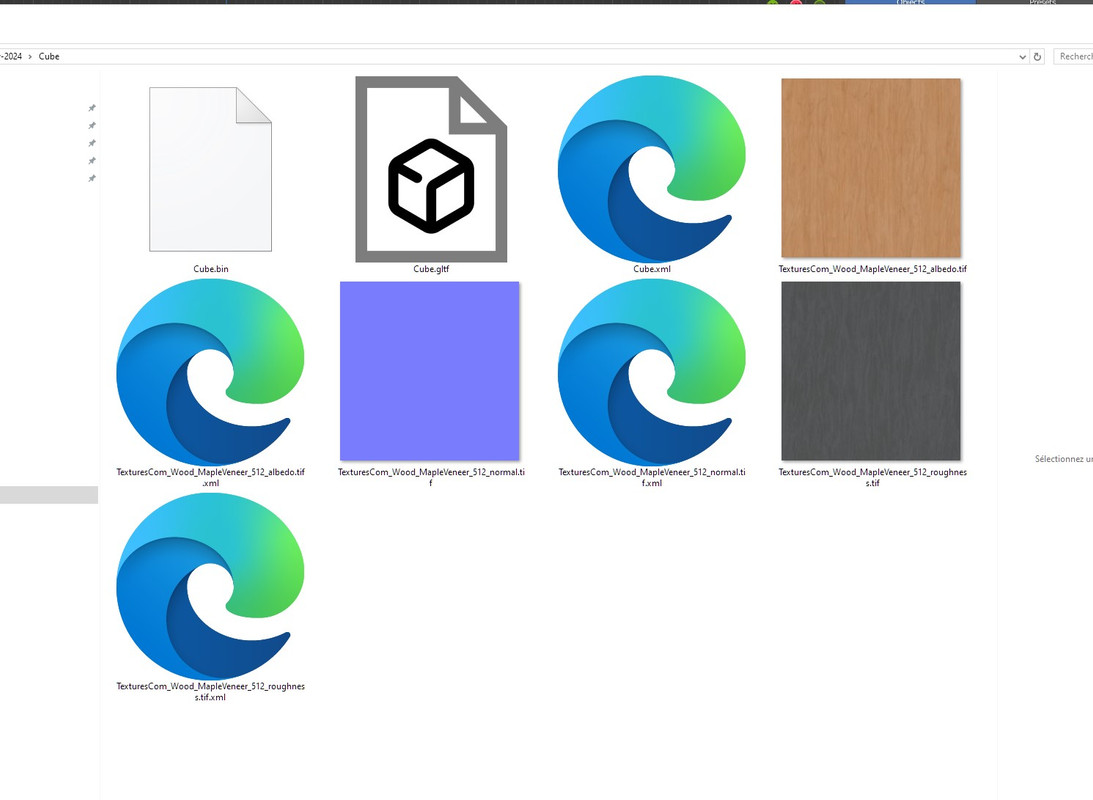
yes now in addition to the textures an xml file is delivered for each texture
 
On topic of lights: Interestingly enough, the guys testing my current project in MSFS 2024 report the lights do indeed work, however all my models are done in Blender 3.0 with the old Blender2MSFS toolkit and exporter. Will let them dig a little deeper and confirm for all models that use lights and emissive textures.
 
Hi!

With the transition to MSFS 2024 I have noticed a few problems that my MSFS2020 projects now has. Hopefully some of you might have an solution:

- Airports/projects don't show custom made aerial images in MSFS2024. I have tried to build the project with SDK 2024, but no result. Has there been any changes regarding aerials?
- Objects exported from Blender does not show/display lights. I do not get the emissive effect on emissive materials either. I am using the blender exporter made for msfs2024.
- In general, do you know of any changes that has to be done with a MSFS2020 project to get it to work proper in MSFS2024?
Concerning the aerial images issue: I also tried to build the aerial project Buechel Airbase with SDK 2024, even using the 2024 sample 'SimpleAerial', also with a new .cgl not showing in the sim.
As the Asobo's handcrafted Stuttgart EDDS aerial image doesn't show up too, I think it's a general problem showing .cgl files.
 
Last edited:
Back
Top