• Which the release of FS2020 we see an explosition of activity on the forun and of course we are very happy to see this. But having all questions about FS2020 in one forum becomes a bit messy. So therefore we would like to ask you all to use the following guidelines when posting your questions:

    • Tag FS2020 specific questions with the MSFS2020 tag.
    • Questions about making 3D assets can be posted in the 3D asset design forum. Either post them in the subforum of the modelling tool you use or in the general forum if they are general.
    • Questions about aircraft design can be posted in the Aircraft design forum
    • Questions about airport design can be posted in the FS2020 airport design forum. Once airport development tools have been updated for FS2020 you can post tool speciifc questions in the subforums of those tools as well of course.
    • Questions about terrain design can be posted in the FS2020 terrain design forum.
    • Questions about SimConnect can be posted in the SimConnect forum.

    Any other question that is not specific to an aspect of development or tool can be posted in the General chat forum.

    By following these guidelines we make sure that the forums remain easy to read for everybody and also that the right people can find your post to answer it.

Sim Update 5 messed with MSFSToolKit?

Messages
12
Country
unitedstates
Is anyone else experiencing export problems with the most recent Sim Update 5? I know that the MSFS Model Importer for Blender (they recently pushed out a hotfix for it) got bugged with Sim Update 5 and wondering if ToolKit maybe got bugged also?

These are the export settings I have, nothing has changed since the last time I used Blender and images are set to 2048x2048. When I use '3D Viewer' to see my models, nothing loads because the images aren't being properly saved onto the model.
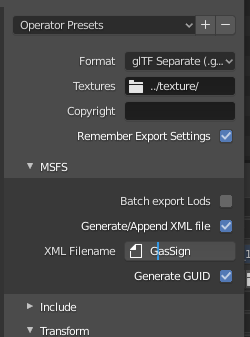
1629124341732.png
 
I think 3D Viewer requires the textures to be in the same folder as the glTF and the BIN in order to load.
 
So I think you're right. It has to be a bug with how they grab the files. Because last time it didn't do this.

As a workaround, just put all your textures in your folder of your glTF and the BIN, load up MSFS, load your scenery and press 'Build & Export.' Exit MSFS, paste that Export folder in your Community folder, reload MSFS and files should be in.
 
Back
Top