• Which the release of FS2020 we see an explosition of activity on the forun and of course we are very happy to see this. But having all questions about FS2020 in one forum becomes a bit messy. So therefore we would like to ask you all to use the following guidelines when posting your questions:

    • Tag FS2020 specific questions with the MSFS2020 tag.
    • Questions about making 3D assets can be posted in the 3D asset design forum. Either post them in the subforum of the modelling tool you use or in the general forum if they are general.
    • Questions about aircraft design can be posted in the Aircraft design forum
    • Questions about airport design can be posted in the FS2020 airport design forum. Once airport development tools have been updated for FS2020 you can post tool speciifc questions in the subforums of those tools as well of course.
    • Questions about terrain design can be posted in the FS2020 terrain design forum.
    • Questions about SimConnect can be posted in the SimConnect forum.

    Any other question that is not specific to an aspect of development or tool can be posted in the General chat forum.

    By following these guidelines we make sure that the forums remain easy to read for everybody and also that the right people can find your post to answer it.

Simple XML Gauge

Messages
1,068
Country
us-northcarolina
I would like to have a gauge that will call a wav file for my C-46 in Prepar3D V4.5. I have Doug Dawsons sound gauge 64 installed for other gauges. I know how to write the xml code for some things but not to do this. Can anyone tell me if it IS just a simple coded gauge and write it for this clueless guy. Once someone helps me I save the help so that I can do this in the future for a different airplane/project. I created effects to play a wav file in the past but they are installed with scenery.
 
XML:
<Gauge Name="Nav Lights" Version="1.0">

<Element>
  <Select>
    <Value>(A:LIGHT NAV,Bool)</Value>
    <Case Value="0">
      <Image Name="Switch_Lights_Nav_Off.bmp" />
    </Case>
    <Case Value="1">
      <Image Name="Switch_Lights_Nav_On.bmp" />
    </Case>
  </Select>
</Element>

<Mouse>
  <Help ID="HELPID_GAUGE_LIGHT_SWITCH_NAV" />
  <Cursor Type="Hand" />
  <Click>1 (&gt;K:TOGGLE_NAV_LIGHTS) 1 (&gt;L:Switch_Click_N,Number)</Click>
</Mouse>

</Gauge>
 
The bit you are interested in is the Click line in the Mouse section. You are sending a 1 to the LVar Switch_Click_N which is an entry in Doug Dawson's sound.ini file which corresponds to the .wav file you want to play.
 
Thank you for taking the time to write the complete code. I want to have a switch that just plays the wav file which is a reply to the captain to start the apu in the C-46 Commando. I will open up Doug's sound.ini and see if I understand how to do that. Again thanks. I will try in just a bit.
 
Here is what I have done this morning. I added to the gauges in Prepar3D V4.5 but it does not appear to add in FS Panel Studio. I found what was wrong. First, I create xml gauges very infrequently and forget everything. I have been saving this as text not xml in Notepad++ When I saved it as xml it works as far as being able to install in the panel popup. Here is the code:

Code:
<Gauge Name="putt putt" Version="1.0">

<Element>
  <Select>
    <Value>(A:APU GENERATOR SWITCH,Bool)</Value>
    <Case Value="0">
      <Image Name="APU_Off.bmp" />
    </Case>
    <Case Value="1">
      <Image Name="APU_On.bmp" />
    </Case>
  </Select>
</Element>

<Mouse>
  <Help ID="HELPID_GAUGE_APU_SWITCH" />
  <Cursor Type="Hand" />
  <Click>1 (&gt;K:APU_STARTER) 1 (&gt;L:Switch_Click_N,10)</Click>
</Mouse>

</Gauge>

I was able to install it in the Prepar3D V4.5 gauges and add a dsd folder into the P3D Sounds because it was not there and is referenced in the dsd....ini in the gauges folder. I added the wav file into it in the format of the other wav files in the ini. I can get it to open up in the popup panel but when iI click it, the bmp remains as the OFF one and no sound is played.
 
Last edited:
Unable to make it work, I "Googled" APU for Prepar3D and came up with this file. I kept the code and just changed the bmp's to the ones I want. I have not though been able to get the sound wav to work. What I am attaching does NOT have the wav coded because no matter how hard I tried and read P3D SDK and my xml tutor from FS2X that I have used for years.......can you please add the line of code in the mouse area to get the sound file to play. The wav file is in the zip folder. When you code it and it works I can then save the file and I will know how to play sound in the future. Thank you for your time and patience. I AM trying to learn and spent 5 hours on it.
 

Attachments

Code:
<Gauge Name="APUPow" Version="1.0">
  <Element>
    <Select>
      <Value>(L:APUPower,bool)</Value>
         <Case Value="0">
            <Image Name="APU_OFF.bmp" Luminous="Yes" ImageSizes="100,100"/>
      </Case>
         <Case Value="1">
            <Image Name="APU_ON.bmp" Luminous="Yes" ImageSizes="100,100"/>
      </Case>
    </Select>
  </Element>
  <Mouse>
    <Area Left="30" Right="70" Top="30" Bottom="70">
      <Cursor Type="Hand"/>
      <Click>
           (L:APUPower,bool) ! (>L:APUPower,bool)
      </Click>
   <Tooltip>%((L:APUPower,bool) 1 ==)%{if}APU (ON)%{end}%((L:APUPower,bool) 0 ==)%{if}APU (OFF)%{end}</Tooltip>
    </Area>
  </Mouse>

  <Element>
    <Select>
      <Value>
           (L:APUPower,bool) 1 ==
           if{
              1 (>K:APU_STARTER)
              1 (>K:APU_GENERATOR_SWITCH_SET) 
              2 (>L:SIMPLE_APU_BLEED,number)
              }
           (L:APUPower,bool) 0 == 
           if{
              0 (>K:APU_GENERATOR_SWITCH_SET) 
              (>K:APU_OFF_SWITCH)
              0 (>L:SIMPLE_APU_BLEED,number)
             }
      </Value>
    </Select>
  </Element>
</Gauge>


*****************************************************
Info
replace 1 (>L:SIMPLE_APU_BLEED,number) with 2 (>L:SIMPLE_APU_BLEED,number)

this means the sound is ON until you stop it.


of course not tested!
 
a little bit improved

Code:
  <Element>
    <Select>
      <Value>
           (L:SIMPLE_APU_BLEED,number) 0 ==
           (L:APUPower,bool) 1 ==
           and
           if{
              1 (>K:APU_STARTER)
              1 (>K:APU_GENERATOR_SWITCH_SET)
              2 (>L:SIMPLE_APU_BLEED,number)
              }


           (L:SIMPLE_APU_BLEED,number) 0 !=
           (L:APUPower,bool) 0 ==
           and
           if{
              0 (>K:APU_GENERATOR_SWITCH_SET)
              (>K:APU_OFF_SWITCH)
              0 (>L:SIMPLE_APU_BLEED,number)
             }
      </Value>
    </Select>
  </Element>

the change is important, so the K: elements will be fired only once!
 
a little bit improved

Code:
  <Element>
    <Select>
      <Value>
           (L:SIMPLE_APU_BLEED,number) 0 ==
           (L:APUPower,bool) 1 ==
           and
           if{
              1 (>K:APU_STARTER)
              1 (>K:APU_GENERATOR_SWITCH_SET)
              2 (>L:SIMPLE_APU_BLEED,number)
              }


           (L:SIMPLE_APU_BLEED,number) 0 !=
           (L:APUPower,bool) 0 ==
           and
           if{
              0 (>K:APU_GENERATOR_SWITCH_SET)
              (>K:APU_OFF_SWITCH)
              0 (>L:SIMPLE_APU_BLEED,number)
             }
      </Value>
    </Select>
  </Element>

the change is important, so the K: elements will be fired only once!
Thank you. I am just about ready to test it having finished programming my Christian Internet Radio Station (rushingwind.airtime.pro) for next week so your timing with the change is perfect. With the little I know: Danke Sehr
 
The improved goes after the <mouse> correct? This gauge with the change doesn't work. The first code works in Prepar3D V4.5 JF C46 Commando but there is no "putt-putt" sound. The bmp changes and the tooltip says apu off or apu on.
I opened up "Some Tips For User Of Doug Dawson's FSX Sound Gauge and it told me to put an entry in the popup window for gauge 01 to reference the dsd_fsx_xml_sound.gau which in the case of P3D is dsd_P3D_xml_sound_x64.dll which I did and I thought that I heard it briefly buy it does not continue.
 
Last edited:
The improved part replace the other element part.

So maybe the ini file was not found.
I give her some examples of installations.
You have to adapt it to your needs

Code:
this is the path to my soundfiles.

G:\P3Dv6\SimObjects\Airplanes\B727P_214FAdv-AirClassCargo-TDS\panel\XMLDSD_Sounds

My soundfile is named   B727_XMLDSD_Sounds.ini

excerpt from    B727_XMLDSD_Sounds.ini
-------------------------------------------------
[Config]
MaxSounds=320

[Sounds]
Sound00=.\SimObjects\Airplanes\B727P3D_200AdvF_ENH\panel\XMLDSD_Sounds\PF_FlapsUp_Req.wav,    -1200

[LVars]
Lvar00=DSD_FlapsUp_Req_SD
--------------------------------------------------------------

Sound00      is the path  to your soundfile.   Adapt this to your path!
 Rename  PF_FlapsUp_Req.wav,     to your soundfile.
-1200 mutes your sound.  for tests change it to -200 or even 0.

Lvar00  is the connection to your variable.  Should be   SIMPLE_APU_BLEED.  ONLY  Name!


------------------------------
Panel.cfg

i have a special directory for my DSD gauges, named  XMLDSD_Gauges

gauge96=XMLDSD_Gauges\DSD_P3D_Xml_sound_x64!Sound,             0,    0,   0,   0,    .\SimObjects\Airplanes\B727P_214FAdv-AirClassCargo-TDS\panel\XMLDSD_Sounds\B727_XMLDSD_Sounds.ini

if you have the dsd gauge in the panel, so,it should look this way
gauge96=DSD_P3D_Xml_sound_x64!Sound,             0,    0,   0,   0,    .\SimObjects\Airplanes\B727P_214FAdv-AirClassCargo-TDS\panel\XMLDSD_Sounds\B727_XMLDSD_Sounds.ini


.\SimObjects\Airplanes\B727P_214FAdv-AirClassCargo-TDS\panel\XMLDSD_Sounds\B727_XMLDSD_Sounds.ini
the 5. parameter defines the link to the ini-file.

as far i remember you can install the DSD soundgauge in the general gauge directory and should also be found.

---------------------------------------------------
for testing the soundfile installation add following code at the end of file

Code:
  <Element>
    <Select>
      <Value>
            2 (>L:SIMPLE_APU_BLEED,number)
      </Value>
    </Select>
  </Element>

If the sound should not work post your sound.ini file and your panel.cfg.
Also the path were the sound.wav file is.


I hope it helps and is clear enough.
 
I tried. Here is the dsd_fsx_xml_sound.ini, panel.cfg and SOUND in JF_Curtis_C46_mod. These were too large to attach so I packed them and put in mediafire. I appreciate all your help. Everything works great but the sound. Nothing I tried to do on the computer worked today so I shouldn't be surprised that I couldn't get this to work either. Let me know if I didn't send everything you need.

https://www.mediafire.com/file/aftoto8trzswgn6/New+folder.zip/file
 
dsd_xml_10.wav is the file with the apu- sound!?

Did you make some changes in the dsd_fsx_xml_sound.ini
especially this here
----------------------------------------------
Sound05=CSIDL_COMMON_APPDATA\dsd\dsd_xml_05.wav
Sound06=CSIDL_COMMON_APPDATA\dsd\dsd_xml_06.wav

Sound10=.\Sound\SimObjects\Airplanes\JF_Curtiss_C46_Mod\panel\sound\dsd_xml_10.wav, 0
----------------------------------------------
from the panel.cfg

gauge00=APU_POWER!APUPOW, 14,8,100,100
gauge01=gauges\dsd_p3d_xml_sound_x64.dll!Sound,0,0,1,1, .\gauges\dsd_fsx_xml_sound.ini

------------------------------------------------------
Is this your work? Just do make it clearer for me what's going on.


Next step is to find the wav -files

Because of this path .\Sound\dsd\ do the follwing steps
Go into your main folder of the sim.
Here you will find the subfolder SOUND.
Go into this folder and you should find a DSD - folder which should include all the neccesary DSD wave files.

Check whether all this file are there
dsd_xml_00.wav
dsd_xml_01.wav
dsd_xml_02.wav
dsd_xml_03.wav
dsd_xml_04.wav
dsd_xml_05.wav
dsd_xml_05.wav
dsd_xml_06.wav
dsd_xml_07.wav
dsd_xml_08.wav
dsd_xml_09.wav
dsd_xml_10.wav
dsd_xml_100.wav
dsd_xml_999.wav
dsd_fsx_xml_sound.ini

If you have found this files i will send you a corrected dsd_fsx_xml_sound.ini.

Btw where did you download the c46?
 
Yes dsd_fsx_xml_10.wav is the sound. The C-46 is JF from simmarket. Payware. dsd folder is there but none of the above wav files. How do I get them in there? They should be the actual .wav files not text like you show correct? I don't know where these files are because they are NOT in the Dawson dsd sound zip. I am glad that you are patiently trying to help because I am so confused. Please pack up all the wav files that should be in that Sound\dsd folder in a zip folder and send them to me so that I can put them in that folder. I HAVE my own dsd_xml_10.wav file so I don't need that.
 
Last edited:
Do you have a subfolder DSD in the Sound folder??

Is dsd_p3d_xml_sound_x64.dll in gauges folder??

Check this please carefully!

Copy the dsd_fsx_xml_sound.ini in this subfolder DSD !
dsd_fsx_xml_10.wav copy this also in the subfolder DSD!

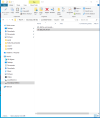
Could you make a screenshoot from the file explorer to check this?


Replace the panel.cfg with this change one.
I change the dsd gauge from [Window05] into the [Vcockpit01] section.


in your xlm file replace the the <element> with this one

XML:
 <Element>
    <Select>
      <Value>
            1 (>L:dsd_fsx_sound_id_10,number)
      </Value>
    </Select>
  </Element>

If everything is proper done you should hear permant the sound. Hopefully


I can only attach txt files.

So rename panel.txt to panel.cfg

rename dsd_fsx_xml_sound.txt to dsd_fsx_xml_sound.ini
 

Attachments

there is a dsd subfolder in the Sound folder
dsd_p3d_xml_sound_x64 is in the gauges foldeer
attached is a screenshot of the file explorer
I have replaced the panel.cfg
I have replaced the dsd_fsx_xml_sound.ini with the new one .txt renamed
I have copied and pasted at the bottom of the xml with the new copy above.

I just tried it but I need to know if the dsd_xml_10.wav should be only in the main SOUND\dsd or should it be in the C-46 sound or the APU POWER folders. I still did not get more than a short blip of sound and then nothing. This is our last try. I am not going to use any more of your time after you answer this last question about the .wav file.
 

Attachments

  • file explorer screen shot.png
    file explorer screen shot.png
    66 KB · Views: 71
dsd_xml_10.wav must be in the sound/dsd folder but can stay in the other folders.

Sorry to say but i forget something about how the sim finds a gauge.


Code:
-------------------------------
Replace this line in the panel.cfg

gauge03=gauges\dsd_p3d_xml_sound_x64!Sound,0,0,1,1, .\Sound\dsd\dsd_fsx_xml_sound.ini

with

gauge03=dsd_p3d_xml_sound_x64!Sound, 0, 0, 1, 1,    .\Sound\dsd\dsd_fsx_xml_sound.ini

Should work,


 if not then try this

gauge03=.gauges\dsd_p3d_xml_sound_x64!Sound, 0, 0, 1, 1,    .\Sound\dsd\dsd_fsx_xml_sound.ini

-------------------------------------------


Could you please post the xlm file.

if you have the nerves we can play some rounds more.
I mean this is not a rocket science.
 
About ready to leave for the evening church service. I will tackle this tomorrow morning. I found out in the P3D SDK that if a sound file is aliased to another as the C-46 Mod is to the C-46 mil then nothing except the sound.cfg aliasing it should be in there so I moved the line to the C-46 mil sound folder. Thank you for wanting to continue to help me. I HATE to quit when there has to be a logical explanation to why something doesn't work. Have a good night.

Richard
 
Code:
dsd_xml_10.wav must be in the sound/dsd folder.

the other dsd_xml_10.wav could be deleted to prevent confusion in the future.


I looked into the sound.cfg but there is no connection to the dsd-sound.

Le's say DSD - sound is a standalone!
dsd_fsx_xml_sound.ini is the connection between your L: - variable and the wav - files where ever they are.
So it is important that the pathes are correct defined.
At the beginning with the sound-gauge i had also some troubles!

I am playing with a B727 panel. I have at least 150 sounds.
Doug's dsd_sound gauge makes the sim much more alive!
 
Back
Top