

- Messages
- 588
- Country

Hello folks!
I have come up with a workaround to using envelopes with armatures and skinned meshes. When you set up an object for skinning, you usually create vertex groups for the different bones that deform it. Well, this workaround creates theses vertex groups for you, using the envelope data of the bones.
So make sure you have an object and the corresponding armature to deform it. I will use the Cylinder and the Armature from the tutorial on skinned meshes. Then add an armature modifier to the object...

You can now check that vertex groups were created in the mesh tab of the object:
Make sure you have a material with "Skinned mesh" checked.
You can now export your skinned mesh as usual.
Thank you for reading
I have come up with a workaround to using envelopes with armatures and skinned meshes. When you set up an object for skinning, you usually create vertex groups for the different bones that deform it. Well, this workaround creates theses vertex groups for you, using the envelope data of the bones.
So make sure you have an object and the corresponding armature to deform it. I will use the Cylinder and the Armature from the tutorial on skinned meshes. Then add an armature modifier to the object...
- Check the "Bone Envelopes" box as in the picture below
- Animate your bones (and tag them with FSX Animation Tool)
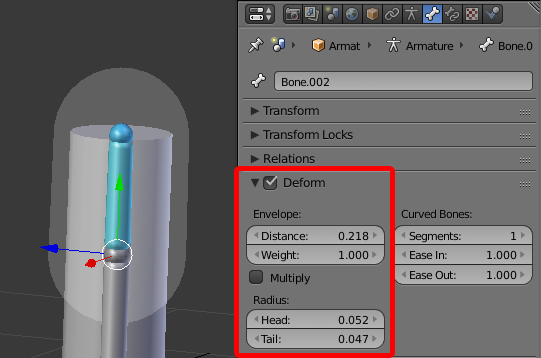
- Adjust the envelopes (Distance, Weight, Head, Tail) in the bones tab of the armature until you're satisfied with your animation/deformation.
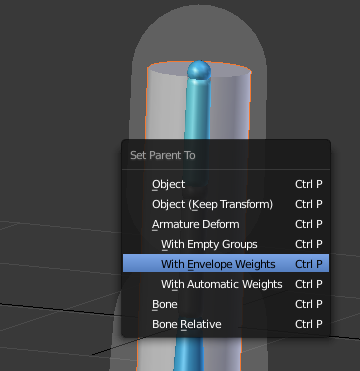
- Select the object then the armature and make it parent to the object (hit Ctrl+P). Choose "With Envelope Weights"
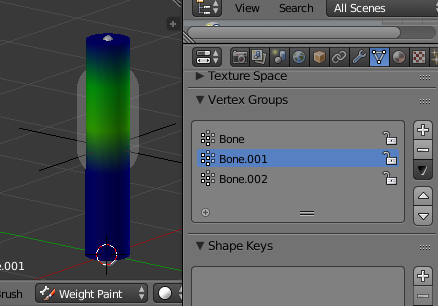
You can now check that vertex groups were created in the mesh tab of the object:
Make sure you have a material with "Skinned mesh" checked.
You can now export your skinned mesh as usual.
Thank you for reading


