• Which the release of FS2020 we see an explosition of activity on the forun and of course we are very happy to see this. But having all questions about FS2020 in one forum becomes a bit messy. So therefore we would like to ask you all to use the following guidelines when posting your questions:

    • Tag FS2020 specific questions with the MSFS2020 tag.
    • Questions about making 3D assets can be posted in the 3D asset design forum. Either post them in the subforum of the modelling tool you use or in the general forum if they are general.
    • Questions about aircraft design can be posted in the Aircraft design forum
    • Questions about airport design can be posted in the FS2020 airport design forum. Once airport development tools have been updated for FS2020 you can post tool speciifc questions in the subforums of those tools as well of course.
    • Questions about terrain design can be posted in the FS2020 terrain design forum.
    • Questions about SimConnect can be posted in the SimConnect forum.

    Any other question that is not specific to an aspect of development or tool can be posted in the General chat forum.

    By following these guidelines we make sure that the forums remain easy to read for everybody and also that the right people can find your post to answer it.

Something I Think Bares Attention When Creating a Model from a 2 D Satellite Image

Messages
1,268
Hi, Gary

I hope I chose the correct thread to post this.

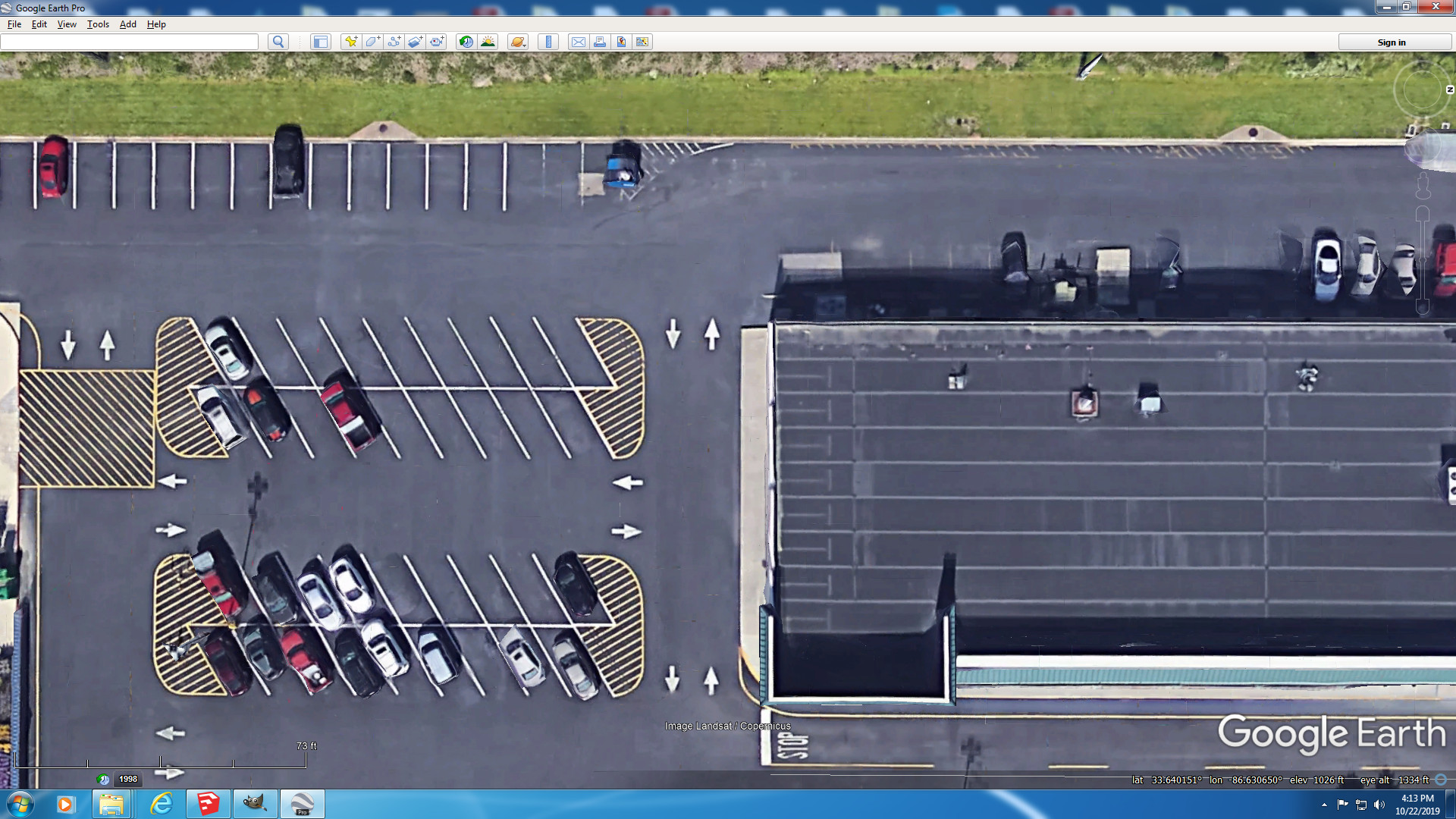
For some time, I've been using a 2D google earth satellite image to create my models. After importing the satellite image, the image will have to be scaled. Then I would usually draw around the perimeter of a building that I want to create using the satellite 2D Image. But the one thing I've come to realize is that simply drawing around the perimeter of a building from a 2D satellite image does not always come out right. Take a look at the satellite image below from google earth that I've used to create my model:


2.jpg


Take note of the sidewalk on the ground and the exterior of the building shown by the red arrows. Actually, the exterior of the building does not extend beyond the sidewalk as it appears in the satellite image. This causes that side of the building being longer than what it really is. Notice the walls on each side from the top. The satellite is looking at this building from the back and the from the right side.

To illustrate this, notice below, and this time, I'm using a 3D image google earth image, and I purposely placed the camera, so to speak, at about the same angle as the satellite above:


3.jpg


Notice that the exterior appears to extend beyond the sidewalk.


Now look at the same 3D viewed from another angle:

4.jpg


As you can see, the top of that building exterior does not extend beyond the sidewalk, and here's another image looking at it from a bird's eye view:
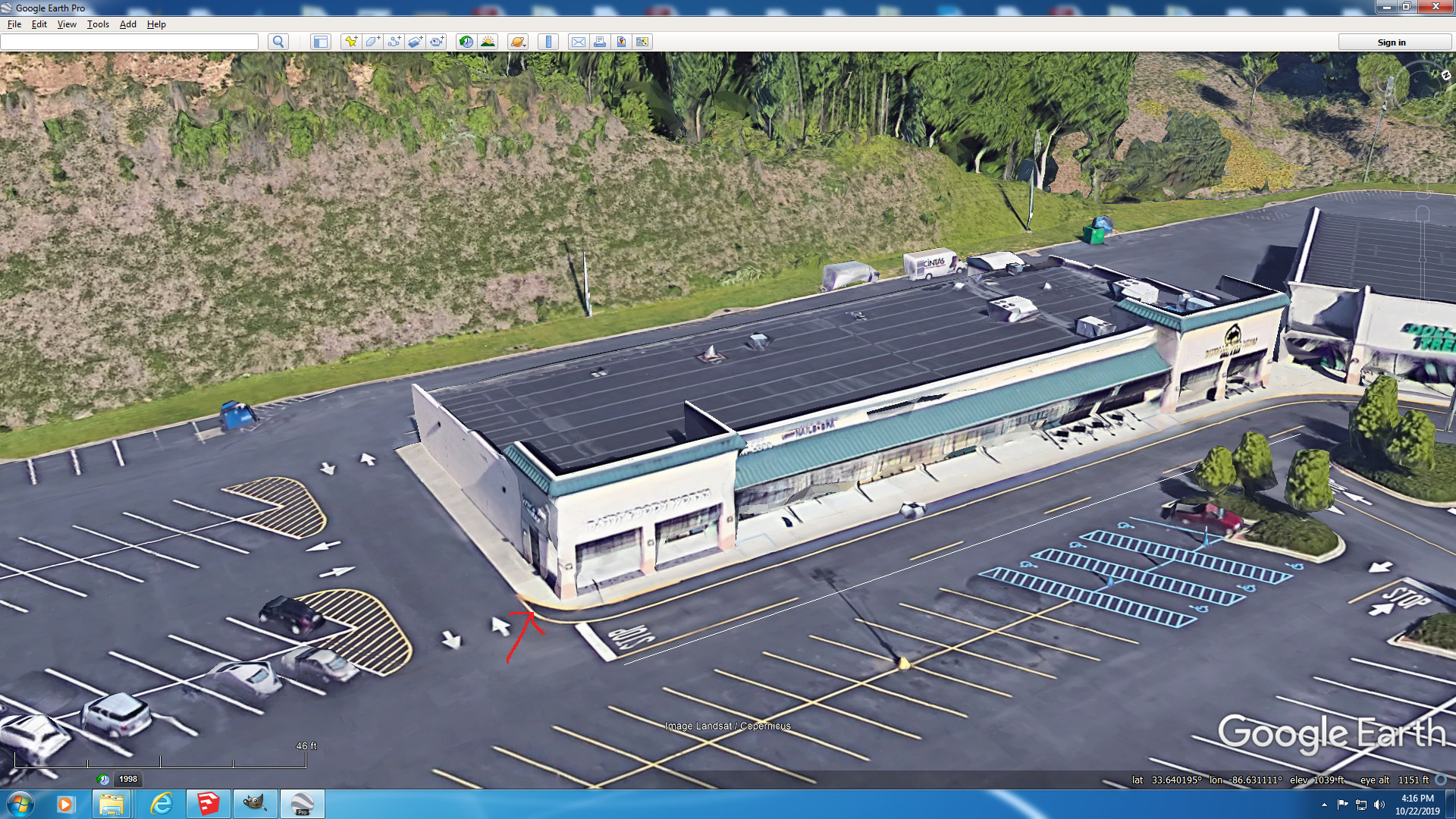

5.jpg


This is how the building really should look in my model but as you can see from the image below, the front part of the building extends some 12 to 15 feet too far:


1.jpg


Even though I followed and traced the building right to the tee using the 2D image, it did not come out right. The top exterior at the front of the building is about 30 feet tall, and about 16 feet at the back of the building. The taller the building, the greater the error becomes, especially when the satellite is at an angle. I can't remember if you've mentioned this, but did you say that the images in google earth is sometimes, or always warped? If so, could this be the reason for my error, or is it due to the angle at which the satellite took this image? I use the ruler provided in google earth to make measurements and make those same measurements in my model. I drew a 200 foot line using the ruler so that I could scale the image when I import it into Sketchup. Would it be better to use the 3D image so that I can see the base of the building and there's no distortion as to the angle of the satellite and the height of the building?

Ken.
 
Last edited:
Ken
I noted the exact same issue many times. Ive adopted a "median" attitude to some areas where I can only get the best out of what I have. Because 3D imagery is not universally available on every airport area its a little hit and miss with what we have. The only thing I can add is if there is any photos from any source no matter how old they are they can provide evidence of "close to reality" as you can get. The other option and its not the easiest one is a visit to the site itself to see if you can get "now shots" Ive also tried such things as GMAP CATCHER to see if this gives a differing perspective where I can judge.

I also have used the Sherlock Holmes approach where I use other items in the shot to determine the approximate over head location the shot was taken. In your shots for example I can see that cars parked near to the building in question have their side (right side from above) slightly visible so that tells me that the shot was taken(ish) from about top right of shot so therefore of course there will be a slight distortion in the buildings.
I guess its about awareness and taking things in to account , using an application to just account for and make subtle changes to the image if its to be Incorporated in to the final scenery or used as a "close as possible guide" for scenery building.

Good points made Ken

Gareth


Technically, this topic applies to 3D modeling in general, and involves accommodating "offset" of the camera used to capture imagery from a position that would otherwise (ideally) be directly above objects on the ground.

But, this thread also deals with terrain imagery data as a factor that must be accommodated when 3D modeling, so that certainly would qualify putting this thread within this forum as well, IMHO. ;)


When a line is drawn from the center of the Earth vertically on the "Z" axis through the object and extnded into the sky, that position directly above the object is its "Zenith", and the position where the "Z" line passes through the base of the object at ground level is called the "Nadir", thus imagery that is "offset" is often referred to as "off-Nadir".


https://www.fsdeveloper.com/forum/t...from-a-2-d-satellite-image.446227/post-831314

I can't remember if you've mentioned this, but did you say that the images in google earth is sometimes, or always warped? If so, could this be the reason for my error, or is it due to the angle at which the satellite took this image?


It is due to the angle at which the satellite took this image ...as described above


https://www.fsdeveloper.com/forum/t...from-a-2-d-satellite-image.446227/post-831314

I use the ruler provided in google earth to make measurements and make those same measurements in my model. I drew a 200 foot line using the ruler so that I could scale the image when I import it into Sketchup. Would it be better to use the 3D image so that I can see the base of the building and there's no distortion as to the angle of the satellite and the height of the building?

Ken.


As Gareth stated above, a mix of methods may be used for more accurate 3D model results, but there has been a significant improvement in the quality of imagery, LiDAR scans, and resulting 3D photogrammetric / procedural objects etc. as to make the measurements derived from such 3D objects more useful.

IMHO, one may still find it practical to assign an 'even' numbers of Feet increments to length / width, and perhaps to also use 1/2 Foot (6 inch) increments for height, that 'more likely' would apply to the real world object when 3D modeling such objects.

However, one may still end up with parts of an image of objects that were warped in the Offset / Off-Nadir imagery ...protruding from under one's 3D model base.

Some developers may wish to position the 3D model base at its correct 'bottom' (Nadir) position and ignore the protruding warped 'top' part of the object as seen the imagery; others may position the 3D model base so it conceals as much of that warped part of the imagery as possible.


Still other developers may use a graphics application to clone local image pixels to eliminate more objectionable offsets for taller buildings as part of preparing source imagery for SDK Resample.

The choice is yours to make as to whether / how to deal with off-Nadir imagery mis-match of object size / positioning with custom photo-real land class, since we 'usually' only see a few inches or feet of offset. :)

GaryGB
 
Last edited:
Ive adopted a "median" attitude to some areas where I can only get the best out of what I have.

Yes, that's what I have to do on occasions.


The other option and its not the easiest one is a visit to the site itself to see if you can get "now shots" Ive also tried such things as GMAP CATCHER to see if this gives a differing perspective where I can judge.

Yes, that's true. The shopping center is just over the hill from me so when I'm there, I get some photos of images that's not shown elsewhere.


In your shots for example I can see that cars parked near to the building in question have their side (right side from above) slightly visible so that tells me that the shot was taken(ish) from about top right of shot so therefore of course there will be a slight distortion in the buildings.

Yes, I see. The big tipoff is when I noticed how much of the back wall of the upper exterior is exposed. The image was taken from top right and behind the building, and that's why the top portion appears to be beyond the sidewalk. When you extrude that from the ground up using the Push/Pull Tool, your model will be too long.


I guess its about awareness and taking things in to account , using an application to just account for and make subtle changes to the image if its to be Incorporated in to the final scenery or used as a "close as possible guide" for scenery building.

That's exactly it. Before beginning to draw, one should be aware of how much the sides of the building is exposed. Just because the top portion of a building ends at a certain point from the top, and that's the first thing you're looking at when you look at a 2D image, that doesn't mean it meets at the same point on the ground, and the taller the structure, the greater the error becomes. So, I use other evidence to determine that, and that's where a 3D image would come in.

Ken.
 
Ive adopted a "median" attitude to some areas where I can only get the best out of what I have.

Yes, that's what I have to do on occasions.


The other option and its not the easiest one is a visit to the site itself to see if you can get "now shots" Ive also tried such things as GMAP CATCHER to see if this gives a differing perspective where I can judge.

Yes, that's true. The shopping center is just over the hill from me so when I'm there, I get some photos of images that's not shown elsewhere.


In your shots for example I can see that cars parked near to the building in question have their side (right side from above) slightly visible so that tells me that the shot was taken(ish) from about top right of shot so therefore of course there will be a slight distortion in the buildings.

Yes, I see. The big tipoff is when I noticed how much of the back wall of the upper exterior is exposed and how much it went way beyond the sidewalk. The image was taken from top right and behind the building, and that's why the top portion appears to be beyond the sidewalk. When you begin drawing your model tracing those outlines, you're not drawing it as it really is from the ground, but we think we're on the ground. And when you extrude that from the ground up using the Push/Pull Tool, your model will not be right. After doing this a few times, I came to realize that I need to figure out something else.


I guess its about awareness and taking things in to account , using an application to just account for and make subtle changes to the image if its to be Incorporated in to the final scenery or used as a "close as possible guide" for scenery building.

That's exactly it. Before beginning to draw, one should be aware of how much the sides of the building is exposed. Just because the top portion of a building ends at a certain point from the top, and that's the first thing you're looking at when you look at a 2D image, that doesn't mean it meets at the same point on the ground, and the taller the structure, the greater the error becomes. So, I use other evidence to determine that, and that's where a 3D image would come in.

Ken.
 
Last edited:
When a line is drawn from the center of the Earth vertically on the "Z" axis through the object and extnded into the sky, that position directly above the object is its "Zenith", and the position where the "Z" line passes through the base of the object at ground level is called the "Nadir", thus imagery that is "offset" is often referred to as "off-Nadir".

Wow. Thanks for explaining that. This seem to be getting into trigonometry. I've seen you use the term, "Nadir," but I didn't understand what you meant.


It is due to the angle at which the satellite took this image ...as described above.

That's what I was thinking.


Ken.
 
Got to say, I love many of the discussion in this area but to be honest I've really enjoyed this one , loads of info and positive perspectives . And Gary........ legend! Learned something new that I never got in the class room.


Gareth
 
Got to say, I love many of the discussion in this area but to be honest I've really enjoyed this one , loads of info and positive perspectives . And Gary........ legend! Learned something new that I never got in the class room.


Yes, I think Gary is really a legend and I've learned quite a bit from him and has been a big help for me and all of us. I would also like to thank all of those who participate here at FSDeveloper.

Ken.
 
Last edited:
Ideally you should work off the bottom of the building, where the building intersects the ground. But it's not always possible...

In the first picture, check the building at the bottom right of the image, you'll get an idea of the offset you need to take into account.
 
Ideally you should work off the bottom of the building, where the building intersects the ground. But it's not always possible...

Yes, you're correct. In a 2D view, it not always possible to work from the bottom. But in a D3 view, it is possible. You would have to take measurements since it would be difficult to simply trace around the building.


In the first picture, check the building at the bottom right of the image, you'll get an idea of the offset you need to take into account.

Are you referring to the white area that's in the shadow of the building I'm working on indicated by the red arrow shown in the picture below?:


1.jpg


If so, this is not the wall of the building you're looking at. It is a sidewalk. But you may be referring to the building next to it. Yes, I do see the wall on that side.


Take a look at the picture below:


2.jpg


The red arrows indicate the walls of that upper exterior which is 28 feet above the ground. The satellite angle is from the right and behind the building.

Ken.
 
Back
Top