

- Messages
- 4
- Country

Hi everyone,
I wanted to share a Blender addon I've been working on (full README on the github page)
https://github.com/Talon42/TaxiLineGenerator
I really don't like the painted lines in MSFS and prefer projected meshes. However in Blender, drawing lines, curves, converting them to meshes, can be time consuming. Especially if you need to fix a line or change it's size. This can all be done now instantly and non destructively with the addon.
The addon is designed to streamline the creation of airport taxiway lines by allowing users to draw curves directly on the ground plane that are automatically converted into export-ready ribbon meshes with customizable UVs. It employs a non-destructive workflow that links editable source curves to generated meshes, enabling you to easily modify path shapes, line widths, and segment density, while providing specialized tools for smoothing handles, normalizing control points, and extending existing lines.
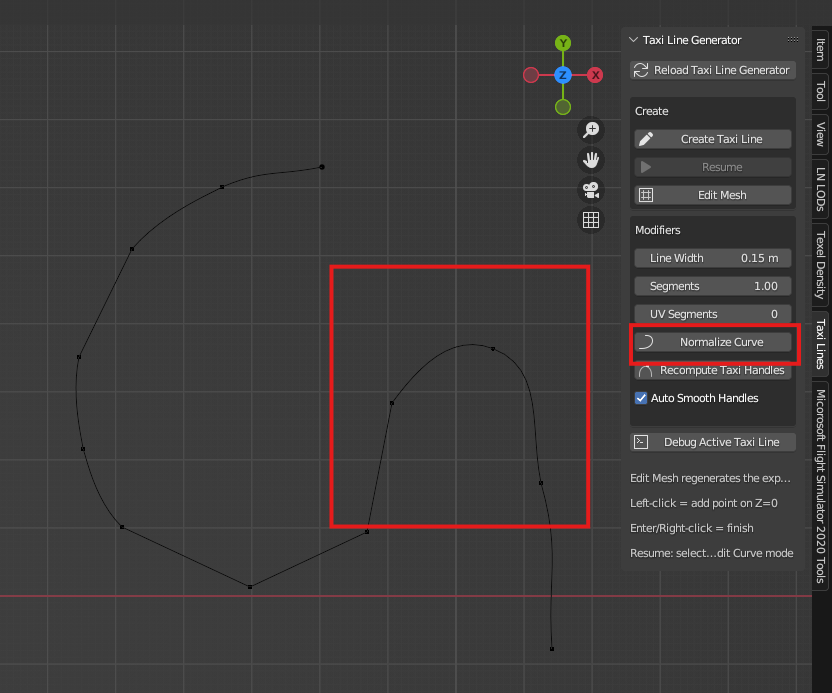
It starts by creating bezier curves. It's smart enough to detect pathing and will curve for you as you one-click place points. You always have manual control over the control arms or you can use a few auto curve tweaks (such as normalize curve). You can always resume your curve by selecting the last or first point in the line OR right click and add additional points. The curve will adapt.

Peak after "normalizing" curve:
When ready for texturing you click "edit mesh" and you can fully texture the line. Don't want to scale 1000 faces from a follow active quads unwrap? No problem, you can choose the number of face segments that get textured before repeating. Don't like the size of the line? No Problem, you can tweak the width in real time. Is the line to square or needs more edge loops? No problem, just adjust the segment slider to add more or less edge loops.
Always looking for feedback and I hope this is useful for everyone!!
1.00 Segments (it's a multiplier)

10.0 Segments

The mesh that you'll export to MSFS

I wanted to share a Blender addon I've been working on (full README on the github page)
https://github.com/Talon42/TaxiLineGenerator
I really don't like the painted lines in MSFS and prefer projected meshes. However in Blender, drawing lines, curves, converting them to meshes, can be time consuming. Especially if you need to fix a line or change it's size. This can all be done now instantly and non destructively with the addon.
The addon is designed to streamline the creation of airport taxiway lines by allowing users to draw curves directly on the ground plane that are automatically converted into export-ready ribbon meshes with customizable UVs. It employs a non-destructive workflow that links editable source curves to generated meshes, enabling you to easily modify path shapes, line widths, and segment density, while providing specialized tools for smoothing handles, normalizing control points, and extending existing lines.
It starts by creating bezier curves. It's smart enough to detect pathing and will curve for you as you one-click place points. You always have manual control over the control arms or you can use a few auto curve tweaks (such as normalize curve). You can always resume your curve by selecting the last or first point in the line OR right click and add additional points. The curve will adapt.
Peak after "normalizing" curve:
When ready for texturing you click "edit mesh" and you can fully texture the line. Don't want to scale 1000 faces from a follow active quads unwrap? No problem, you can choose the number of face segments that get textured before repeating. Don't like the size of the line? No Problem, you can tweak the width in real time. Is the line to square or needs more edge loops? No problem, just adjust the segment slider to add more or less edge loops.
Always looking for feedback and I hope this is useful for everyone!!
1.00 Segments (it's a multiplier)
10.0 Segments
The mesh that you'll export to MSFS


