

I'm no developer by any means, but I am looking for a little help with an issue that I'm having after purchasing a FSX scenery add-on. About a week ago I had purchased Moscow City X and added it to my small collection of scenery add-on's in FSX. At first everything appeared to work fine, but once the Dusk hours set in UUWW, UUBW and UUDD airports suddenly have large grayish texture (?) blocks that appear in two locations of the airport.
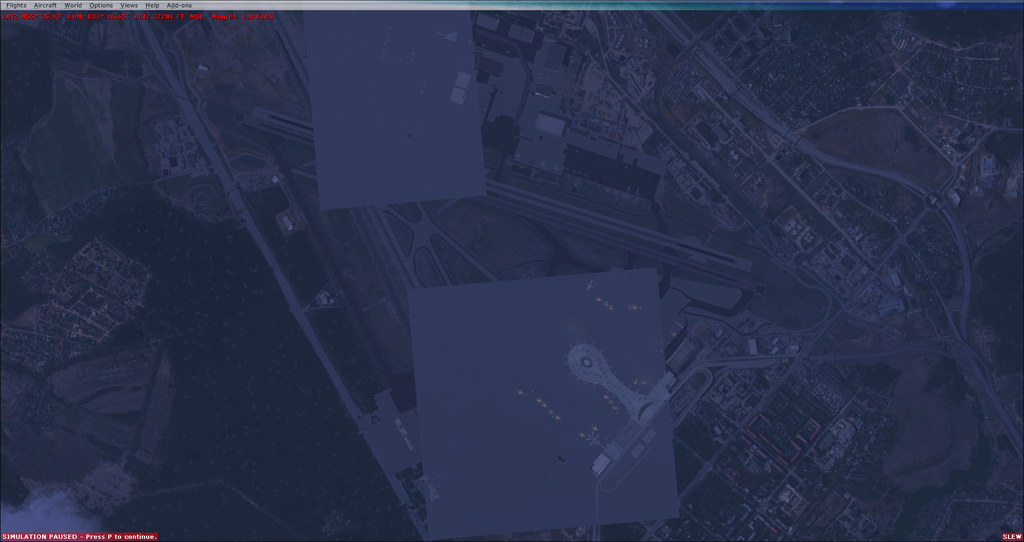
I have been told that this was because of another scenery add-on installed in my FSX, and that it was causing a disruption in the terrain mesh and that it was not an issue with textures. Because of that, I had uninstalled all of my add-on scenery and reinstalled only Moscow City X, only to find that the problem was still there. The photo above was taken at 32,201ft, but at around 35,000ft the problem goes away.
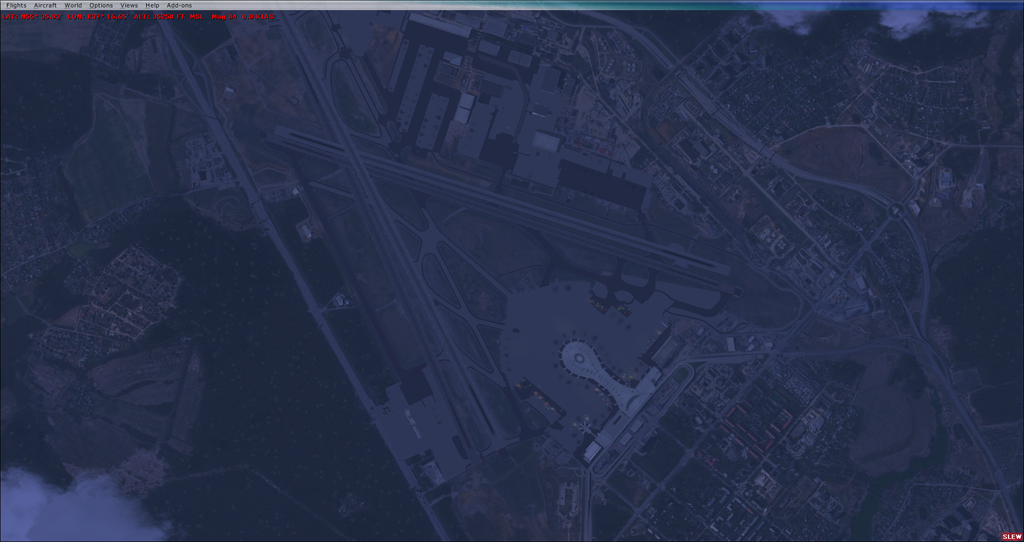
After uninstalling all of my scenery files once again; to include Ultimate Terrain Alaska and My Traffic 2013, I reinstalled the original FSX bgl airport files and started up FSX once again. I was back at the original FSX UUWW airport and all of it's textures were working fine.
So here’s what I did next…
I reinstalled Moscow City X only, and I took a tour of all of the airports that Moscow City X upgraded; there are seven in total (UUWW, UUMB, UUMU, UUBW, UUBM UUDD and UUMO), and I made note of each one that had similar issues (The airport in the picks above are UUWW). Out of the seven airports, UUWW, UUBW & UUDD all had the exact same issue when the clock struck Dusk, Night or Dawn. Oddly enough, in the Moscow City X texture folder, only UUWW, UUBW and UUDD have LT_XXXX & LT_XXXX_LM texture files. None of the other four airports have these texture files in this folder.
I removed the six texture files (Two per airport) and ran FSX again. During the day hours, the exact same squares were missing, just as the evening, night and morning texture squares that you see in the photos.
So I did some testing…
By removing and installing these texture files, this is what happened in FSX:
1. With both LT_XXXX & LT_XXXX_LM textures installed: Day Textures, but no Night textures
2. With only LT_XXXX textures installed: Day Textures, but no Night Textures
3. With only LT_XXXX_LM textures installed: No Day or Nights Textures
Something else was interesting to me. When I had cut and pasted these six texture files to my desktop, I noticed a significant difference between the LT_XXXX files and the LT_XXXX_LM files. The LT_XXXX file display was completely translucent whereas the LT_XXXX_LM file displays were solid white, as if there were no textures added to them at all. This, coupled with the fact that the LM files gave no texturing to FSX, tells me that the _LM files are possibly corrupt or incomplete.
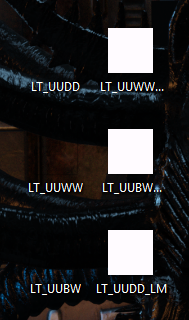
It is the “LT_” texture files that give the textures to the squares in question for the three airports (Day Time Only), and that the “LT_LM” texture files offer nothing to FSX. And it’s equally interesting that only these three airports have these texture sets.
If it is a texture issue, how do I fix it?
If it is a terrain issue, why is it only at night and not during the day?

I have been told that this was because of another scenery add-on installed in my FSX, and that it was causing a disruption in the terrain mesh and that it was not an issue with textures. Because of that, I had uninstalled all of my add-on scenery and reinstalled only Moscow City X, only to find that the problem was still there. The photo above was taken at 32,201ft, but at around 35,000ft the problem goes away.

After uninstalling all of my scenery files once again; to include Ultimate Terrain Alaska and My Traffic 2013, I reinstalled the original FSX bgl airport files and started up FSX once again. I was back at the original FSX UUWW airport and all of it's textures were working fine.
So here’s what I did next…
I reinstalled Moscow City X only, and I took a tour of all of the airports that Moscow City X upgraded; there are seven in total (UUWW, UUMB, UUMU, UUBW, UUBM UUDD and UUMO), and I made note of each one that had similar issues (The airport in the picks above are UUWW). Out of the seven airports, UUWW, UUBW & UUDD all had the exact same issue when the clock struck Dusk, Night or Dawn. Oddly enough, in the Moscow City X texture folder, only UUWW, UUBW and UUDD have LT_XXXX & LT_XXXX_LM texture files. None of the other four airports have these texture files in this folder.
I removed the six texture files (Two per airport) and ran FSX again. During the day hours, the exact same squares were missing, just as the evening, night and morning texture squares that you see in the photos.
So I did some testing…
By removing and installing these texture files, this is what happened in FSX:
1. With both LT_XXXX & LT_XXXX_LM textures installed: Day Textures, but no Night textures
2. With only LT_XXXX textures installed: Day Textures, but no Night Textures
3. With only LT_XXXX_LM textures installed: No Day or Nights Textures
Something else was interesting to me. When I had cut and pasted these six texture files to my desktop, I noticed a significant difference between the LT_XXXX files and the LT_XXXX_LM files. The LT_XXXX file display was completely translucent whereas the LT_XXXX_LM file displays were solid white, as if there were no textures added to them at all. This, coupled with the fact that the LM files gave no texturing to FSX, tells me that the _LM files are possibly corrupt or incomplete.

It is the “LT_” texture files that give the textures to the squares in question for the three airports (Day Time Only), and that the “LT_LM” texture files offer nothing to FSX. And it’s equally interesting that only these three airports have these texture sets.
If it is a texture issue, how do I fix it?
If it is a terrain issue, why is it only at night and not during the day?

