• Which the release of FS2020 we see an explosition of activity on the forun and of course we are very happy to see this. But having all questions about FS2020 in one forum becomes a bit messy. So therefore we would like to ask you all to use the following guidelines when posting your questions:

    • Tag FS2020 specific questions with the MSFS2020 tag.
    • Questions about making 3D assets can be posted in the 3D asset design forum. Either post them in the subforum of the modelling tool you use or in the general forum if they are general.
    • Questions about aircraft design can be posted in the Aircraft design forum
    • Questions about airport design can be posted in the FS2020 airport design forum. Once airport development tools have been updated for FS2020 you can post tool speciifc questions in the subforums of those tools as well of course.
    • Questions about terrain design can be posted in the FS2020 terrain design forum.
    • Questions about SimConnect can be posted in the SimConnect forum.

    Any other question that is not specific to an aspect of development or tool can be posted in the General chat forum.

    By following these guidelines we make sure that the forums remain easy to read for everybody and also that the right people can find your post to answer it.

P3D v4 Terrain Sloping Problem

Messages
15
Country
taiwan
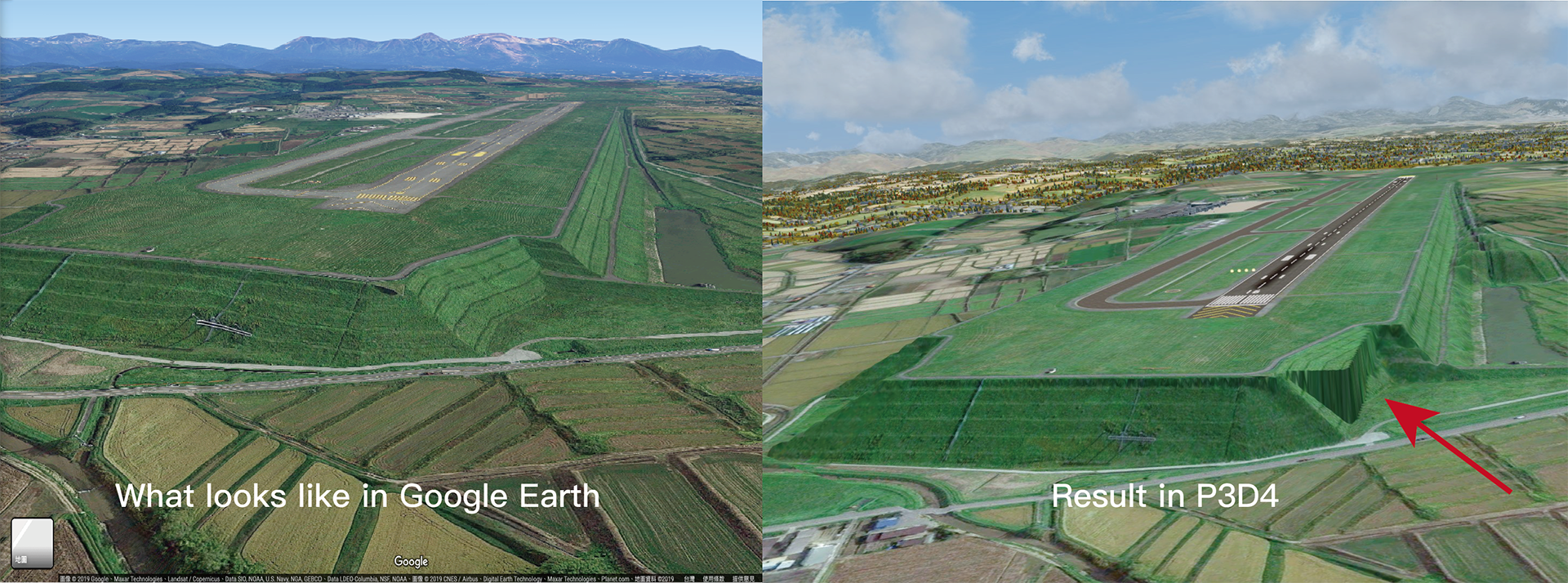
Hello, I'm working on an airport which has a sloped runway end, I used Airport Design Editor to create the sloped flattens and were satisfied with the result but a few problems in some edges,
marked as the red arrow, there is a rectangle part coming out, not sure if it is caused by the runway flatten and how to fix it?
screenshot1_工作區域 1_工作區域 1.png


What it looks like in TMFViewer:
螢幕擷取畫面 (3).png
 
Pretty sure that's the runway flatten. You may be able to fix this by renaming your sloped bgl to load after the runway flatten if they are in the same folder. Try putting a 'Z' in the BGL name, as in "Z_slopedFlatten.bgl". It might work.

Otherwise get rid of the airport flatten, and make it all just sloped as you desire.
 
Pretty sure that's the runway flatten. You may be able to fix this by renaming your sloped bgl to load after the runway flatten if they are in the same folder. Try putting a 'Z' in the BGL name, as in "Z_slopedFlatten.bgl". It might work.

Thanks for your fast reply , may I ask if the runway flatten was automatically generated since I don’t have any other flatten bgls? Do I have to compile the base flatten and sloped flattens as separate files?
 
Back
Top