
-
Which the release of FS2020 we see an explosition of activity on the forun and of course we are very happy to see this. But having all questions about FS2020 in one forum becomes a bit messy. So therefore we would like to ask you all to use the following guidelines when posting your questions:
- Tag FS2020 specific questions with the MSFS2020 tag.
- Questions about making 3D assets can be posted in the 3D asset design forum. Either post them in the subforum of the modelling tool you use or in the general forum if they are general.
- Questions about aircraft design can be posted in the Aircraft design forum
- Questions about airport design can be posted in the FS2020 airport design forum. Once airport development tools have been updated for FS2020 you can post tool speciifc questions in the subforums of those tools as well of course.
- Questions about terrain design can be posted in the FS2020 terrain design forum.
- Questions about SimConnect can be posted in the SimConnect forum.
Any other question that is not specific to an aspect of development or tool can be posted in the General chat forum.
By following these guidelines we make sure that the forums remain easy to read for everybody and also that the right people can find your post to answer it.
You are using an out of date browser. It may not display this or other websites correctly.
You should upgrade or use an alternative browser.
You should upgrade or use an alternative browser.
Texture filter editor machine learning steps changes
- Thread starter arno
- Start date

- Messages
- 1,637
- Country

Thanks! Looking forward to that update with bated breath  . For those 8 areas I had to revert to my old manual methods of creating trees that I used some 4-5 years ago, ha! The errors were the same by the way.
. For those 8 areas I had to revert to my old manual methods of creating trees that I used some 4-5 years ago, ha! The errors were the same by the way.
- Messages
- 1,637
- Country
Did my first test with the new version with tree detection. Happy to report all eight scripts that previously crashed went through the new version with no issues.
Initial Observations:
I am still seeing points not updating after I click on the TrainML button. However once again, if I click onto the next image and then back I see the changes have occurred. I would say this happens around 90% of the time? Can't say for sure if it happened every single time.
On the other side, I did see changes occur once in awhile when I did not even click on the Train ML button.
I think overall this new method tends to create the most accurate detection of vegetation based on initial review. Only thing that caught my attention is I did not see trees on water bodies in TFE but saw them after processing in scenProc? I'll have to watch that more to see if that was a one off or something to dig in deeper.
But overall... I'm hooked. Came thru at just the right time. Will start testing water detection in a few days.
Initial Observations:
I am still seeing points not updating after I click on the TrainML button. However once again, if I click onto the next image and then back I see the changes have occurred. I would say this happens around 90% of the time? Can't say for sure if it happened every single time.
On the other side, I did see changes occur once in awhile when I did not even click on the Train ML button.
I think overall this new method tends to create the most accurate detection of vegetation based on initial review. Only thing that caught my attention is I did not see trees on water bodies in TFE but saw them after processing in scenProc? I'll have to watch that more to see if that was a one off or something to dig in deeper.
But overall... I'm hooked. Came thru at just the right time. Will start testing water detection in a few days.
- Messages
- 1,637
- Country
I was able to start testing water detection. I used your script as my template. Used my standard scenProc script to create water polys. Added a few sample images and the detection of my points appeared to work correctly. I ran TML and saved the file. However, when I run scenProc it produces zero shapefiles.


- Messages
- 34,544
- Country

Hi,
Let me try it again. But what do you mean with points not appearing? Not as circle on the image or in the detection results? The detection results should only update after you press the Train ML button.Initial Observations:
I am still seeing points not updating after I click on the TrainML button. However once again, if I click onto the next image and then back I see the changes have occurred. I would say this happens around 90% of the time? Can't say for sure if it happened every single time.
That is weird, let me check if not somewhere a training is done automatically (should not be the case).On the other side, I did see changes occur once in awhile when I did not even click on the Train ML button.
That can always happen if the sample images do not match that area of the total image correctly. Usually I try to add a sample for that area when I see issues.Only thing that caught my attention is I did not see trees on water bodies in TFE but saw them after processing in scenProc? I'll have to watch that more to see if that was a one off or something to dig in deeper.
The feature detection did not find any match. Are you sure that the image you use in the script has the same number of bands?I was able to start testing water detection. I used your script as my template. Used my standard scenProc script to create water polys. Added a few sample images and the detection of my points appeared to work correctly. I ran TML and saved the file. However, when I run scenProc it produces zero shapefiles.
- Messages
- 1,637
- Country
Let me clarify my post above:
1) When I click to create a point (red or green), the points do appear, no issue there. It's when I click on the TML button the area below the point is not updated. It only updates the area below the point when I click on the next sample image and then click back to that previous image I placed the point on. In the past, I would always see real-time updates below the point in past versions. Are you not seeing that?
2) As explained above... no changes in my observation.
3) Can't remember if I had sample points on those water bodies or not. I think for the first few images I would have red points on those water bodies to not have trees. The ass I moved on to ther images I would see no trees on the water which I assumed the TML was working... learning from those earlier images and point. I assumed if I see an image that has no trees on a water body and I did not have points on that water body, TFE was telling me "based on your previous points, we understand you do not want trees on those water bodies". If I have to add points regardless of whether I see there are trees or no trees that sounds a little like the TML purpose is not realized. Again, I need to observe this more.
4) I think this was a simple mistake on my part. I think I was using images from a folder that was 3-band comparing against the 4band sample images. My bad. I'm sure it will work today properly.
1) When I click to create a point (red or green), the points do appear, no issue there. It's when I click on the TML button the area below the point is not updated. It only updates the area below the point when I click on the next sample image and then click back to that previous image I placed the point on. In the past, I would always see real-time updates below the point in past versions. Are you not seeing that?
2) As explained above... no changes in my observation.
3) Can't remember if I had sample points on those water bodies or not. I think for the first few images I would have red points on those water bodies to not have trees. The ass I moved on to ther images I would see no trees on the water which I assumed the TML was working... learning from those earlier images and point. I assumed if I see an image that has no trees on a water body and I did not have points on that water body, TFE was telling me "based on your previous points, we understand you do not want trees on those water bodies". If I have to add points regardless of whether I see there are trees or no trees that sounds a little like the TML purpose is not realized. Again, I need to observe this more.
4) I think this was a simple mistake on my part. I think I was using images from a folder that was 3-band comparing against the 4band sample images. My bad. I'm sure it will work today properly.
- Messages
- 34,544
- Country
Ah, sorry, now I get it. After the training is done the image should update. Sounds like a bug, let me check.1) When I click to create a point (red or green), the points do appear, no issue there. It's when I click on the TML button the area below the point is not updated. It only updates the area below the point when I click on the next sample image and then click back to that previous image I placed the point on. In the past, I would always see real-time updates below the point in past versions. Are you not seeing that?
I would only add more points when you see trees on the water. Else you have sufficient samples. But the fact that you get them on the full image means that the water is some areas is slightly different.3) Can't remember if I had sample points on those water bodies or not. I think for the first few images I would have red points on those water bodies to not have trees. The ass I moved on to ther images I would see no trees on the water which I assumed the TML was working... learning from those earlier images and point. I assumed if I see an image that has no trees on a water body and I did not have points on that water body, TFE was telling me "based on your previous points, we understand you do not want trees on those water bodies". If I have to add points regardless of whether I see there are trees or no trees that sounds a little like the TML purpose is not realized. Again, I need to observe this more.
- Messages
- 34,544
- Country
I have fixed that bug now, will be in the next development release.Ah, sorry, now I get it. After the training is done the image should update. Sounds like a bug, let me check.
- Messages
- 1,637
- Country
While you are working on that new release consider this. On several occasions I will add sample images and process with results that need more samples. So I will go back and add more sample images. If I happen to add a duplicate sample image without knowing and and click on TML, TFE will crash stating I have a duplicate image. If I remove the image it crashed saying I did not have an image for the points. What I would suggest:
1. When one adds sample images, scenProc checks to insure no duplicates right at the start, before any processing. Gives a warning so I can immediately fix.
2. Zooming in will still cut off part of the image, even using the sliders to move around.
3. I nice bonus would be a "SORT" button for images based on sample image name. That would be nice being I am thinking I will need at least 25 images to get a good sample for a 30sq kilometers (and may be more as I test further). So it can be easy for me to add a duplicate image by mistake. Looks like once that happens, even if I click on "continue" on the error window, it appears I really can't save or process and I need to start fresh.
1. When one adds sample images, scenProc checks to insure no duplicates right at the start, before any processing. Gives a warning so I can immediately fix.
2. Zooming in will still cut off part of the image, even using the sliders to move around.
3. I nice bonus would be a "SORT" button for images based on sample image name. That would be nice being I am thinking I will need at least 25 images to get a good sample for a 30sq kilometers (and may be more as I test further). So it can be easy for me to add a duplicate image by mistake. Looks like once that happens, even if I click on "continue" on the error window, it appears I really can't save or process and I need to start fresh.
Last edited:
- Messages
- 34,544
- Country
Hi,
Sounds like you found another bug, I'll have a look at it.
Not sure what you mean with the sort button in bullet 3. Do you mean the images should be sorted by name? I don't think a button would be needed for that, would be better to just always do that then.
Sounds like you found another bug, I'll have a look at it.
Not sure what you mean with the sort button in bullet 3. Do you mean the images should be sorted by name? I don't think a button would be needed for that, would be better to just always do that then.
- Messages
- 1,637
- Country
Yes, that is what I mean for bullet 3. If it can automatically sort by name that would be even better. Here is something that has caught my attention as I work on an area right now. Take a look at this sample screenshot.
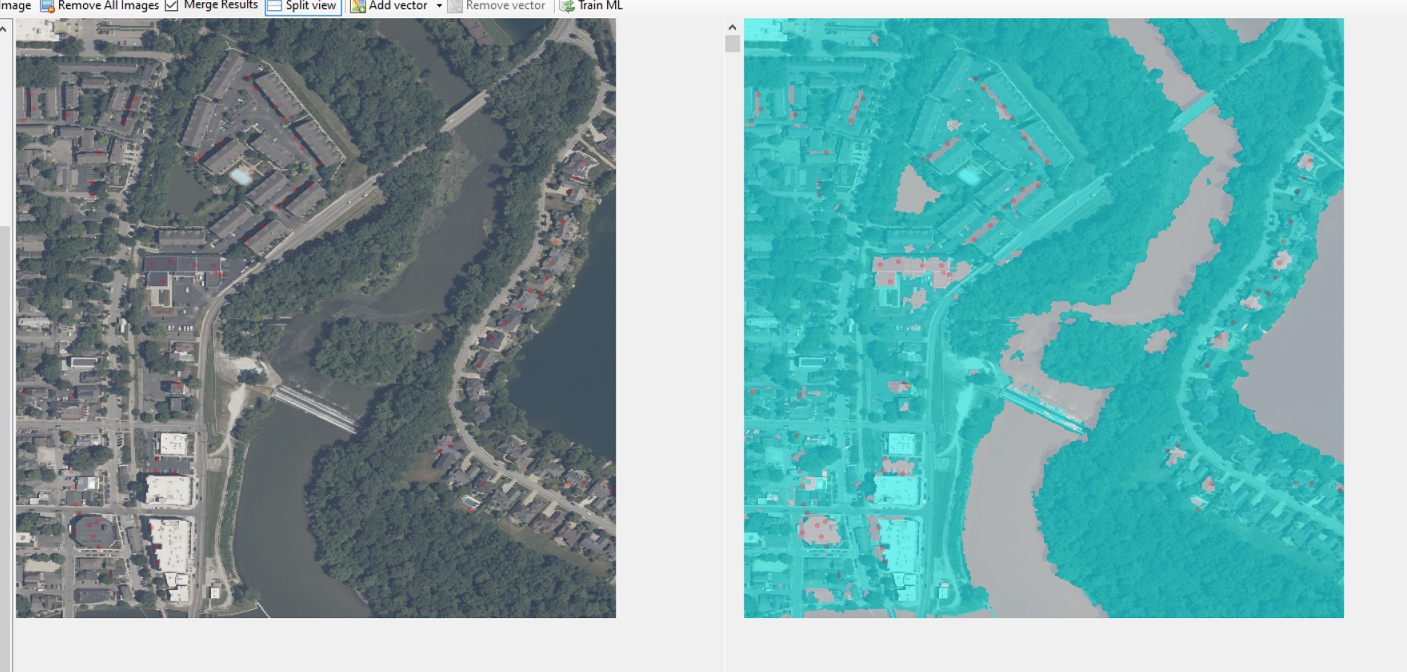
I have been trying to get rid of water where I do not want it. You can see all the red points on the right side. Despite running TML several times, adding more points , saving to a new file and checking image to the next one and back again, it will not remove those water bodies. To me, if a user selects a red or green point that should be absolute as I am instructing TFE where I want and do not want something. I confirm this with your next release but don't you agree those areas should have been eliminated (at at least minimized)?
I have been trying to get rid of water where I do not want it. You can see all the red points on the right side. Despite running TML several times, adding more points , saving to a new file and checking image to the next one and back again, it will not remove those water bodies. To me, if a user selects a red or green point that should be absolute as I am instructing TFE where I want and do not want something. I confirm this with your next release but don't you agree those areas should have been eliminated (at at least minimized)?
- Messages
- 34,544
- Country
Hi,
Placing the red and green points is not absolute. All the data of the sample points go into training the algorithm. When the data for red and green points is very similar the algorithm can make different decisions. In this case it might be you have more green points for that similar data than red points, so it is still classified as water. So with the samples points you are only giving hints.
Placing the red and green points is not absolute. All the data of the sample points go into training the algorithm. When the data for red and green points is very similar the algorithm can make different decisions. In this case it might be you have more green points for that similar data than red points, so it is still classified as water. So with the samples points you are only giving hints.
- Messages
- 1,637
- Country
Interesting. My point being it should be more than a hint, it should be a directive, ha! Should it not have some added weight in the algorithm over its learning? That's what I would think. More tests going on here. 
- Messages
- 34,544
- Country
Well of course it is taken as input. But when you have many points it can be that you indicate conflicting ones and then the algorithm has to decide.
Which machine learning step are you using? SVM or MLP?
Which machine learning step are you using? SVM or MLP?
- Messages
- 1,637
- Country
I am using your sample template you sent me without any changes, so that would be using MLP.
- Messages
- 1,637
- Country
"number of later and neurons" ?!?! Ha, I don't know what that even means. (haven't researched that). No, I just took your sample script, plugged it into my TFE and ran my samples for water detection, that's it.
 .
.