• Which the release of FS2020 we see an explosition of activity on the forun and of course we are very happy to see this. But having all questions about FS2020 in one forum becomes a bit messy. So therefore we would like to ask you all to use the following guidelines when posting your questions:

    • Tag FS2020 specific questions with the MSFS2020 tag.
    • Questions about making 3D assets can be posted in the 3D asset design forum. Either post them in the subforum of the modelling tool you use or in the general forum if they are general.
    • Questions about aircraft design can be posted in the Aircraft design forum
    • Questions about airport design can be posted in the FS2020 airport design forum. Once airport development tools have been updated for FS2020 you can post tool speciifc questions in the subforums of those tools as well of course.
    • Questions about terrain design can be posted in the FS2020 terrain design forum.
    • Questions about SimConnect can be posted in the SimConnect forum.

    Any other question that is not specific to an aspect of development or tool can be posted in the General chat forum.

    By following these guidelines we make sure that the forums remain easy to read for everybody and also that the right people can find your post to answer it.

FS2004 Thrust calculations

Messages
1,468
Country
italy
I need reminding how to calculate the figures for table 1506
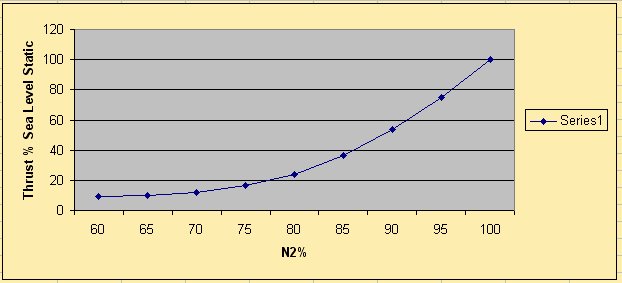
Here is an actual graph with thrust related to n2. I can extrapulate for n1 but need to know
how to generate the actual numbers for 1506
here is the graph
n2t.jpg

Next is the 0 MACH 1506 I actually have in the sim
0 0
20 0.063
25 0.132
30 0.188
35 0.227
40 0.263
45 0.291
50 0.31
55 0.323
60 0.34
65 0.357
70 0.383
75 0.425
80 0.485
85 0.565
90 0.7
95 0.88
100 0.99
105 1.05
110 1.076

So its the second column of numbers I need to generate. I know this has been covered a hundred times but I always find it a bit complicated.
For example 60%n2 is equivalent to 35% n1, In the above table that is 0.227(what is 0.227?) In the graph it is shown as 9.5% thrust.
Many thanks
 
Last edited:
Since everything relates to SSL conditions, CN1=N1, CN2=N2
Assuming 100% N2 = 100% N1, then the 1506 entry for 100%CN1 should be 1.0, based on your chart. (1.0=100%)
Then for each N2 in your chart, assign the thrust to the corresponding N1 and enter that value for CN1 in 1506.
In your example 60%N2 has a thrust value of 9.5% or 0.095. 60%N2=35%N1 so 35%CN1 gets to be 0.095.
Be careful to not have values below 0.06 at what would be idle CN1 or combustion may be absent.
Not too difficult a problem
Roy
 
Since everything relates to SSL conditions, CN1=N1, CN2=N2
Assuming 100% N2 = 100% N1, then the 1506 entry for 100%CN1 should be 1.0, based on your chart. (1.0=100%)
Then for each N2 in your chart, assign the thrust to the corresponding N1 and enter that value for CN1 in 1506.
In your example 60%N2 has a thrust value of 9.5% or 0.095. 60%N2=35%N1 so 35%CN1 gets to be 0.095.
Be careful to not have values below 0.06 at what would be idle CN1 or combustion may be absent.
Not too difficult a problem
Roy
Many thanks Roy,
I'll chew over the numbers.
 
Roy,
I'm having a little problem with low end thrust. The real numbers in the graph above between 50 and 80 are barely enough to get the aircraft moving. In reality breakaway thrust at 68%n2 is sufficient even for a fully loaded aircraft. At all loads up to 85% idle thrust is all that is needed to keep the a/c rolling once on the move at 10-15kts. So I've had to beef up the lower end of 1506

n1 sl .9m
0 0 0
20
0.063 0.079
25
0.101 0.125
30
0.13 0.157
35
0.16 0.197
40
0.189 0.236
45
0.212 0.271
50
0.233 0.303
55
0.251 0.338
60
0.268 0.368
65
0.303 0.426
70
0.37 0.537

The real numbers should be

n1 sl .9m
0 0 0
20
0.063 0.171
25
0.085 0.219
30
0.09 0.255
35 0.095
0.295
40
0.108 0.348
45
0.134 0.434
50
0.165 0.535
55
0.2 0.287
60
0.240 0.34
65
0.3 0.423
70
0.370 0.537


The only other factor I can think of is EGT. But if I play with that then I'll get the wrong temperatures at start up. Is there anything else I can do?
 
Volo.
EGT is eye candy in the sim and has no effect on thrust.
The main input for thrust is the static thrust value in the aircraft.cfg.
1506 is made up of scalars for that value depending on CN1 and Mach. 1506 is gross thrust by convention, although there are some folks who have flight data that allows them to treat 1506 as Net thrust.
The ability to taxi comes from thrust and is resisted by inertia and ground friction.
According to Zskowski "There is a natural rolling resistance friction scalar employed to simulate the friction "hump" observed when initiating movement from rest"
I do not know what this amounts to, but it will not have changed, so your challenge is to get thrust up to where it taxies per the Manual.
The problem is that throttle position governs CN2 but thrust comes from CN1.
Your thrust versus N2 chart is what I would use as gospel and I would then play with 1502 to get acceptable taxi thrust even if the N1 to N2 relationship does not stack with what it should be.
I had the DM VC10 years ago, but I forget what engine RPM is used for reference.
Roy
 
Thanks Roy,
That's an idea. However when I set up with real numbers it required almost full power to start rolling so even changing n1 would be noticeable. In the 10 everything is driven by n2. Breakaway thrust being 68% for example. One only needs 68% though if the aircraft is close to max auw. Also at idle thrust I have to stay within 56-58%n2 and 28-29%n1 so I can't really change the n1 figures. The top end is spot on and climb thrust is perfect. I'm now tweaking up the cruise figures which are a bit low too. Generally cruise at 0.84Mach is in the mid to high 80's.n2. I've also been given a table that matches n2 with n1 so I don't think I could arbitarilly change the relationship without it bein obvious.
So I'm looking for the sweet spot of 88% at FL350 which should be lower at higher levels. You should hear the roar on take-off as the engines spool up to max. It's quite impressive. (the engine sounds are pretty much perfect). One misses the kick in the back of the seat though aka Concorde without force feedback!
 
Last edited:
Volo,
What you need is test data for sea level thrust and corresponding N1 and N2. You need a gauge that shows this so you can later construct spreadsheets and work to the solution based on data.
I use a pop-up 2D test gauge which is tailored for each test program I attempt.
If you do not have such a gauge, PM me or start a conversation and I'll provide it.
Until you have solid data you are not going to nail this issue.
Roy
 
Taxi thrust is always off in the sim. They hard coded ground friction to a value that is incorrect for most jets.

Thrust:

1. Make a chart of Sea Level Thust vs CN1 for the real aircraft at Mach 0, Mach 0.2 (or typical V-Rotate mach), Mach 0.x, 0.x, 0.x up to the highest mach the airplane might see.
2. Decide whether to control Ram Drag directly or let the sim do it via 1507
3. Enter the data from step one into 1506 as either GROSS THRUST or NET THRUST; depending on what you decided in step two.
4. Fill in table 1507 if needed.

Done.
 
Hi Jx,
I pretty much came to the same conclusion. I have left 1507 alone. You'll see that low end thrust is considerably higher than the real published figures. It's still a little strong between 70-85%n2. The graph is in n2 but obviously 1506 has the equivalent n1 numbers.
The operational criteria are.
1. Breakaway thrust 68% (the a/c must move off from a standstill even at max auw).
2. Taxiing at 10-15kts at idle thottle 56%n2 at anything up to at least 70%auw.
3. If the a/c is empty then care has to be taken to stop it running away.
4. In the cruise typically at 0.84 Mach at or above FL300 n2 should be in the mid to high 80's

Having done various aborted take-offs with long taxis back to the start at differing weights plus climb outs to crusie level. I'm pretty much in the ballpark with a few adjustments of half a percent needed here or there.

1506.jpg
 

Attachments

  • 1506.jpg
    1506.jpg
    52.6 KB · Views: 555
Back
Top