• Which the release of FS2020 we see an explosition of activity on the forun and of course we are very happy to see this. But having all questions about FS2020 in one forum becomes a bit messy. So therefore we would like to ask you all to use the following guidelines when posting your questions:

    • Tag FS2020 specific questions with the MSFS2020 tag.
    • Questions about making 3D assets can be posted in the 3D asset design forum. Either post them in the subforum of the modelling tool you use or in the general forum if they are general.
    • Questions about aircraft design can be posted in the Aircraft design forum
    • Questions about airport design can be posted in the FS2020 airport design forum. Once airport development tools have been updated for FS2020 you can post tool speciifc questions in the subforums of those tools as well of course.
    • Questions about terrain design can be posted in the FS2020 terrain design forum.
    • Questions about SimConnect can be posted in the SimConnect forum.

    Any other question that is not specific to an aspect of development or tool can be posted in the General chat forum.

    By following these guidelines we make sure that the forums remain easy to read for everybody and also that the right people can find your post to answer it.

P3D v4 Troubles with SAMM2

Messages
129
Country
france
Hello,
Wishing to create some static aircrafts, I have just been installing SAMM2 latest general release (first time I installed SAMM), but am having troubles with it...
Just as background,
* my flight sim utilities, including ADE, Arno Gerretsen softwares, and many more, are installed at C:\Flight Sim Utilities (SSD)
* SAMM is installed at C:\Flight Sim Utilities\SAMM
* my P3Dv4 is installed at F:\Lockheed Martin\Prepar3D v4 (HDD)
* my P3Dv4 SDK is installed at F:\Lockheed Martin\Prepar3D v4 SDK 4.2.21.24048

When starting SAMM for the first time, I am getting following message
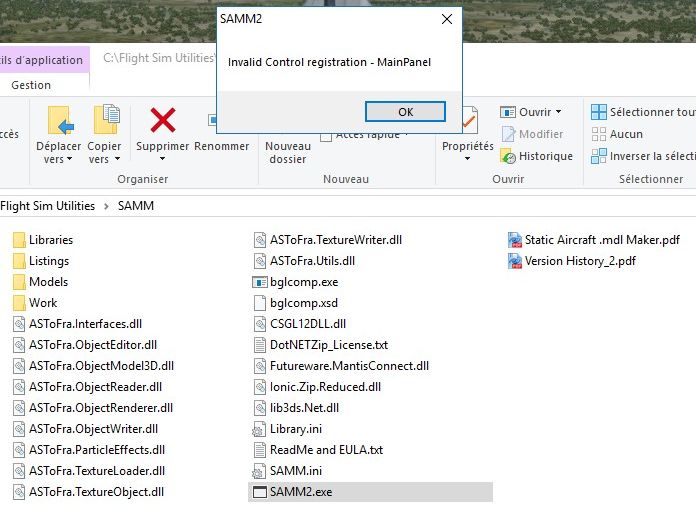
SAMM -2018-may-27-001.jpg


When clicking OK, coming to this screen
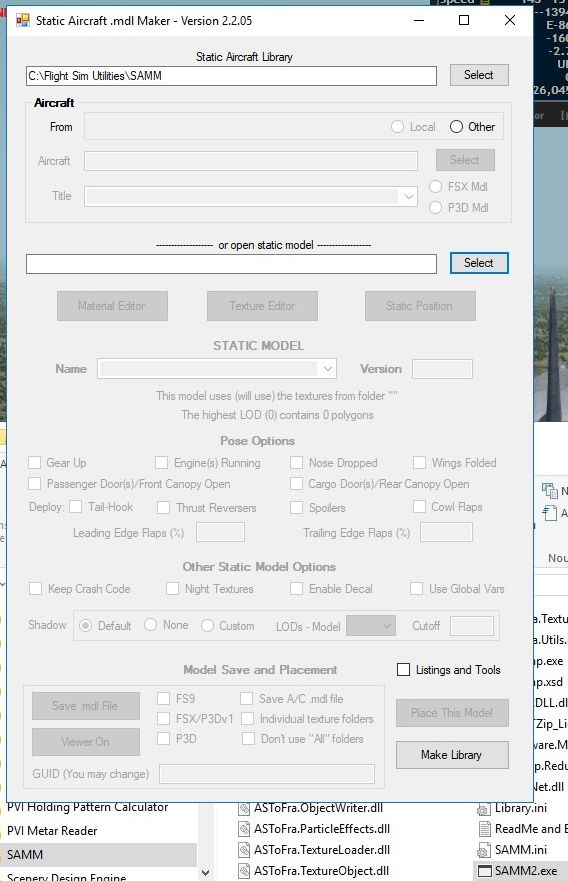
SAMM -2018-may-27-002.jpg


and when selecting for instance Listings and Tools,
SAMM -2018-may-27-003.jpg


Something wrong with my system? I do not find where I can point the software to SDK's or whatever. Should I install a P3Dv3 or FSX SKD, that the software would find automatically?
Am a bit confused... Any help or suggestions welcome.

Blue skies
 
Last edited:
The first error message suggests SAMM is unable to find the necessary registry items for Pv4. That's why the Aircraft - From group-box does not contain a Pv4 button. Can't help you with that. But, the group-box does contain an active "Other" button.

So, click on "Other", navigate to the Simobjects folder containing the aircraft you wish to convert and click on that aircraft's folder.

Don
 
Don,

Thank you for the feed back.
Yes, the Other button is active, but does not make the aircraft selection field active, so no luck to navigate...

Which registry items is SAMM looking for to identify the installed simulator version?
I started with P3Dv2, and upgraded version by version.
Into my registry, I can find many items about P3Dv4, of course, but also for instance App paths for FSPanelStudio, ranging from CFS to FSX Steam with all intermediate variants.
I deleted these unnecessary values directly from the registry.
I also have items mentionning Prepar3D v3, for various versions of Simconnect.msi, various other items, for instance in the redist\interface\ folder, or in ManagedByApp sections about sounds in relation with Microsoft.ZuneMusic_8wekyb3d8bbwe on my system.
Under HKCU\Softwares\Lockheed Martin, I can find items mentionning Prepar3D v2 and v3 for the SimConnect_Port_IPv4 and IPv6. Should I uninstall these stuffs, and reinstall them from the v4 redist folder?
Under ...\Windows\Current Version\Installer\Folders, I also find items about two v3 SDK's and former v4 SDK which have been uninstalled since a while...
Also have various P3Dv3 mentions for various apps, as last file opened.

Even when using CCleaner, there are so many leftovers in the registry...

Any information or comments appreciated

Have a good day
Philippe
 
Yes, the Other button is active, but does not make the aircraft selection field active, so no luck to navigate...
The Aircraft Select field is used to select a variant of a particular aircraft. It won't be enabled until you navigate to and select the aircraft folder using the Other button.

For PV4, SAMM (and all my other applications) look for a valid path to Prepar3d.exe (in the PV4 folder) in the registry key "Software\Lockheed Martin\Prepar3d v4\SetupPath. The section of the registry in which it is found depends on how you installed PV4. But, for most users, it will be "LocalMachine". In the 32-bit section of the registry, SAMM looks for the "AppPath" key instead. For the SDK, the path is retrieved from "Software\Lockheed Martin\Prepar34 v4 SDK\SetupPath".

I have encountered an issue on my own system whereby PV2 was installed as an upgrade to PV1 and its items placed in the "LockheedMartin" (note the missing space) folder in the registry, making it look like PV2 was not installed. While you didn't mention having PV1 installed, I'd be inclined to check any remnant registry items (i.e.," Lockheed Martin\Prepar 3D v2 - or 3) to see if the PV4 paths has been saved erroneously.

Don
 
Don,
Thank you
Yes, I saw in my registry Lockheed Martin and LockheedMartin folders. I will check the various points highlighted by you.
Have a good week-end
Philippe
 
Sorry, will give up so far, as I am running out of ideas... SAMM still giving me problems as per screenshots above.
Have cleaned registry as much as I dared about P3Dv2 (none found so far except at the two mentionned herebelow) or P3Dv3 mentions, but still a few ones still remaining.
So far, I can not find any wrong path about P3Dv4.
I started directly with P3Dv2, and each further major version, as well as most of the sub-versions were installed after complete uninstall of former version. One or two of the P3Dv3 were updated with the only install of the client pack. P3Dv3 was completely uninstalled before install of the v4.
When switching from P3Dv4.1 to P3Dv4.2, I did uninstalled separately of the scenery, content and client, the Prepar3D but keeping the licence, then installed P3Dv4.2 in the same directory, which enabled me to keep most of my former P3D setup, as well as the registration key.
My non-stock stuff is located outside of the P3D directory using the various .cfg files available, as well as ORBX, for which I use a symbolic link.
Digging into the registry, I found that my simconnects were all still mentioned with an install path located into Prepar3D v3, although it was uninstalled before moving to P3Dv4, and despite the fact that I did reinstall them from P3Dv4 redist. Therefore uninstalled the simconnects, restarted the PC, and installed them again from P3Dv4. Now the paths are correct into the registry.
Now, if I delete from registry the entries found as Prepar3D v2 and Prepar3D v3 at HKCU\Software\Lockheed Martin\Prepar3D , as well as the LockheedMartin entry, and also Prepar3D v2 and Prepar3D v3 entries at HKU\S-1-5-21-2579743314-8945443-4097973005-11\Software\Lockheed Martin, these entries will appear again as soon as I have run Prepar3D again...
Sorry, forgot to mention that I also have the FSX SDK installed.
Will check again with next P3D version.
Blue skies
 
Phillipe, I have no idea what all those manipulations of the registry would have done. I mentioned above the registry items that SAMM is looking for. Apparently SAMM is still not finding anything it "likes".
these entries will appear again as soon as I have run Prepar3D again...
To what entries are you referring? Are you telling me that the PV4 radio button does appear under those circumstances?

Don
 
Sorry, Don

The SAMM windows are exactly as per my first post, nothing changed.

About the entries I mention,
SAMM -2018-jun-19-001.jpg

---
SAMM -2018-jun-19-006.jpg

---
SAMM -2018-jun-19-011.jpg

SAMM -2018-jun-19-015.jpg

SAMM -2018-jun-19-026.jpg

SAMM -2018-jun-19-027.jpg

SAMM -2018-jun-19-028.jpg


The Prepar3D v3 remnants I can find are this kind :
SAMM -2018-jun-19-007.jpg


SAMM -2018-jun-19-008.jpg


Any other place or info to chase?

Thank you for your help or advice

Blue skies
 
You mentioned earlier you had a "LockheedMartin" (no space) folder. Are there any PV4 entries in it?

You might also try editing the SAMM.ini folder and adding/editing an entry "Path to P3Dv4=F:\Lockheed Martin\Prepar3D v4".

Don
 
This is how the LockheedMartin entry looks :
SAMM -2018-jun-19-029.jpg

- - -
Unfortunately, no joy when editing the SAMM.ini file so far. Still getting the message about Invalid Control registration - MainPanel

Will reboot and check

Blue skies
 
You will continue to get the invalid registration message (since SAMM can't find a valid registry entry for PV4). But, the .ini fix should work; however, the editing must be done with SAMM not open. Please send me a copy of your SAMM.ini file following your edit and before running SAMM.

Don
 
Don,
Sorry, I did not check the file again before zipping it :-(
I probably have gremlins into my PC box...
I add the Path to... line, save the samm.ini file.
I open it again with notepad, the line is there.
I fire up SAMM, receive the invalid control message etc..., and once the program is closed, check again the samm.ini... The Path to line has disapeared...
I repeat the operation, placing the path to... just after the path to makemdl line, or at the end, it seems SAMM is rewriting the ini file each time and deletes the added line.
Philippe
 
Well, we're one step closer. I found the reason why the .ini file entry you made was ignored and deleted. That I can fix (and will do so later today). But, the fundamental problem, i.e., unable to find the proper registry item remains a mystery.

I trust you have not renamed "Prepar3D.exe", since that would cause what you are seeing.

Don
 
I have just uploaded Development Release 2.2.05(a) to http://stuff4fs.com. It may solve both issues, but at least it will accept and preserve your .ini entry.

Give it a try first without the .ini entry. (Earlier this year I updated all my applications to address an anomaly in registry entries when P3D is upgraded. Unfortunately, I neglected to release that update for SAMM. It may be that anomaly was causing you initial problem.)

Don
 
Don,
Sorry, was out of town yesterday late afternoon and evening.
No, I did not rename Prepar3D.exe.
I deleted my former SAMM folder, and reinstalled SAMM 2.2.05 as well as 2.2.05(a).
Unedited samm.ini : now the message reads "No version of FlightSim found in System Registry. SAMM cannot continue and will shut down", and no samm.ini into the folder...
Putting back former samm.ini, and editing it to include the "Path to P3Dv4=F:\Lockheed Martin\Prepar3D v4 " statement now gives me Aircraft From with the P3Dv4 radio button, which, like the Other radio button, opens the selection window!
New generated SAMM.ini file enclosed.
Now have to get more into the software.
Thank you so much for your help and assistance!
Have a good day
Philippe
 

Attachments

I'm out of ideas, Philippe. As I said yesterday, 2.2.05(a) includes the same registry scanning software as all my other applications. For whatever reason, SAMM is not finding PV4's location in your registry. Fortunately, I infer from your report that placing that location in your .ini file solves your issue.

If I think of anything else, I'll let you know.

Don
 
Don,
Don't worry. The main thing is that the software now works. Possibly my own setup is somehow specific, but with your latest version and with the addition of the line into the former samm.ini solves the problem and allows SAMM to write then a proper ini file based on P3Dv4 and relevant SDK.
Thank you for all
Philippe
 
Last edited:
Don,
Just a short report. I guess my former problems probably find their origin in the way I did upgrade my P3D to v4.2 last time.
I now have moved to P3D v4.3, making a complete uninstall and cleaning of the former version, and installed latest opus using the Setup_Prepar3D.exe. SAMM did find it's way without any troubles.
Have a good day.
Philippe
 
Back
Top