

Hi,
Wondering if someone can help me understand what's happening here. I have been having some trouble with the latest MSFS Standard material shader node structure and getting the albedo channel to render in cycles both in the viewport and the render output. I have tracked the problem down to the Vertex Color node (which is a renamed Color Attribute node) which feeds Alpha output into the Factor input of the Base Color Multiplier RGB node (which is a renamed Mix node).
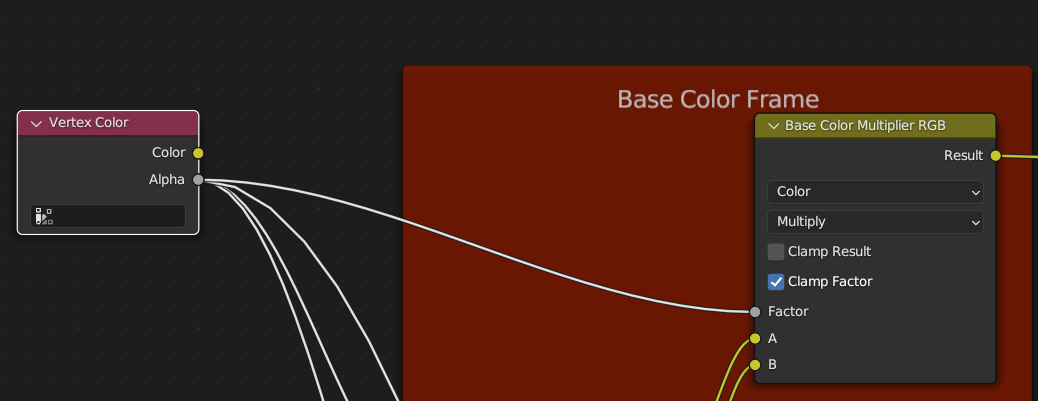
Then this is setup like this (which is how it is by default when you first select MSFS Standard from the material properties panel), the material renders in cycles all white. Please forgive the quality it's just a quick render in the viewport to demonstrate.

If I remove the input to the Base Color Multiplier RGB node and set the Factor to 1.0 the material renders correctly (note the hair).
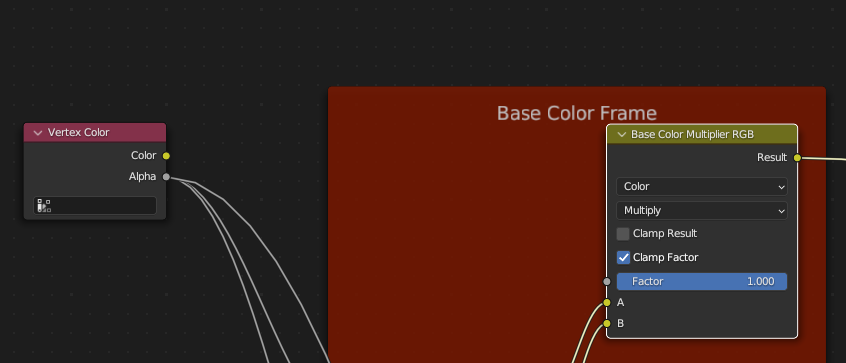

Does anyone have an explanation for this? What is feeding the Vertex Color node and why does it behave like this? As far as I can tell there are no vertex groups or colors defined in my mesh. I can go through and remove this link on all materials affected and it seems to export ok to the sim, but I am nervous about messsing around in the shader editor as I know it can get you into trouble.
Wondering if someone can help me understand what's happening here. I have been having some trouble with the latest MSFS Standard material shader node structure and getting the albedo channel to render in cycles both in the viewport and the render output. I have tracked the problem down to the Vertex Color node (which is a renamed Color Attribute node) which feeds Alpha output into the Factor input of the Base Color Multiplier RGB node (which is a renamed Mix node).
Then this is setup like this (which is how it is by default when you first select MSFS Standard from the material properties panel), the material renders in cycles all white. Please forgive the quality it's just a quick render in the viewport to demonstrate.
If I remove the input to the Base Color Multiplier RGB node and set the Factor to 1.0 the material renders correctly (note the hair).
Does anyone have an explanation for this? What is feeding the Vertex Color node and why does it behave like this? As far as I can tell there are no vertex groups or colors defined in my mesh. I can go through and remove this link on all materials affected and it seems to export ok to the sim, but I am nervous about messsing around in the shader editor as I know it can get you into trouble.


