• Which the release of FS2020 we see an explosition of activity on the forun and of course we are very happy to see this. But having all questions about FS2020 in one forum becomes a bit messy. So therefore we would like to ask you all to use the following guidelines when posting your questions:

    • Tag FS2020 specific questions with the MSFS2020 tag.
    • Questions about making 3D assets can be posted in the 3D asset design forum. Either post them in the subforum of the modelling tool you use or in the general forum if they are general.
    • Questions about aircraft design can be posted in the Aircraft design forum
    • Questions about airport design can be posted in the FS2020 airport design forum. Once airport development tools have been updated for FS2020 you can post tool speciifc questions in the subforums of those tools as well of course.
    • Questions about terrain design can be posted in the FS2020 terrain design forum.
    • Questions about SimConnect can be posted in the SimConnect forum.

    Any other question that is not specific to an aspect of development or tool can be posted in the General chat forum.

    By following these guidelines we make sure that the forums remain easy to read for everybody and also that the right people can find your post to answer it.

Virtual Cockpit Problem in GMax

Bambi_007

Resource contributor
Messages
908
Country
germany
Hello,

I have doing some long hours to solve my Problem - no solution in this Moment. :confused:


I build a plane in GMax - now i want to add a Virtual Cockpit.

I have found some help in the web, but there must another Trick life.

When I export my Model .... I see the panel in the Outside-View - but i dont see it in the Cockpit View.

It is outhere some People they can help me on the right way?

Thanks a lot.
 
You should have two top level nodes, one named "interior" and another named "exterior".


ALL your exterior parts and hierarchies must be linked to the exterior node.

ALL your interior parts and hierarachies must be linked to the interior node.


exterior
...left_wing
......l_aileron
...main_fuselage
......door-passenger

etc

interior
...headliner
...pilot_yoke
......lever_stick_l_r
etc

This is what tells the compiler to separate the VC parts.
 
Thanks a lot for that help.

Now I have two Groups:

Interior and Exterior

Now we want them Export.

It is for the FS9. Must I export them to different mdl, maybe CP210_interior.mdl and CP210_exterior.mdl and then I set them in the Aircraft Folder in two different Models?
Model.CP210 and Model.CP210_VC or is this the wrong way and I export them in only one mdl, maybe CP210.mdl

It is really A Hard work, but I like the Work with GMax 1.2. It is nice to see the work in FS9 and fly them, but without a VC, it is not so nice, it looks like a half work.

Thanks for all your helps.
 
For FS9 you export everything to one model file.

Make sure that nothing is "unattached" to the two top-level nodes though, or you will wind up with only an exterior model, assuming it compiles at all! :duck:
 
Thanks Bill, I will do that what you wrote.

Tomorrow I will let you know because this.
 
Now it is a Good year going through the World.....
and here I stand back again with the Problem that I
have with my Virtual Cockpit.

I export only the Interior and see nothing of my gauges in the VC.

What make I wrong.

Please bring me on the right way.

Thanks in advance.
 
Hey Sandra,

Make sure your gauges are hooked up correctly in 'Panel.cfg'

I need to ask you, if you are making the model for FS9 or for FSX.

For FS9, you have $pan1 and $pan2, etc, of which you have a blank bitmap mapped to your gauge polygons, then you map your gauges onto that texture via something like FSPanel Studio.

For FSX, you have to make a material that will be your instruments (gauges) texture, and tick on 'gauges texture' near the bottom of the Materials settings pages to activate that as the gauge texture, allowing the gauges to show up in the VC in FSX.

If you have never done VC gauages before, let me / us know and we can walk you through that. VC gauges are seperate from the 2D panel, totally different, (as you may know, I have no idea of how much you have learned on making planes yet).

If though you are getting the exterior and interior to compile, then congradulations. That is your first step!


Tip: You can make a texture that has 'pictures' of the gauge art you are mapping into your panel, arrange them on a texture sheet, then make round discs and rectangles for each gauge, map them to the textures/material so you can see them on the objects, then place the objects on the panel. Name the material $pan1. Copy a BMP of this to your Panel folder for this plane in FS. Then open up FS Panel Studio and arrange your gauges onto the 'gauge art BMP', with this being noted on the 'panel.cfg' that this is VC section 01.

Next, burn a MDL from Gmax, place in your plane model folder, boot up FS, and check to see if your gauges are showing...

:D


Bill
 
Hello Bill, thanks for your nice, fast reply.

I build for FS9. I have never build gauges with
Gmax.


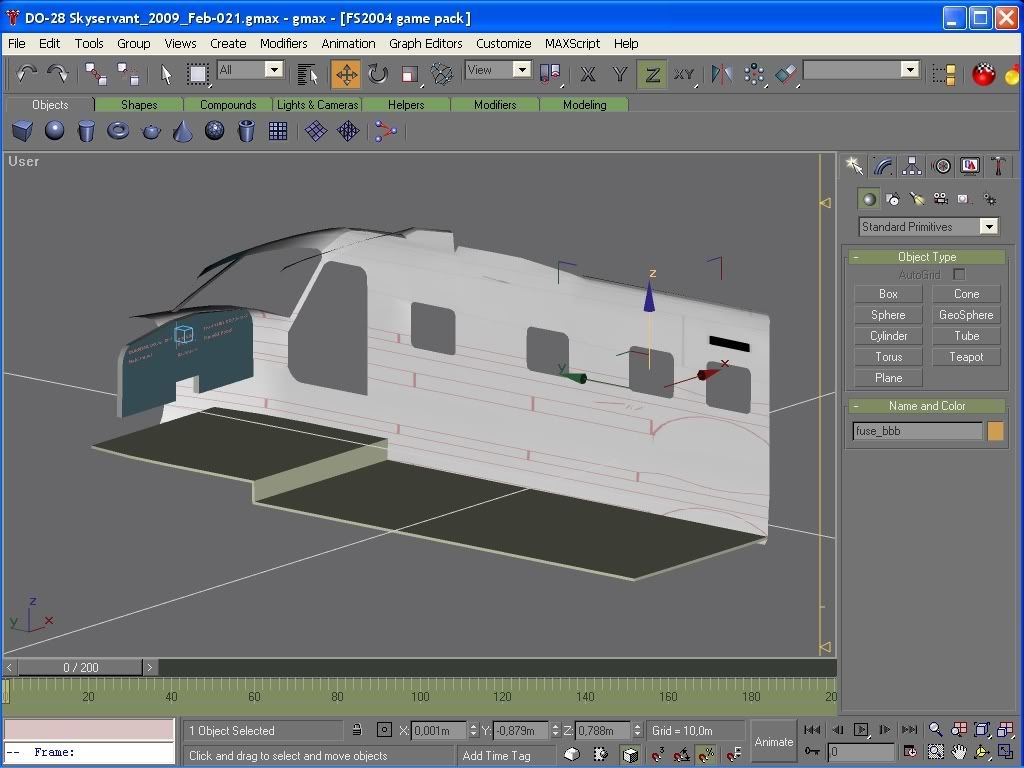
Look at the Pictures, the first is the Model
that I build. The second is only my Interior.
There are three Objects - Panel left is Main, Radio Stack is Radiostack, Panel right is Main01.
The Name of the Textures are:
$Main.bmp
$Radiostack.bmp
$Main01.bmp
The color of bmp is not 0,0,0

When I export the Interior with or without Exterior
I see the Panels only in the Extern View.

DO28-Feb2009_01.jpg


DO28-Feb2009_02.jpg
 
Make sure that nothing is "unattached" to the two top-level nodes though, or you will wind up with only an exterior model, assuming it compiles at all! :duck:


This was my fault. :banghead:

I dont have my 3sided views removed. I have they only hidden and this was my fault.

Now is no more than my two top-level-nodes in there.
And - hurray - it works fine.

And the log say now:
Running Cockpits

Start! (C:\gmax\gamepacks\fs2004\Meine Objekte\DO28-Skyservant-04\DO28_interior)
Loading X C:\gmax\gamepacks\fs2004\Meine Objekte\DO28-Skyservant-04\DO28_interior...
Processing...
Model units are 1024.00 units/meter
eyepoint: (0.000000,0.000000,0.000000)
Sorting alpha polys by distance to eye...
Sorting by Material...
Optimize Parts...
Welding...
Generate BGL...
Done!

and the other entry is for the Exterior-Model.


Thank you :teacher: Bill 1 and Bill 2 for your helps.
The work will now go on.
 
Last edited:
Awesome!

Glad you found the issue and have it working proper.


Nice looking model! Have fun. :)


Bill
 
Back
Top