• Which the release of FS2020 we see an explosition of activity on the forun and of course we are very happy to see this. But having all questions about FS2020 in one forum becomes a bit messy. So therefore we would like to ask you all to use the following guidelines when posting your questions:

    • Tag FS2020 specific questions with the MSFS2020 tag.
    • Questions about making 3D assets can be posted in the 3D asset design forum. Either post them in the subforum of the modelling tool you use or in the general forum if they are general.
    • Questions about aircraft design can be posted in the Aircraft design forum
    • Questions about airport design can be posted in the FS2020 airport design forum. Once airport development tools have been updated for FS2020 you can post tool speciifc questions in the subforums of those tools as well of course.
    • Questions about terrain design can be posted in the FS2020 terrain design forum.
    • Questions about SimConnect can be posted in the SimConnect forum.

    Any other question that is not specific to an aspect of development or tool can be posted in the General chat forum.

    By following these guidelines we make sure that the forums remain easy to read for everybody and also that the right people can find your post to answer it.

MSFS24 Wrong ground texture coordinates

Messages
70
Country
spain
Hi everyone,


I’ve been experimenting with converting a modelLib.bgl + textures from an MSFS 2020 airport using MCX, and exporting it as a package compatible with MSFS 2024 (using the settings shown in the screenshot below).


After compiling the project in the MSFS 2024 Dev Mode, all buildings and 3D objects appear correctly and their textures are applied as expected. However, ground textures (e.g., asphalt surfaces) are being placed at incorrect coordinates.


Has anyone encountered this issue or knows what might be causing it?


Any guidance would be much appreciated.


Thanks in advance!
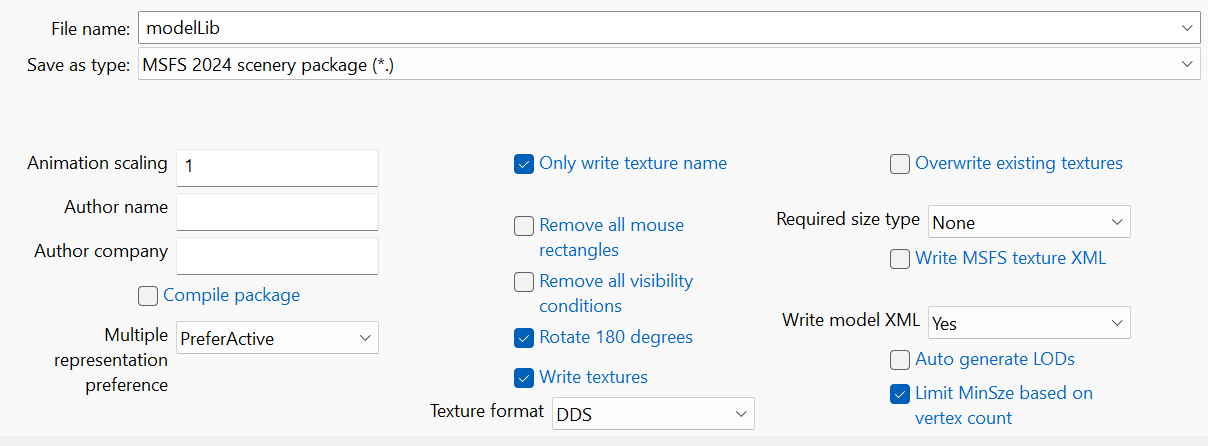
1776794921448.png
 
Are these ground polygons part of the modellib as well?
 
Hi Arno,

Re-reading my post I believe I wasn’t accurate on it.

The ground textures (asphalt and concrete) themselves are png’s, converted to ktx2 format by MCX. The issue is not with the textures, but with objects representing aprons, runways, taxiways, etc. all ground based. All these objects are part of the modellib.

Any other objects, such as tower, buildings, etc. are placed correctly.
 
Last edited:
If you convert the package all objects and placement information is converted. So I am not sure why some objects are not placed correctly while others are. Can you post a screenshot of the issue?
 
Back
Top