

- Messages
- 67
- Country

Can't override default airport background -- SOLVED
On my first airport, I had problems with enlarging the airport background and then surrounding it with an even larger land class polygon. I eventually just made the airport background polygon the size of the land class polygon, and deleted the land class polygon. Worked, but the ground texture isn't what I was really hoping for.
I'm now working on my second airport, and I've concluded that I really don't understand the airport background!
I am working on YWRN. The default FSX airport background (as they always do) just surrounds the runways. I've added taxiways and parking spots, so I need to enlarge the airport background. I also want to add my own larger landclass polygon around the airport, to make it blend in with the surrounding countryside better.
I've defined a polygon, and made it the Airport Background type (exclude Autogen). I've defined a larger polygon, and made it the Land Class type. Everything looks just fine in ADEX.
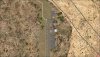
When viewed in FSX, however, my ADEX airport background polygon seems to be restricted to the size and shape of the default FSX airport background. I've attached two screenshots to illustrate. You can see that in ADEX, my airport background completely includes the parking places and aprons. But in FSX, you can see the airport background stops between the taxiway and the parking places (which is where FSX's default airport background stopped).
I should add that my YWRN airport BGL is placed into a folder within Addon Scenery, and it has the highest level within my Scenery Library.
Why didn't my scheme work? I've also uploaded my ad3 file (newly saved with ADEX 1.60) if that helps you help me!
Thanks so much!!
On my first airport, I had problems with enlarging the airport background and then surrounding it with an even larger land class polygon. I eventually just made the airport background polygon the size of the land class polygon, and deleted the land class polygon. Worked, but the ground texture isn't what I was really hoping for.
I'm now working on my second airport, and I've concluded that I really don't understand the airport background!
I am working on YWRN. The default FSX airport background (as they always do) just surrounds the runways. I've added taxiways and parking spots, so I need to enlarge the airport background. I also want to add my own larger landclass polygon around the airport, to make it blend in with the surrounding countryside better.
I've defined a polygon, and made it the Airport Background type (exclude Autogen). I've defined a larger polygon, and made it the Land Class type. Everything looks just fine in ADEX.
When viewed in FSX, however, my ADEX airport background polygon seems to be restricted to the size and shape of the default FSX airport background. I've attached two screenshots to illustrate. You can see that in ADEX, my airport background completely includes the parking places and aprons. But in FSX, you can see the airport background stops between the taxiway and the parking places (which is where FSX's default airport background stopped).
I should add that my YWRN airport BGL is placed into a folder within Addon Scenery, and it has the highest level within my Scenery Library.
Why didn't my scheme work? I've also uploaded my ad3 file (newly saved with ADEX 1.60) if that helps you help me!
Thanks so much!!
Attachments

Last edited:


