• Which the release of FS2020 we see an explosition of activity on the forun and of course we are very happy to see this. But having all questions about FS2020 in one forum becomes a bit messy. So therefore we would like to ask you all to use the following guidelines when posting your questions:

    • Tag FS2020 specific questions with the MSFS2020 tag.
    • Questions about making 3D assets can be posted in the 3D asset design forum. Either post them in the subforum of the modelling tool you use or in the general forum if they are general.
    • Questions about aircraft design can be posted in the Aircraft design forum
    • Questions about airport design can be posted in the FS2020 airport design forum. Once airport development tools have been updated for FS2020 you can post tool speciifc questions in the subforums of those tools as well of course.
    • Questions about terrain design can be posted in the FS2020 terrain design forum.
    • Questions about SimConnect can be posted in the SimConnect forum.

    Any other question that is not specific to an aspect of development or tool can be posted in the General chat forum.

    By following these guidelines we make sure that the forums remain easy to read for everybody and also that the right people can find your post to answer it.

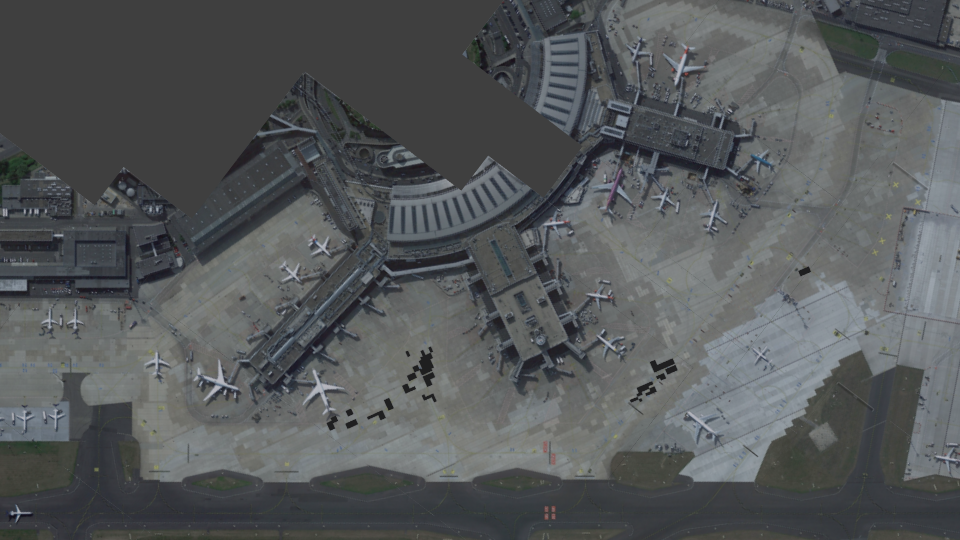
Düsseldorf Airport

So what I've done today is make a raster of google earth images (images made in 3-2016 according to google) to have an accurate, sharp and up to date layout of the tarmac to model with... works pritty well actually (thanks for earth pro I guess, which is now free BTW)

55.png


(already layout the patches of asphalt within the concrete apron)
 
Was SBuilder giving an older image while Google Earth Pro was giving the newer version? I've never use GE Pro before, any benefits to start using it? I usually just use SBuilder and the web browser version of Google Maps.
 
Was SBuilder giving an older image while Google Earth Pro was giving the newer version? I've never use GE Pro before, any benefits to start using it? I usually just use SBuilder and the web browser version of Google Maps.

Yes. GE pro gave me more up to date images in this case, so it was usefull to take the images from GE pro. Thgough it is a lot of work to lay everything out, I think it was worth it in this instance.
 
Hallo,
bitte vergiss nicht das De-Icing Pad east und west ;)
 

Attachments

  • image.png
    image.png
    1,012.7 KB · Views: 544
  • image.png
    image.png
    1 MB · Views: 493
Do you have the GE PRO plugin for Sbuilder or i didnt understand :D

No I used GE Pro as I can no longer find an up to date Sbuilder GE plugin. What GE Pro (name suggests it's payware but it actually is free since a couple of years) allows me to do, over what GE does, is allow me to make images from what I zoom in on with a max resolution of 4800 by 2737 pixels. If I then make images with consistant zoom and a 90 degree angle I can map it when import them in Blender, works like a charm.

Hallo,
bitte vergiss nicht das De-Icing Pad east und west ;)

Wird ich bestimmt nicht vergessen ;)
 
I don't like static planes in sceneries, but it looks okay regardless.
 
Well I could make it optional in the installer.

If you don't want to do an installer, simply put them into a separate .bgl and make sure that theres a suitable ADEX file that has real parking positions in place of the static aircraft. That way, everybody wins.
 
I'd lose the AO on the fuselage, those grey stripes are ruining the model... The model itself is excellent (although the shape of the engines seems a bit off)
 
If you don't want to do an installer, simply put them into a separate .bgl and make sure that theres a suitable ADEX file that has real parking positions in place of the static aircraft. That way, everybody wins.

I think I can make that happen ;)


Good Job F747 :)

Thanks Marc!

I'd lose the AO on the fuselage, those grey stripes are ruining the model... The model itself is excellent (although the shape of the engines seems a bit off)


okay, well take a look at this:

  • AO fixed
  • Engines replaced by CFMs (as inherited by Lufthansa)
  • Textured the shadow, in order to get the same result in FSX
Looks a bit better IMO

61.png


62.png
 
I just need to retouch the textures a bit (adding a light bloom for instance and ofcourse nigth textures) and then I'll be on to the next static, probably a B737 or an A320 (with a different paint scheme ofcourse)
 
Back
Top