• Which the release of FS2020 we see an explosition of activity on the forun and of course we are very happy to see this. But having all questions about FS2020 in one forum becomes a bit messy. So therefore we would like to ask you all to use the following guidelines when posting your questions:

    • Tag FS2020 specific questions with the MSFS2020 tag.
    • Questions about making 3D assets can be posted in the 3D asset design forum. Either post them in the subforum of the modelling tool you use or in the general forum if they are general.
    • Questions about aircraft design can be posted in the Aircraft design forum
    • Questions about airport design can be posted in the FS2020 airport design forum. Once airport development tools have been updated for FS2020 you can post tool speciifc questions in the subforums of those tools as well of course.
    • Questions about terrain design can be posted in the FS2020 terrain design forum.
    • Questions about SimConnect can be posted in the SimConnect forum.

    Any other question that is not specific to an aspect of development or tool can be posted in the General chat forum.

    By following these guidelines we make sure that the forums remain easy to read for everybody and also that the right people can find your post to answer it.

MSFS20 Distrorted textures

Messages
37
Country
belgium
I've been trying to figure out why this happens for a while.
Why are my textures being distorted like this?


It looks fine in SketchUp and MCX, but once it is in the sim it looks like this.

Note, the facade you see here are 3 faces, since overal the building is circular.
I positioned one texture and then copy/pasted the texture with the pipet.

In the console I do get one warning (well, the same for each texture):
VFS Bitmap Loader | Can not find 'vfs://.......PNG.DDS' for reloading.
Obviously the dots are a filepath.


I don't know where to actually post this, since I don't know where it's going wrong.
Is it in SketchUp, MCX or MSFS?
I posted this on the MSFS forum too, but only got a reply from someone who's experiencing the same:
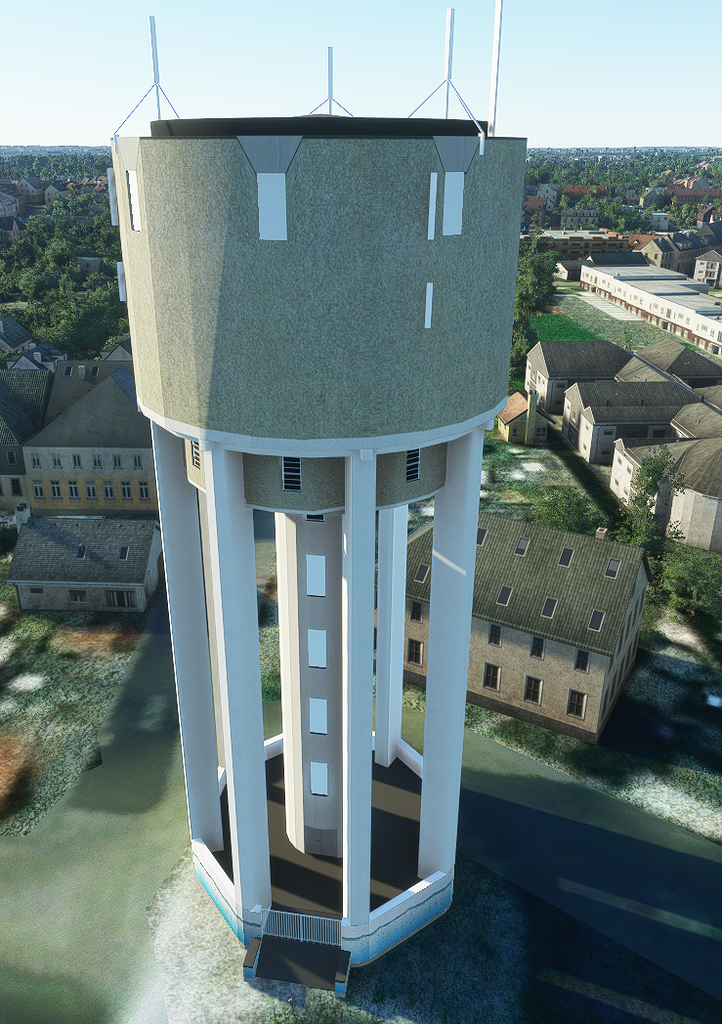
 
To me it looks like a problem with the UV map maybe? Did you check that all faces are properly unwrapped and their shape on the UV map is correct?
 
You can try triangulating the faces in SketchUP (not familiar with the program myself). This will force the progam to draw in triangles and any poor UV mapping should become more apparent. It's possible you have vertices that are not in the corners or not properly welded together. Stuff that looks fine in your 3D modelling but is not cleanly built and falls apart in another program (ie the game).
 
Hi,

Are you repeating the texture a lot on those faces? In MSFS the accuracy of the UV coordinates goes down a lot when you tile, which can lead to distortions. If you can avoid repeating the texture that is usually best.
 
Hi,

Are you repeating the texture a lot on those faces? In MSFS the accuracy of the UV coordinates goes down a lot when you tile, which can lead to distortions. If you can avoid repeating the texture that is usually best.
Ew, that sounds horrible. This is a circular building (water tower), so I need the same texture 24 times. So I need 24 times the same texture with a different name?
 
No, you can still use the same texture, but you need to prevent that you repeat it a lot of times on a polygon. You might need to split big polygons into smaller pieces for that.
 
Hello:

You may wish to review info on Aerilius' Make Unique Texture++ plugin Ruby script for Sketchup:


Feel free to open a thread on this in the Sketchup sub-forum if the anomaly persists after baking distortions into texture Materials mapped per Face.

GaryGB
 
Last edited:
I'm getting this on an object built in blender. The .PNG.DDS exists, but it still gets the error. Did you ever work out what caused the issue?
 
No, unfortunately I haven't. I got a bit discouraged after trying to fix it for 2 months. :D
It's fixed by having each texture where it happens as a unique one. But I don't think that's a good solution as it rapidly increases file size and it's messy.
 
No, unfortunately I haven't. I got a bit discouraged after trying to fix it for 2 months. :D
It's fixed by having each texture where it happens as a unique one. But I don't think that's a good solution as it rapidly increases file size and it's messy.
Hmmm, OK that's a bummer. The workaround might work for the model I'm working on, it's not got a ton of textures, so I'll give it a go.
 
Hmmm, OK that's a bummer. The workaround might work for the model I'm working on, it's not got a ton of textures, so I'll give it a go.
Can you post a Screenshot of the issue then someone might be able to track down the problem.
 
I'd love to, but when I try to attach a JPG, I get a security error. Here's my problem described without images.

OK, here's an example. I want to create a sign for the front of my hangar. The sign is just a cube in blender with a single texture image. When I try to compile it in my MSFS scene, it gets the error "VFS Bitmap Loader | Can not find 'vfs://racair-airport-ympa/scenery/TEXTURE/RACAIR-YMPA-SIGN-LOGO.PNG.DDS' for reloading." but the screenshot shows that the file has been created.
 
I'd love to, but when I try to attach a JPG, I get a security error. Here's my problem described without images.

OK, here's an example. I want to create a sign for the front of my hangar. The sign is just a cube in blender with a single texture image. When I try to compile it in my MSFS scene, it gets the error "VFS Bitmap Loader | Can not find 'vfs://racair-airport-ympa/scenery/TEXTURE/RACAIR-YMPA-SIGN-LOGO.PNG.DDS' for reloading." but the screenshot shows that the file has been created.
Do you use the compiler from within the developer mode in the Sim? That gives you tons of misleading error messages that have nothing to do with the actual process. I always use the fspackagetool.exe found in the sdk/tools/bin folder. If you get an error message there then something actually went wrong. If it says 0 failed than all went well. Do you see your model and texture inside the aim displayed correctly and only worry about the error message or does your texture not show up correctly. If you want you can PM me your blend file and texture and I can see if I can get it to work
 
Do you use the compiler from within the developer mode in the Sim? That gives you tons of misleading error messages that have nothing to do with the actual process. I always use the fspackagetool.exe found in the sdk/tools/bin folder. If you get an error message there then something actually went wrong. If it says 0 failed than all went well. Do you see your model and texture inside the aim displayed correctly and only worry about the error message or does your texture not show up correctly. If you want you can PM me your blend file and texture and I can see if I can get it to work
Thanks for taking the time to help - I'm just a beginner with all this, so I didn't even know about fspackagetool.exe! Anyway, I compiled it using the -rebuild option, and it worked! Looks like it's back to the command line for compiling - do I need to exit the sim if I re-compile a project, or is closing & re-opening enough?

Also, it's saying 1 failed, but that seems to be related to a missing thumbnail, so probably not important? At least my model is showing up in the objects list now!

Thanks again!
 
Last edited:
Thanks for taking the time to help - I'm just a beginner with all this, so I didn't even know about fspackagetool.exe! Anyway, I compiled it using the -rebuild option, and it worked! Looks like it's back to the command line for compiling - do I need to exit the sim if I re-compile a project, or is closing & re-opening enough?

Also, it's saying 1 failed, but that seems to be related to a missing thumbnail, so probably not important? At least my model is showing up in the objects list now!

Thanks again!
To be honest I don't know if you have to exit the Sim I never use the developer mode to build a package I always do it off-sim. But you could just give it a try I guess
 
Back
Top