

I've been trying to figure out why this happens for a while.
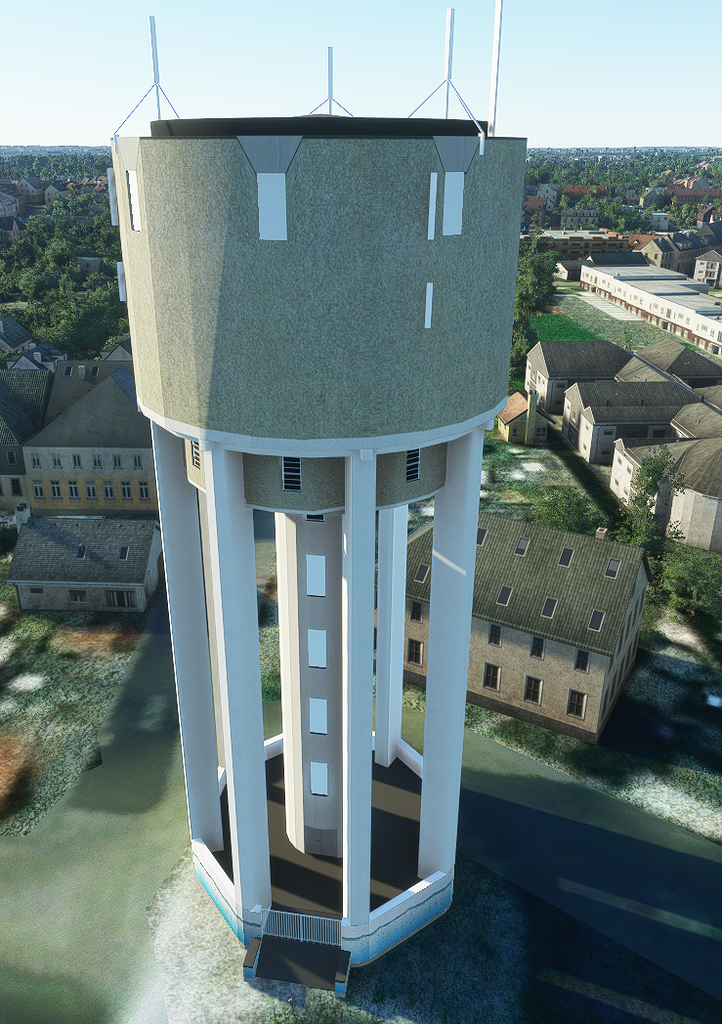
Why are my textures being distorted like this?
It looks fine in SketchUp and MCX, but once it is in the sim it looks like this.
Note, the facade you see here are 3 faces, since overal the building is circular.
I positioned one texture and then copy/pasted the texture with the pipet.
In the console I do get one warning (well, the same for each texture):
VFS Bitmap Loader | Can not find 'vfs://.......PNG.DDS' for reloading.
Obviously the dots are a filepath.
I don't know where to actually post this, since I don't know where it's going wrong.
Is it in SketchUp, MCX or MSFS?
I posted this on the MSFS forum too, but only got a reply from someone who's experiencing the same:
 forums.flightsimulator.com
Why are my textures being distorted like this?
It looks fine in SketchUp and MCX, but once it is in the sim it looks like this.
Note, the facade you see here are 3 faces, since overal the building is circular.
I positioned one texture and then copy/pasted the texture with the pipet.
In the console I do get one warning (well, the same for each texture):
VFS Bitmap Loader | Can not find 'vfs://.......PNG.DDS' for reloading.
Obviously the dots are a filepath.
I don't know where to actually post this, since I don't know where it's going wrong.
Is it in SketchUp, MCX or MSFS?
I posted this on the MSFS forum too, but only got a reply from someone who's experiencing the same:
Missing texture and distorted texture
Hey, I’m building some landmarks for my local city. I imported the watertower and have some issues with the textures: As you can see some of the windows are missing. All missing windows are the same texture. The ones you can see are a different texture. The strange things is, there is one...
forums.flightsimulator.com


