
-
Which the release of FS2020 we see an explosition of activity on the forun and of course we are very happy to see this. But having all questions about FS2020 in one forum becomes a bit messy. So therefore we would like to ask you all to use the following guidelines when posting your questions:
- Tag FS2020 specific questions with the MSFS2020 tag.
- Questions about making 3D assets can be posted in the 3D asset design forum. Either post them in the subforum of the modelling tool you use or in the general forum if they are general.
- Questions about aircraft design can be posted in the Aircraft design forum
- Questions about airport design can be posted in the FS2020 airport design forum. Once airport development tools have been updated for FS2020 you can post tool speciifc questions in the subforums of those tools as well of course.
- Questions about terrain design can be posted in the FS2020 terrain design forum.
- Questions about SimConnect can be posted in the SimConnect forum.
Any other question that is not specific to an aspect of development or tool can be posted in the General chat forum.
By following these guidelines we make sure that the forums remain easy to read for everybody and also that the right people can find your post to answer it.
You are using an out of date browser. It may not display this or other websites correctly.
You should upgrade or use an alternative browser.
You should upgrade or use an alternative browser.
What is the furthest distance from an airport terrain/scenery can be added
- Thread starter jgarnold
- Start date

Hi John:
MSFS RTM default was coded so that certain scenery objects were only able to be displayed within the test radius of an Airport Reference Point (aka "ARP").
Dick has previously tested expanding the ARP Test Radius from its FS2Kx default of 5 Kilometers to 50 Kilometers for MSFS to enable object display when placing scenery content at greater distances from a 'relatively' nearby airport.
https://www.fsdeveloper.com/forum/threads/ade-and-poi-project.452822/
In theory, one can increase the ARP Test Radius to allow placement / display of objects at greater distances from a particular MSFS BGL containing airport code.
BTW: There was FS Community opposition to the MSFS RTM restriction of certain scenery content to being allowed display "only within the context of airport XML code".
Subsequently, certain scenery content was allowed display independent of the context of airport XML code..
AFAIK, the original 'intent' of ARP-linked display control as authored by ACES may have only pertained to FS2Kx objects placed by BGLs containing "airport" code, or more specifically objects from the default FS airport objects scenery library files.
But, IIUC, ultimately object display is controlled by Geographic extents coded in the headers of BGLs, and local 3D world Quad / Octet context-related LOD / MIPMAP switching as a function of run time Z-sorting object distance and calculated extent of local object vertex geometry (whether visibly textured or not) from the user A/C camera within the domain of its "Aircraft Z-Test Radius" (which is diamond-shaped when visualized in top-down view).
That "Aircraft Z-Test Radius" is further linked to the "Visual Display Radius" which controls display of scenery content in concentric rings of Quad / Octet related LOD / MIPMAP switching in the area surrounding the user A/C camera position of the FS 3D world at run time.
Thus, I am inclined to believe there is now a way in MSFS to place certain objects independent of the context of airport XML code which would not be subject to limitation by ARP Test Radius.
Perhaps Dick might be willing to post (or link to) an example of scenery objects placed using code that is not subject to the display restrictions imposed by an Airport Test Radius ?
GaryGB
MSFS RTM default was coded so that certain scenery objects were only able to be displayed within the test radius of an Airport Reference Point (aka "ARP").
Dick has previously tested expanding the ARP Test Radius from its FS2Kx default of 5 Kilometers to 50 Kilometers for MSFS to enable object display when placing scenery content at greater distances from a 'relatively' nearby airport.
https://www.fsdeveloper.com/forum/threads/ade-and-poi-project.452822/
In theory, one can increase the ARP Test Radius to allow placement / display of objects at greater distances from a particular MSFS BGL containing airport code.
BTW: There was FS Community opposition to the MSFS RTM restriction of certain scenery content to being allowed display "only within the context of airport XML code".
Subsequently, certain scenery content was allowed display independent of the context of airport XML code..
AFAIK, the original 'intent' of ARP-linked display control as authored by ACES may have only pertained to FS2Kx objects placed by BGLs containing "airport" code, or more specifically objects from the default FS airport objects scenery library files.
But, IIUC, ultimately object display is controlled by Geographic extents coded in the headers of BGLs, and local 3D world Quad / Octet context-related LOD / MIPMAP switching as a function of run time Z-sorting object distance and calculated extent of local object vertex geometry (whether visibly textured or not) from the user A/C camera within the domain of its "Aircraft Z-Test Radius" (which is diamond-shaped when visualized in top-down view).
That "Aircraft Z-Test Radius" is further linked to the "Visual Display Radius" which controls display of scenery content in concentric rings of Quad / Octet related LOD / MIPMAP switching in the area surrounding the user A/C camera position of the FS 3D world at run time.
Thus, I am inclined to believe there is now a way in MSFS to place certain objects independent of the context of airport XML code which would not be subject to limitation by ARP Test Radius.
Perhaps Dick might be willing to post (or link to) an example of scenery objects placed using code that is not subject to the display restrictions imposed by an Airport Test Radius ?
GaryGB
Last edited:

=rk=
Resource contributor
- Messages
- 4,702
- Country

I have placed scenery objects many hundreds of miles from an airport, I have increased airport radius by 5000 meters to cover an entire island, to allow the restricted objects and I have placed polygons 600 miles from an airport scenery, although that was in a previous project that I never published.

- Messages
- 1,821
- Country

Thanks Gary and Rick.
Good to know.
I was just about to try and remove my post/question as I achieved placing a model quite a distance from my airport (see image bel;ow)
A project I started 2 years ago and which I wanted to add a nearby island (for VFR) I achieved using ADE as I had no idea how to use devmode then. I located the correct area to place my satellite imagery model by creating an image from Google maps and overlaying that (add image) to determine where to 'drop' my (island) model.
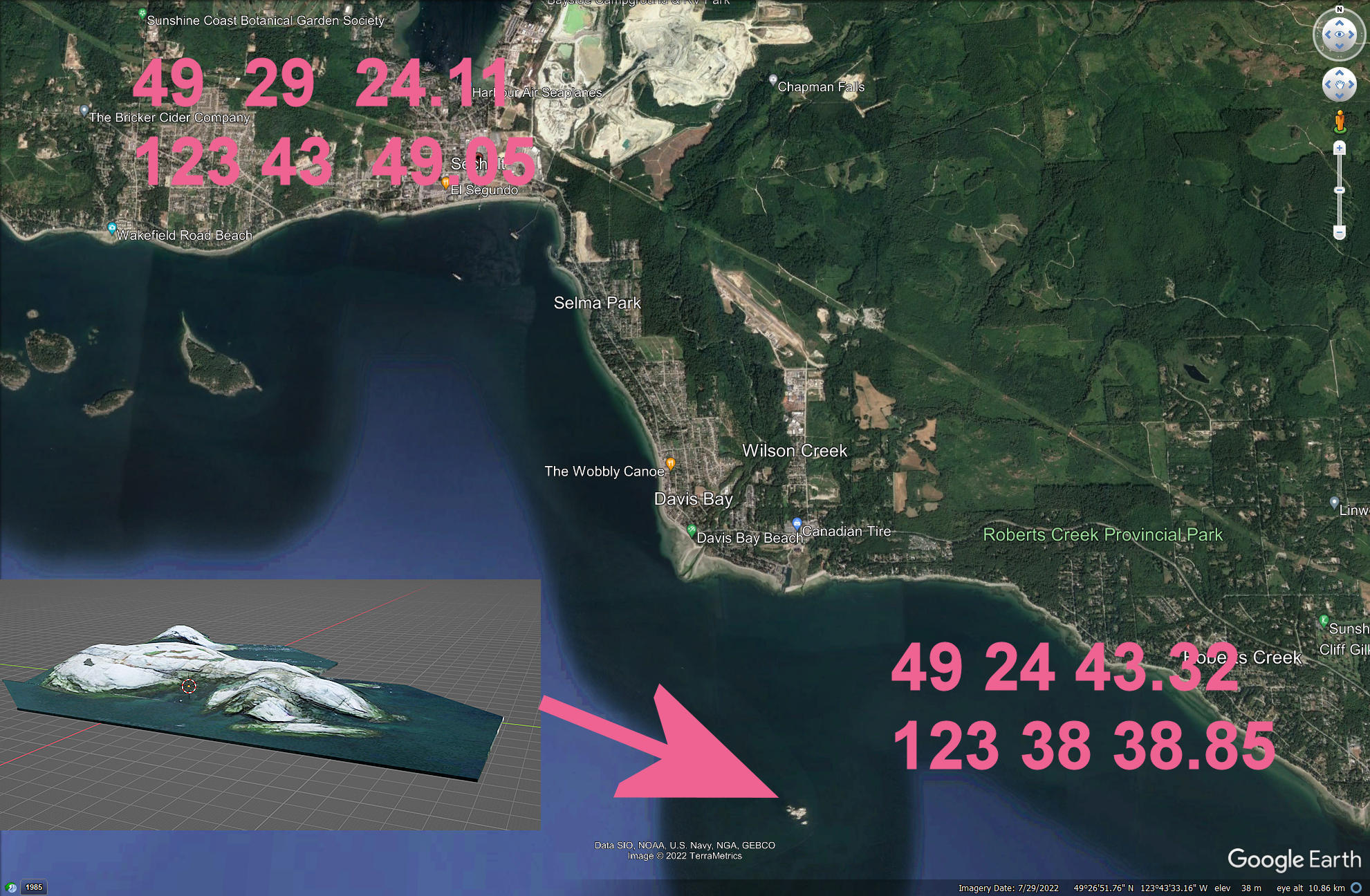
Good to know.
I was just about to try and remove my post/question as I achieved placing a model quite a distance from my airport (see image bel;ow)
How did you do that Rick? I mean how did you 'move' to an area so far away. I only know how to start at an airport and then 'slew' to another place. I assume you know how to 'move' to co-ordinates.I have placed scenery objects many hundreds of miles from an airport,
A project I started 2 years ago and which I wanted to add a nearby island (for VFR) I achieved using ADE as I had no idea how to use devmode then. I located the correct area to place my satellite imagery model by creating an image from Google maps and overlaying that (add image) to determine where to 'drop' my (island) model.
- Messages
- 1,821
- Country
YES but how do you know where to go (north, south east or west and how far)? Co-ordinates, visual recognition of the area? Taking my island for example how can I know I am the correct location when all around is ocean or can an image like I used be used in devmode?
- Messages
- 1,821
- Country
Hey guys to (perhaps) save creating a new thread/question which will (perhaps) display my noobie like features could someone please explain what the strange noise is in the short video clip attached here. The noise I feel maybe coming from Discord even though I have set it up to prevent notifications as it (occasional noise) only ever starts up after I have started MSFS2020 (and before I even start a flight) and is heard haphazardly.
Any ideas and if so how do I stop it as it is very annoying?
Any ideas and if so how do I stop it as it is very annoying?
Attachments
Hi John:
Is this something that shows SE of Roberts Creek during low tide at Georgia Strait ?
But, if, IIUC, that is a intended placement for White Islets SE of Davis Bay (not SE of Roberts Creek), the coordinates require correction.
FYI: The decimal coordinates of what you show above are: 49.412033333333333333333333333333,-123.644125.
NOTE: One must include a " - " charcter to designate West Longitude ...when a coordinate format does not contain a W or E designation
The correct coordinates for White Islets are: 49.418002,-123.712415 (aka "49.418002N°,123.712415W°"
In SBuilderX > View > Go To Position, using tileservers at your original coordinates above: 49.418002,-123.712415:
* Google Satellite / MS Virtual Earth imagery does not show a rocky formation
* ArcGIS World Imagery shows a seaplane by a small blurry area that 'may' be submerged rocks, but I have not checked local nautical maps.
PS: Instead of MSFS default HUD view, I display FS2Kx legacy on-screen flight parameters via "Shift-Z-stats" add-in for MSFS:
https://flightsim.to/file/16358/shift-z-stats
Note as well that there are several MSFS utilities that can control Slew Rate via Sim Rate: ex: https://github.com/Elephant42/FS_Tool
Otherwise, one may control Sim Rate via the MSFS default Key mapping.
GaryGB
Is this something that shows SE of Roberts Creek during low tide at Georgia Strait ?
But, if, IIUC, that is a intended placement for White Islets SE of Davis Bay (not SE of Roberts Creek), the coordinates require correction.
FYI: The decimal coordinates of what you show above are: 49.412033333333333333333333333333,-123.644125.
NOTE: One must include a " - " charcter to designate West Longitude ...when a coordinate format does not contain a W or E designation
The correct coordinates for White Islets are: 49.418002,-123.712415 (aka "49.418002N°,123.712415W°"
In SBuilderX > View > Go To Position, using tileservers at your original coordinates above: 49.418002,-123.712415:
* Google Satellite / MS Virtual Earth imagery does not show a rocky formation
* ArcGIS World Imagery shows a seaplane by a small blurry area that 'may' be submerged rocks, but I have not checked local nautical maps.
PS: Instead of MSFS default HUD view, I display FS2Kx legacy on-screen flight parameters via "Shift-Z-stats" add-in for MSFS:
https://flightsim.to/file/16358/shift-z-stats
Note as well that there are several MSFS utilities that can control Slew Rate via Sim Rate: ex: https://github.com/Elephant42/FS_Tool
Otherwise, one may control Sim Rate via the MSFS default Key mapping.
GaryGB
Last edited:
- Messages
- 1,821
- Country
Thanks Gary.
The co-ordinates you see in my image are those for the top left and bottom right of the image for placement of the image as an overlay in ADE AND I was just lazy not including tghe minus sigh in front of the longitude co-ordinates. I diod NOT intend to 'publish' that image for others it was merely created for myself.
I don't think SBX works for MSFS.
The satellite image I took (for my model) was from maps.google.com and videos and still I have found on the internet shows it also as a rocky outcrop complete with sea lions and some type of warning light/beacon (doesn't look like a lighthouse).

The co-ordinates you see in my image are those for the top left and bottom right of the image for placement of the image as an overlay in ADE AND I was just lazy not including tghe minus sigh in front of the longitude co-ordinates. I diod NOT intend to 'publish' that image for others it was merely created for myself.
I don't think SBX works for MSFS.
The satellite image I took (for my model) was from maps.google.com and videos and still I have found on the internet shows it also as a rocky outcrop complete with sea lions and some type of warning light/beacon (doesn't look like a lighthouse).
Thanks Gary.
The co-ordinates you see in my image are those for the top left and bottom right of the image for placement of the image as an overlay in ADE AND I was just lazy not including the minus sign in front of the longitude co-ordinates. I did NOT intend to 'publish' that image for others it was merely created for myself.
So, the area in question here is indeed White Islets.
You should be able to place the 3D model as a part of the airport BGL or other project BGL for CAP3 or CAX3
The satellite image I took (for my model) was from maps.google.com and videos and still I have found on the internet shows it also as a rocky outcrop complete with sea lions and some type of warning light/beacon (doesn't look like a lighthouse).
Remember this thread ?

https://www.fsdeveloper.com/forum/threads/adding-contours-to-a-new-island-created.440835/
John, please feel free to regard the beacon model attached as yours to do with entirely as you wish, (...and no author credit required).
It was just a test of concept / work-flow at that time, and it was never finished.
Some new links:
http://www.explorationguides.com/info/destination-apps/lighthouse-na/bc/
I'll check and see if the local BC LiDAR extends offshore to include the White Islets, and will let you know if you wish to try it in Blender.
I used a local Canada 23 Meter DEM (which is terribly low-res) to gauge size / height etc. with images ...in the Sketchup model above.
I don't think SBX works for MSFS.
Actually SBuilderX can still be quite useful for MSFS production... it just does not directly submit source files to MSFS' SDK compiler.
GaryGB
Last edited:
- Messages
- 1,821
- Country
Indeed I do and I also remember it was posted in 2017 before MSFS2020 and I remember creating Poise Island (in Porpoise Bay) using SBX as it was missing in FSX. Thankfully it exists in MSFS as do the Trail Islands on the other side of Sechelt which also were missing in FSX. I used SBX for that which AFAIK is unsuitable for MSFS2020.Remember this thread ?
Thanks for the link. I was hoping it included a better image of the light but now I can see the frequency so will add that to my very simple model of it (no one will ever see it close up unless they have a floatplane and land there

I do have a video (I usually search Youtube) which shows that there is a solar panel on the structure which I probably won't model for the same reason as above. I don't have a lot of detail in any model I create for 2 reasons (more polys and who will see the detail anyway).
- Messages
- 1,821
- Country
Hi GaryJohn, please feel free to regard the beacon model attached as yours to do with entirely as you wish, (...and no author credit required).
I don't see the attachment.
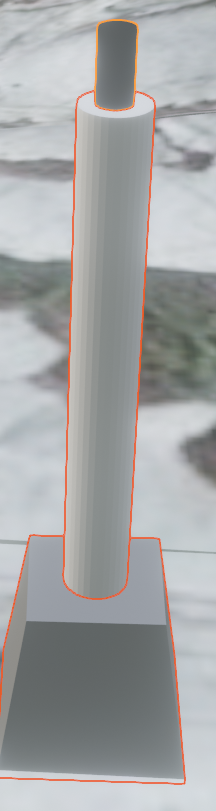
I now also note that the tower is 10.7 meters and the light has a range of 6 km although I don't know if that can be factored in with an MSFS model (light) AND that it has a metal ladder (for maintenance I guess) which I also may not add to my model for the same reasons above. Using the height I can more accurately calculate the dimenions of the plynth and diameter of the tower. Thanks again.
I will try to find out how SBX can be used as a assisting tool
.
Hi John:
I am still searching for the beacon model among numerous drafts of the terrain model.
To my dismay, when I un-hide all objects in the Sketchup files containing the terrain prototypes, the beacon is not seen.
I'll keep searching after I check the local LiDAR Elevation extent tomorrow.
GaryGB
I am still searching for the beacon model among numerous drafts of the terrain model.
To my dismay, when I un-hide all objects in the Sketchup files containing the terrain prototypes, the beacon is not seen.
I'll keep searching after I check the local LiDAR Elevation extent tomorrow.
GaryGB
- Messages
- 1,821
- Country
That's ok Gary. I have created a simple model based on what I see in images and videos and as mentioned before generally it will be viewed from such a distance as no one will know how accurate or inaccurate it is. It is only 10.7 meters tall (on a rocky outcrop 140 metres long x 60 meters wide) so if anyone wants to zoom in close enough to see inaccuracies then I would be happy to incorporate their model 
Indeed I do and I also remember it was posted in 2017 before MSFS2020 and I remember creating Poise Island (in Porpoise Bay) using SBX as it was missing in FSX. Thankfully it exists in MSFS as do the Trail Islands on the other side of Sechelt which also were missing in FSX. I used SBX for that which AFAIK is unsuitable for MSFS2020.
I will try to find out how SBX can be used as a assisting tool.
Hi John:
Your local White Islets project looks good.
When I get some time again, I'll test making a MSFS terrain surface as a "sloped G-Poly" (...output as a MSFS "sloped flatten").
I hope to do this via input from GIS source data in a ESRI Shape (*.SHP) file format as well.
PS: You may recall we discussed how one might use SBuilderX to output scenery content as ESRI Shape (*.SHP) files that can be incorporated into MSFS project data files as "Primitive" Polygons, that become validated into a MSFS compatible format when the internal *.SHP file 'Attribute set" is written into the *.SHP file via MSFS DevMode GUI Properties dialog for any Polygon type to be used:
https://www.fsdeveloper.com/forum/threads/having-trouble-creating-shp-file.456127/
https://www.fsdeveloper.com/forum/t...evation-of-default-terrain.456363/post-909918
GaryGB
Last edited:
- Messages
- 1,821
- Country
Hi Gary,
Indeed I do remember you mentioning that certain things could be done in SBX and incorporated into MSFS however I did not try that out as I am rather 'slow' now and up to my ears trying to achieve other things. At present that is to created flashing lights using an emissive material. Mamu suggested that I use animation and 'hide' the emissive mesh when I want the light off which works but I have now discovered that in Blender you can also use animation of the 'strength' of the emission (and also the color) but have yet to test if that exports to MSFS. Refer https://www.fsdeveloper.com/forum/t...ing-light-using-animation.456460/#post-910707
I do wish you a very Happy Christmas with lots of 'good cheer' (whatever you want to make of that) and much success in whatever you do in 2023.
Indeed I do remember you mentioning that certain things could be done in SBX and incorporated into MSFS however I did not try that out as I am rather 'slow' now and up to my ears trying to achieve other things. At present that is to created flashing lights using an emissive material. Mamu suggested that I use animation and 'hide' the emissive mesh when I want the light off which works but I have now discovered that in Blender you can also use animation of the 'strength' of the emission (and also the color) but have yet to test if that exports to MSFS. Refer https://www.fsdeveloper.com/forum/t...ing-light-using-animation.456460/#post-910707
I do wish you a very Happy Christmas with lots of 'good cheer' (whatever you want to make of that) and much success in whatever you do in 2023.
Hi John:
Just a quick FYI regarding the option for "animation of the 'strength' of the emission (and also the color)".
Prior to SU10, my AMD video card was not able to display the Green flash phase of the default MSFS airport beacon unless Bloom was on.
Since SU10, my AMD video card is now able to display the Green flash phase of the default MSFS airport beacon even if Bloom is off.
Possibly Asobo changed the animation methods used to implement Green and White flash phases of the default MSFS airport beacon ?
Perhaps in the future we may also see a MSFS version of FS2Kx' default "translucent 3D light cone" (rotating) civilian airport beacon.
I have been pleased to see the many interesting insights arising from- and work-flow solutions implemented for- challenges you encountered in your project(s), and I think that through your open discussions, perseverance, and innovation, they have contributed rather well to the knowledge base for working with MSFS here at FS Developer.
Happy Holidays, and I look forward to reading about / discussing your additional interesting developments in the coming New Year.
GaryGB
Just a quick FYI regarding the option for "animation of the 'strength' of the emission (and also the color)".
Prior to SU10, my AMD video card was not able to display the Green flash phase of the default MSFS airport beacon unless Bloom was on.
Since SU10, my AMD video card is now able to display the Green flash phase of the default MSFS airport beacon even if Bloom is off.
Possibly Asobo changed the animation methods used to implement Green and White flash phases of the default MSFS airport beacon ?
Perhaps in the future we may also see a MSFS version of FS2Kx' default "translucent 3D light cone" (rotating) civilian airport beacon.
I have been pleased to see the many interesting insights arising from- and work-flow solutions implemented for- challenges you encountered in your project(s), and I think that through your open discussions, perseverance, and innovation, they have contributed rather well to the knowledge base for working with MSFS here at FS Developer.
Happy Holidays, and I look forward to reading about / discussing your additional interesting developments in the coming New Year.
GaryGB
Last edited:
- Messages
- 8
- Country

Merry Christmas Rick and many thanks for all your informative posts.I have placed scenery objects many hundreds of miles from an airport, I have increased airport radius by 5000 meters to cover an entire island, to allow the restricted objects and I have placed polygons 600 miles from an airport scenery, although that was in a previous project that I never published.