• Which the release of FS2020 we see an explosition of activity on the forun and of course we are very happy to see this. But having all questions about FS2020 in one forum becomes a bit messy. So therefore we would like to ask you all to use the following guidelines when posting your questions:

    • Tag FS2020 specific questions with the MSFS2020 tag.
    • Questions about making 3D assets can be posted in the 3D asset design forum. Either post them in the subforum of the modelling tool you use or in the general forum if they are general.
    • Questions about aircraft design can be posted in the Aircraft design forum
    • Questions about airport design can be posted in the FS2020 airport design forum. Once airport development tools have been updated for FS2020 you can post tool speciifc questions in the subforums of those tools as well of course.
    • Questions about terrain design can be posted in the FS2020 terrain design forum.
    • Questions about SimConnect can be posted in the SimConnect forum.

    Any other question that is not specific to an aspect of development or tool can be posted in the General chat forum.

    By following these guidelines we make sure that the forums remain easy to read for everybody and also that the right people can find your post to answer it.

Latest SDK Missing Samples

Messages
1,025
Country
us-florida
Spent hours trying to get a test scenery built, and came to discover the latest SDK has no sample projects and so much stuff is missing. Thankfully I had an old SDK install on an old install of windows on an NVMe drive.

Asobo, great sim, but starting to find some real bugs lately.
 
Last edited:
Spent hours trying to get a test scenery built, and came to discover the latest SDK has no sample projects and so much stuff is missing. Thankfully I had an old SDK install on an old install of windows on an NVMe drive.

Asobo, great sim, but starting to find some real bugs lately.

Hi Dean,
The code you posted in this 3d a couple hours ago compiled just fine,
think that when dealing with bugs in a community, sharing solutions is a way to make the community improve itself

back in topic,
The SDK comes with LOTS of samples, they have different install packages to better manage everyones need (, a full sdk with samples installation takes over 5gb on my HD, without the xbox stuff)
and the sdk documentation, available online too, is improving everyday, strongly suggest to join the also the official Developers Support at https://devsupport.flightsimulator.com/index.html
so you can give the team suggestions on what you would like to find in the SDK
 
Hi Dean:

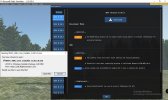
The Orange banner button "SDK Update Available" is confusing and does not show the SDK Docs download.

msfs_sdk_0_20_5_0_core_only_download_via_orange_banner_prompt-jpg.85780


However, the SDK DevMode Menu > Help pull-down menu shows currently available SDK download links. ;)

First install MSFS SDK Core to a default (or custom) Path; then Docs will find that path during its install. :pushpin:

msfs_sdk_devmode_menu_help-jpg.85778


GaryGB
 

Attachments

  • MSFS_SDK_DevMode_Menu_Help.jpg
    MSFS_SDK_DevMode_Menu_Help.jpg
    721 KB · Views: 1,286
  • MSFS_SDK_0_20_5_0_Core_Only_download_via_Orange_banner_prompt.jpg
    MSFS_SDK_0_20_5_0_Core_Only_download_via_Orange_banner_prompt.jpg
    419.2 KB · Views: 1,326
Last edited:
First install MSFS SDK Core to a default (or custom) Path; then Docs will find that path during its install.
Yes it is . The correct order of installation is important. As Gary writes, the installer will not find the paths otherwise.
 
the latest SDK has no sample projects and so much stuff is missing.
The SDK's are not absolute, each version is not intended to be an entire replacement of the previous, they are supplemental, in that only what gets updated, gets changed. If there are no sample projects, it is because because the ones you are supposed to already have, are still current. The fact that the .html documentation does not come with each update shows us, nothing is missing, unless we've deleted it - or isolated it by leaving the previous SDK out of the update loop.

You can make an alias of FSPackagetool.exe, or a desktop icon of it and drop your Project XML onto that to build a package outside DevMode and you can do the Command Line equivalent of same.
 
You can make an alias of FSPackagetool.exe, or a desktop icon of it and drop your Project XML onto that to build a package outside DevMode and you can do the Command Line equivalent of same.
Great!

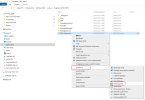
There is another way to compile your project outside of the Scenery Editor. I compile about 50% percent of the packages within the Scenery Editor, the other 50 percent are compiled outside of the Scenery Editor using the FSPackageTool link in the SendTo folder:

fspackagetool_shortcut.jpg

fspackagetool_sendto.jpg
 
Great!

There is another way to compile your project outside of the Scenery Editor. I compile about 50% percent of the packages within the Scenery Editor, the other 50 percent are compiled outside of the Scenery Editor using the FSPackageTool link in the SendTo folder:

View attachment 85781

View attachment 85782
Sweet tip Christian, i use to copy the fspackagetool into every project, your method is certainly better, thanks!!
(Think i'm around 95% fspackagetool Vs in SIM build )

Inviato dal mio Mi 9 Lite utilizzando Tapatalk
 
I still use a batch file to compile without starting MSFS. For Example:
Code:
rmdir "C:\Users\dickl\Desktop\OakCube\_PackageInt" /q /s
rmdir "C:\Users\dickl\Desktop\OakCube\Packages" /q /s

D:\Programs\Steam\steamapps\common\MicrosoftFlightSimulator\FlightSimulator.exe "-I" ; BuildAssetPackages "C:\Users\dickl\Desktop\OakCube\OakCubeProject.xml" "C:\Users\dickl\Desktop\OakCube" "C:\Users\dickl\Desktop\OakCube"

pause
You can simultaneously compile different packages, or compile while the sim is running. The above performs a 'Clean" and then compiles.
 
Or via Windows PowerShell

&"J:\MSFS SDK\Tools\bin\fspackagetool.exe" "project folder\project-name.xml"

Note: fspackgetool.exe with privileges "Run as administrator"

Immagine 2023-01-06 093605 (2).jpg
 
Last edited:
Yeah what happened was an ID10T error on my side on the original compile, the sceneryplacement.xml wasn't saving properly at times. As soon as I located the old samples I had it up in about 10 mins. The house and cars looked way better in Blender so even at 1 million polys, but it looks a bit rough in MSFS. I'll have to see if I can get the full scale 7 million poly house into the sim without breaking anything :p Gray house is my sister's house that I captured with a DJI Mini 2, Map Pilot and used Metashape to generate the 3D model and brought into Blender for clean up work. I should have flown along the fenceline, and these old queenslander houses are quite the challenge compared with modern homes. Was a mini test project to see how far I can take photogrammetry for scenery development.

20230106051211_1.jpg


The SDK downloads, they only have an active link to the most recent version via the sim and assume people have had the SDK since the start of the sim which is a problem I'll raise on the forums, as I've had to rebuild a couple of new rigs over the last couple of years so I need to see if they have the previous SDK versions available via the website.

Thanks for the leads on compiling outside of the sim, wish I had known that two years ago, can't wait to make some new scenery over time. Thankfully for Australia I have long dreamed of high resolution elevation data and maps, and I started my first FS project back in Flight Sim 4.0 back when there was only a USA map, but someone created a blank Australia map that was available on CompuServe. Over the years we eventually got 90m SRTM derived DEM data, but I was shocked after the MSFS Australia update to discover that Asobo has implemented at least 5m DTM data for a lot of Queensland and Australia where the data exists, so now the Glasshouse Mountains look like real and the beaches have sand dunes that are hyper accurate, however due to aerial imagery draping I may go out and shoot one of the peaks at the Glasshouse Mountains and generate a 3D model for the rock faces.

Funny thing is while I was doing contract work for Dovetail Games on FSFS and FSW I wrote up a lot of game design documents (GDD's) pointing in the direction I and many others saw the sim needed to go in. Thankfully I'm no longer under an NDA (It expired in 2018), but almost everything I wrote in the GDD's have been implemented by Asobo, there's basically no enhancements I need to make for my local area other than the 3 airports I learned to fly at and some local scenery objects that are an important part of procedures at YBAF, YAMB and YBOK. There's a few local fixes for the Gold Coast Broadwater and Moreton Island as well, there seems to be a big roll off from the shoreline when it comes to vegetation and a lot of vegetation along the coast in Australia is missing, I'm certain it's there in the datasets (Tangalooma Airport is proof of that when you go to generate a vegetation poly to fill it in, as the vegetation pops up once you open up the SDK tools).

One freeware enhancement I want to do is adding water to the everglades in Florida (most of it is currently appearing as land), I can convert the data to XML from a SHP file but when I tried to compile in sim it didn't work, but I may have forgotten to cut the polgons to remove holes. I'm curious if anyone has found a limitation on the size of a vector polygon.

Gary, I did install that SDK core but it doesn't give anything other than these folders:

* Licenses
* Schemas
* SimConnect SDK
* Tools
* WASM
* version.txt

the whole rest of the SDK's are missing, and all the other SDK links in sim don't provide the ability to download :(

Mamu, I apologize for the brevity of the first post, I had written a lot more originally but then found the solution and wiped out what I wrote and gave that short version. In short I discovered trying to build a project via the in sim dev mode without first using a template is a nightmare, it creates strings of folders that are several layers deep. Best to manually develop off a template and text edit.

What had happened after many years was the latest SDK download link only had the most recent download and as above was missing the rest of the SDK. Generating the scenery project inside the sim was a mess, and the project.xml got blown out by the scenerysource.xml coding. I'll have to do up a video tutorial for others because if you step away from the SDK for a couple of years and have to generate a project from scratch it's not fun.

Thanks everyone so much for your support and help, I've been away from dev work for a couple of years since MSFS launched in 2020. Super stoked at the state of the sim now. Asobo has really done an excellent job.

Now if only I could gather a team and re-launch ProjectAI to recreate what we had back in the days of FS2004 but utilizing live traffic it'd be awesome. Kinda bummed AI has taken a back seat and even though a few groups and devs have tried to tackle AI it's not like it was in the days of Ultimate Traffic and ProjectAI.
 
Last edited:
The SDK downloads, they only have an active link to the most recent version via the sim and assume people have had the SDK since the start of the sim which is a problem I'll raise on the forums, as I've had to rebuild a couple of new rigs over the last couple of years so I need to see if they have the previous SDK versions available via the website.
The SDK is always available for download and online browsing.
All I have to do is type "m" and it pops up on my Google, what's that say about me? Probably that I can't remember what I'd gone there read the last time, huh. Anyway, you'd want to consider that when building a new rig, the in game menu is not available until one has already gone ahead and downloaded a full install. Therefore, "the most recent version available in game," will always be an update, for the sake of efficiency. A suggestion that users with directory issues should not have to minimize MSFS in order to download a larger version of the SDK that will fill their HD with redundant data seems awkward.

Now if only I could gather a team and re-launch ProjectAI to recreate what we had back in the days of FS2004 but utilizing live traffic it'd be awesome. Kinda bummed AI has taken a back seat and even though a few groups and devs have tried to tackle AI it's not like it was in the days of Ultimate Traffic and ProjectAI.
AI are fickle fish in MSFS, not at all like FSX, where you could get them to sit up and beg. Using FSX@WAR, like AICarriers on steroids, we could assemble entire convoys, divisions and squadrons. It's funny because we actually have much more control in MSFS, I think it's a matter of priorities. I recently completed a project that used hybridized assets from default Asobo models to provide my custom AI working animations and I think it worked out pretty well. I made a video and there is a link to all that in my sig.
 
The SDK is always available for download and online browsing.
All I have to do is type "m" and it pops up on my Google, what's that say about me? Probably that I can't remember what I'd gone there read the last time, huh. Anyway, you'd want to consider that when building a new rig, the in game menu is not available until one has already gone ahead and downloaded a full install. Therefore, "the most recent version available in game," will always be an update, for the sake of efficiency. A suggestion that users with directory issues should not have to minimize MSFS in order to download a larger version of the SDK that will fill their HD with redundant data seems awkward.


AI are fickle fish in MSFS, not at all like FSX, where you could get them to sit up and beg. Using FSX@WAR, like AICarriers on steroids, we could assemble entire convoys, divisions and squadrons. It's funny because we actually have much more control in MSFS, I think it's a matter of priorities. I recently completed a project that used hybridized assets from default Asobo models to provide my custom AI working animations and I think it worked out pretty well. I made a video and there is a link to all that in my sig.

It's not about the text but rather all the software .exe's are missing and you can't download any previous SDK except 20.5 which only has updated files, not the core SDK. I did find you can download the samples through the help menu and thought I had found the core base SDK's via the help menu but it still only gives the partial 20.5 SDK which is missing all the necessary tools
 
It seems more likely that this link will answer all your questions, than it seems likely that Asobo blocks new developers. The page literally says, "If you have an issue while creating a package then uninstalling and reinstalling the SDK (or installing a previous version of the SDK) will have no effect, as the issue will be with the package itself, and as such you will need to fix the contents of the package." It strongly suggests you should review what tools are missing, as some work with some version of 3d software and some do not. If you stopped using 3ds Max 2019, for example, you likely lost access to many tools.

 
It seems more likely that this link will answer all your questions, than it seems likely that Asobo blocks new developers. The page literally says, "If you have an issue while creating a package then uninstalling and reinstalling the SDK (or installing a previous version of the SDK) will have no effect, as the issue will be with the package itself, and as such you will need to fix the contents of the package." It strongly suggests you should review what tools are missing, as some work with some version of 3d software and some do not. If you stopped using 3ds Max 2019, for example, you likely lost access to many tools.


RK it's got nothing to do with that, it's literally an issue with the SDK not being the Full SDK, you're not listening to me
 
RK it's got nothing to do with that, it's literally an issue with the SDK not being the Full SDK, you're not listening to me
Oh you caught me, you clever sleuth! I just blindly type away sometimes, with no intention of "helping," whatsoever, what a waste, eh? But if you mean because MSFS does not work exactly as you expect and Asobo should fix that, I'd thought you had been kidding. Beyond that, it already IS the full SDK. You'd think if anyone would have noticed, you know, besides you, it would have been Dick. It not like he doesn't know about your concern.
 
Gary, I did install that SDK core but it doesn't give anything other than these folders:

* Licenses
* Schemas
* SimConnect SDK
* Tools
* WASM
* version.txt

the whole rest of the SDK's are missing, and all the other SDK links in sim don't provide the ability to download :(

Oops ! :oops:

I was in a rush the day I posted that, and had not gone back to see what actually installed to the "Core" folder when I launched:

MSFS_SDK_Documentation_Installer_0.20.5.0.msi


All I know is that the "Docs" installer finished running (yikes ...I should have watched what it was doing as it ran o_O).


Indeed the Docs installer did not seem to find- / install what was expected- into the "Core" folder chain I created when I launched:

MSFS_SDK_Core_Installer_0.20.5.0.msi


My apologies for any confusion that may have caused. :duck:


When I get some more free time, I will search my drives to see where any contents of the latest "Docs" MSI file went to.

I'll also try to see what is inside the latest SDK "Core" MSI file.

GaryGB
 
Last edited:
What it does not get, is the 3ds Max 2016 GUID tool and a similar situation happened to me. When I finally got serious and committed to investing in software, I noticed that 3ds Max 2022 did not seem to have the full capacity my "borrowed" copy of 3ds Max 2016 had had. So I looked into it (that had been my "Google" and "M" reference) and found out that indeed, 2016 had been "well equipped," 3ds Max 2019 is similarly enabled and 2020 is not far behind. It's my belief this is more a matter of what tools they manage to get working with any particular version, than it is a matter of limiting functionality and it is all well documented in the SDK, right down to a chart of which versions have each tool. Curiously, all the tools remain available, although 3ds Max 2016 is a rare gem, I've looked. The license activates any version, but Autodesk only archives the past 5 years' worth. So in essence, if anyone withdrew functionality, it had been Autodesk, not Asobo.
 
Ok so the latest SDK no longer has the offline documentation folder, and the samples need to be downloaded separately via the help menu. The issue is when in DEV mode it only gives a link to download the latest SDK version, but when you've come from earlier versions that included the samples it makes it look like there's stuff missing. Now if you update through the help menu that's fine, but they changed the distribution model for the sample files and that created an issue.

Thanks so much Dick for your help, always professional and helpful.
 
Back
Top