• Which the release of FS2020 we see an explosition of activity on the forun and of course we are very happy to see this. But having all questions about FS2020 in one forum becomes a bit messy. So therefore we would like to ask you all to use the following guidelines when posting your questions:

    • Tag FS2020 specific questions with the MSFS2020 tag.
    • Questions about making 3D assets can be posted in the 3D asset design forum. Either post them in the subforum of the modelling tool you use or in the general forum if they are general.
    • Questions about aircraft design can be posted in the Aircraft design forum
    • Questions about airport design can be posted in the FS2020 airport design forum. Once airport development tools have been updated for FS2020 you can post tool speciifc questions in the subforums of those tools as well of course.
    • Questions about terrain design can be posted in the FS2020 terrain design forum.
    • Questions about SimConnect can be posted in the SimConnect forum.

    Any other question that is not specific to an aspect of development or tool can be posted in the General chat forum.

    By following these guidelines we make sure that the forums remain easy to read for everybody and also that the right people can find your post to answer it.

MSFS20 3D Characters sunken into ground

Messages
5
Country
germany
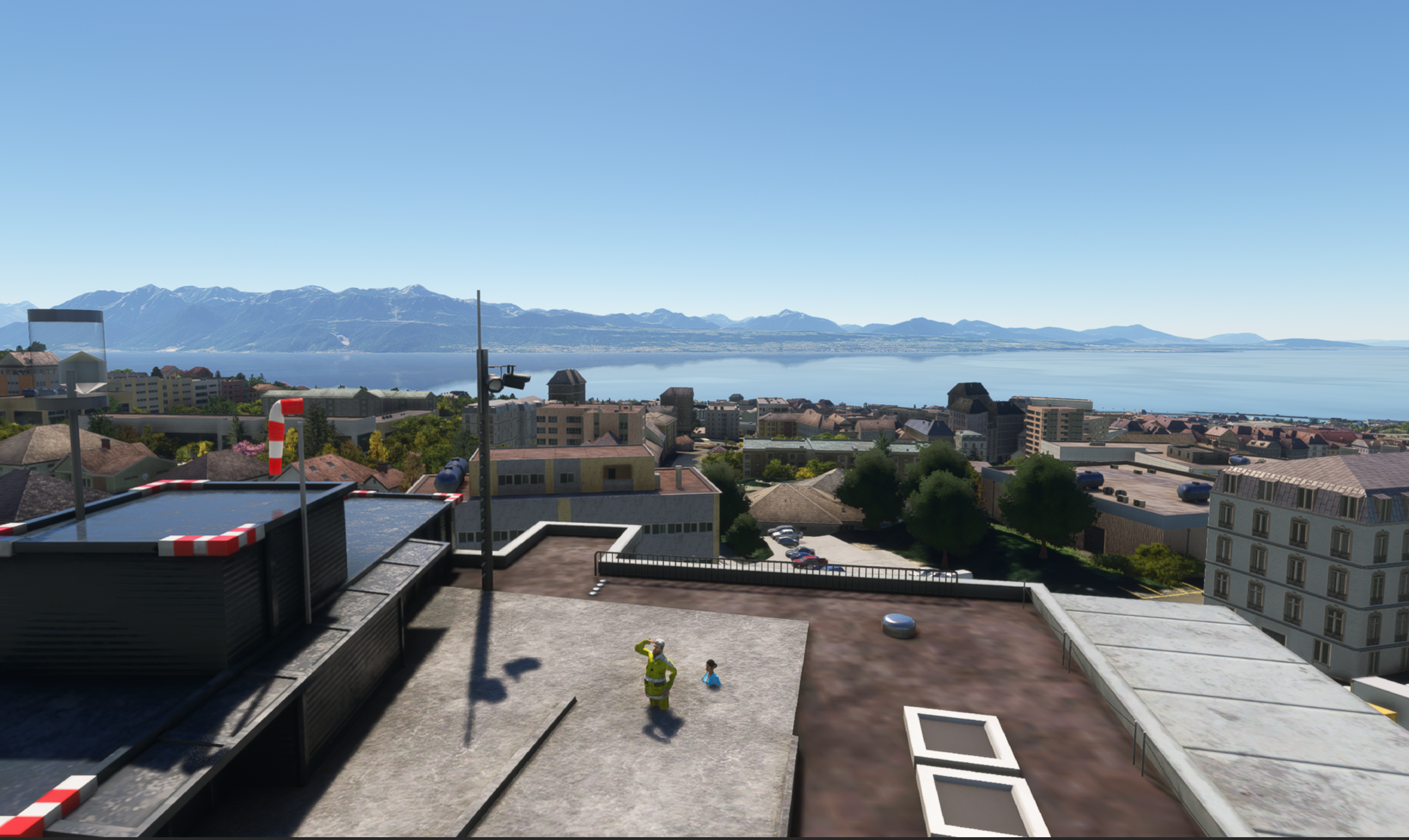
Hi. I have the CHUV Lausanne Scenery an tested it in MSFS2020 and i sadly got a little bug, because the Clinic Personal is sunken into the ground, see the pictures. Is there a way to solve this? For me it would be fine to remove this 2 People. The Developer seems very busy, timeline for solving this maybe takes very long. I think, this must be a little adjustment by someone how has the skills for solving the problem? I have no knowledge of SDK or the developer mode.
Screenshot_2026-03-29_133501.png
Screenshot_2026-03-29_133536.png
 
Please be more specific as to which version of the above cited MSFS 2020 scenery you are referring to:

https://www.google.com/search?q=MSF...4B_wFwgcFMC42LjbIByaACAA&sclient=gws-wiz-serp


IIUC, you may be referring to the payware version on SimMarket, which shows people on the roof at proper AGL elevations:

https://secure.simmarket.com/spinoza-chuv-lausanne-msfs.phtml

295934_chuv08.jpg


If that is correct, do you also have installed, any freeware (especially if using Google-derived "fake" photogrammetry via GEDOT methods) ? :scratchch

For example, either of these:

https://flightsim.to/addon/25433/swiss-hospitals-helipads-v1-1

https://flightsim.to/addon/2516/lausanne-switzerland/1000

https://flightsim.to/addon/52371/lausanne-city

GaryGB
 
Last edited:
Hi. I got the Redwing Version. I got no Freeware Scenery Addon like the one you show me or any other Freeware Photogramic City Addon in this Area. My thought was that the Scenery came out in 2023 and after that there are the world updates 6 and 18 for this regions, maybe the new mesh data for Switzerland change the elevation for this scenery?
 
https://secure.simmarket.com/redwing-sim-chuv-university-hospital-centre-lshv-msfs.phtml

"REDWING scenaries do not ensure compatibility with freeware, add-on modifying general textures and add-on altering elevations."


https://www.flightsimulator.com/world-update-xviii-germany-austria-and-switzerland/

"World Update XVIII provides pilots the highest resolution yet for the stunning scenery of Germany, Austria, and Switzerland!"


The building upon which the Helipads are mounted is on a hill within the local terrain; it is probably Placed using AGL instead of AMSL Altitude.

IMHO, using Arno's MCX, that building must be found and its placement converted to a value AMSL appropriate to the local terrain in MSFS2024.


In MCX, you may also be able to find 3D models of the people sunken into the ramp, then use a proper Altitude AMSL for their current Placement.

https://www.fsdeveloper.com/forum/forums/modelconverterx.87/


See this thread regarding LOD popping of Terrain and SU-11 breaking AGL placement precision:

https://devsupport.flightsimulator.com/t/elevation-offsets-sometimes-ignored-on-loading/5572


I doubt a "Snap To Normal" Property for Placement will work, as the people models are superimposed over a sloped ramp, and the building is on a hill.

https://www.google.com/search?q=MSFS+Property+"Snap+To+Normal"&sca_esv=2eb456f1cafc7d15&source=hp&ei=s5HYaeDqO_ytw8cPgOWsqA0&iflsig=AFdpzrgAAAAAadifxBdd1L9Jd5WJ4ytYMDClahQaR1kF&ved=0ahUKEwigkIKqzeKTAxX81vACHYAyC9UQ4dUDCBY&uact=5&oq=MSFS+Property+"Snap+To+Normal"&gs_lp=Egdnd3Mtd2l6Ih5NU0ZTIFByb3BlcnR5ICJTbmFwIFRvIE5vcm1hbCIyBRAAGO8FMgUQABjvBTIFEAAY7wUyBRAAGO8FMgUQABjvBUjdmgFQlBRYlpEBcAF4AJABAJgBdaAB4wqqAQQxMS40uAEDyAEA-AEC-AEBmAIQoALADagCCsICGhAAGIAEGIoFGLcDGOUCGOcGGOoCGLQCGIoDwgIKEAAYAxiPARjqAsICBhAAGBYYHsICBhAAGAcYHsICCBAAGAgYBxgewgIIEAAYiQUYogTCAggQABiABBiiBJgDIvEFpT_2hjfanK2SBwQ2LjEwoAe7NLIHBDUuMTC4B54NwgcIMi0xLjEwLjXIB_wBgAgB&sclient=gws-wiz

GaryGB
 
Last edited:
Thank you for this analysis and possible workaround. I think my skills are not competent enough for making this changes. I hoped someone can give me a little file that I can put in my community folder that solve the problem. I have something like this for a payware scenery in Corsica at a airport where are static aircraft’s placed that are „in the way“ of the normal positions for the native airline and with this little file from a well known freeware website this static aircraft are disappear. I also hope that the developer brings a little update, but I don’t know when.
 
I'm taking a look at how we can still extract MSFS 2020 Airport Packages into an editable "Project" form via Patrick Germain's Airport2Project:

https://www.fsdeveloper.com/forum/t...here-is-a-small-app-to-help-you-draft.450344/


As for the 3D people in question "They Might Be Giants", but do not let that give you a 'sinking' feeling when you see them, as it should be possible to at least re-position them in MSFS 2020.

Perhaps with some further study, we may find that even though the man waving is an animated 3D SimObject, there may be a way for the end users to scale him down to his actual size IRL using MCX (for use solely on your own personal installation).


I have some further analysis to do, but IIUC, you should be able to access the LSHV CHUV HOSPITAL HELIPAD BGLs in your install.


If you have not already done so, you may wish to review how to work with the MSFS 2020 SDK DevMode Scenery Editor:


Gizmo

https://docs.flightsimulator.com/ht...ery_Objects.htm?rhhlterm=gizmo&rhsearch=Gizmo


ExclusionRectangle

https://docs.flightsimulator.com/html/Developer_Mode/Scenery_Editor/Objects/ExclusionRectangle_Objects.htm?rhhlterm=excluding exclude excluded&rhsearch=Exclude

excludeSimObjects​


excludeLibraryObjects​


GaryGB
 
Last edited:
Hi GaryGB. Many thanks again. I look at this when I am back in my Hometown. I had a other question to a problem that annoys my for a long time. I had the Aerosoft Brussel Airport Scenerie and when I fly over Brussel city with the world update for this region without the POIs but Photogramic Citys on I have a big mesh hole at the ground at the edge aerea where the photogrammetry is blurred because of a NATO Area where there are restrictions of the ground details as my www researches shown. The only solution for me would be to turn the photogrammetry in the MSFS menu completely off but this is not a acceptable solution. Do you know how to flatten this area or makes this also with sharper ground textures?
IMG_0612.jpeg
 
I had a other question to a problem that annoys my for a long time. I had the Aerosoft Brussels Airport Scenery and when I fly over Brussels city with the world update for this region without the POIs but Photogrammetric Cities on I have a big mesh hole at the ground at the edge area where the photogrammetry is blurred because of a NATO Area where there are restrictions of the ground details as my www researches shown. The only solution for me would be to turn the photogrammetry in the MSFS menu completely off but this is not a acceptable solution. Do you know how to flatten this area or makes this also with sharper ground textures?

Which specific "Aerosoft Brussels Airport Scenery" are you referring to (please link to the correct Aerosoft product page in this thread). :pushpin:


To fix this location one may use MSFS SDK Terraforming and/or Aerial Imagery utilizing source imagery from SASPlanet GIS application (free):

Version 200606


http://www.sasgis.org/programs/sasp...tl=en&_x_tr_hl=en&_x_tr_pto=sc&_x_tr_sch=http

https://www-sasgis-org.translate.go...tl=en&_x_tr_hl=en&_x_tr_pto=sc&_x_tr_sch=http


https://www.openhub.net/p/sasplanet

https://bitbucket.org/sas_team/sas.planet.bin/downloads/

https://www-sasgis-org.translate.go...tr_sl=ru&_x_tr_tl=en&_x_tr_hl=en&_x_tr_pto=sc


...with the Satellite tile-server set to "ESRI ArcGIS.Clarity"

https://www.google.com/search?q=ESR...kgEDMC4xmAEAoAECoAEBwAEB&sclient=gws-wiz-serp


SASPlanet Menu: Map > Satellite > ESRI ArcGIS,Clarity

SASPlanet Menu:

Operation > Go To > {Coordinates} tab > Geographic Coordinates > Latitude = 50.873399 > Longitude = 4.425091 > click: [Go To]

brussel_nato_esri_arcgis_clarity-png.99583


More to come after I review a workflow for MSFS SDK Aerial Imagery tiles (and you indicate you are ready / willing / able to use DevMode). ;)

GaryGB
 

Attachments

  • Brussel_NATO_ESRI_ArcGIS_Clarity.png
    Brussel_NATO_ESRI_ArcGIS_Clarity.png
    4.2 MB · Views: 73
Last edited:
Thank you very much for your effort. This picture would be a very good replacement if this can be placed over this blurry fields but I wasn’t even able to get the LSHV Lausanne scenery to work because if I got the rectangle exclude lines right on the place of these 3D characters and delete this library objects and than click to „build all“ the package doesn’t produce a scenery folder with a bgl file and so the changes are not visible. This is very annoying and some threads says that this problem is known. I really want to make these changes by myself but I think it cost me to much of my spear time and I am also not that young anymore. I hoped that someone had this problems also in his sim and is able to make some files for the community but if I really want to make also the bitmap replacement in Brussel I think this would be a much bigger job than excluding these 3D characters and I even wasn’t able to fix that. So sad that a normal Simmer can’t change something easier with some clicks. This is programming in my eyes and I am also not a english native speaking person. If you don’t can make some files to share for these scenery’s I think that’s it for me but I really want to thank you again for all this information I get from this conversation.
 
Last edited:
Back
Top