

- Messages
- 30
- Country

Hello all,
I'm new to airport scenery design using 3ds Max, previously used ADE but I think the texture is not good enough, so I tried using 3ds Max (ver 2021). Usually I use SketchUp but interested to try Max. Today I finished a ground poly design for WICA Kertajati Airport in Indonesia, following this tutorial for GMax: https://www.fsdeveloper.com/wiki/index.php?title=Ground_Poly_Tutorial_for_the_year_2014+
But I encountered some problems:
1. Loft cannot be exported into *.dae (error message in FDX converter in Max) and automatically converted into editable splines
2. Texture is not exported. I copied the jpeg files into the same folder, then tried to make another folder with a same name, still same result (grey when viewed in MCX)
3. I then tried exporting in different file types (3ds, fbx, obj, etc) to MCX and SketchUp. Still same grey texture.
I want to try converting via *.x but P3D v4.5 SDK can only support up to 2019, so I'm waiting (hopefully) there's support for 2021 in v5 SDK. I don't understand where are the mistakes I made, since I'm new to 3ds Max so any help is great
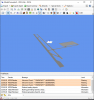
MCX screenshot when I imported *.3ds file. Same grey texture but no error messages for *.dae files
I'm new to airport scenery design using 3ds Max, previously used ADE but I think the texture is not good enough, so I tried using 3ds Max (ver 2021). Usually I use SketchUp but interested to try Max. Today I finished a ground poly design for WICA Kertajati Airport in Indonesia, following this tutorial for GMax: https://www.fsdeveloper.com/wiki/index.php?title=Ground_Poly_Tutorial_for_the_year_2014+
But I encountered some problems:
1. Loft cannot be exported into *.dae (error message in FDX converter in Max) and automatically converted into editable splines
2. Texture is not exported. I copied the jpeg files into the same folder, then tried to make another folder with a same name, still same result (grey when viewed in MCX)
3. I then tried exporting in different file types (3ds, fbx, obj, etc) to MCX and SketchUp. Still same grey texture.
I want to try converting via *.x but P3D v4.5 SDK can only support up to 2019, so I'm waiting (hopefully) there's support for 2021 in v5 SDK. I don't understand where are the mistakes I made, since I'm new to 3ds Max so any help is great
MCX screenshot when I imported *.3ds file. Same grey texture but no error messages for *.dae files


