
-
Which the release of FS2020 we see an explosition of activity on the forun and of course we are very happy to see this. But having all questions about FS2020 in one forum becomes a bit messy. So therefore we would like to ask you all to use the following guidelines when posting your questions:
- Tag FS2020 specific questions with the MSFS2020 tag.
- Questions about making 3D assets can be posted in the 3D asset design forum. Either post them in the subforum of the modelling tool you use or in the general forum if they are general.
- Questions about aircraft design can be posted in the Aircraft design forum
- Questions about airport design can be posted in the FS2020 airport design forum. Once airport development tools have been updated for FS2020 you can post tool speciifc questions in the subforums of those tools as well of course.
- Questions about terrain design can be posted in the FS2020 terrain design forum.
- Questions about SimConnect can be posted in the SimConnect forum.
Any other question that is not specific to an aspect of development or tool can be posted in the General chat forum.
By following these guidelines we make sure that the forums remain easy to read for everybody and also that the right people can find your post to answer it.
You are using an out of date browser. It may not display this or other websites correctly.
You should upgrade or use an alternative browser.
You should upgrade or use an alternative browser.
FS2004 4.3.0.5 Not compiling
- Thread starter Nater
- Start date


- Messages
- 463
- Country

Project Folder
 www.dropbox.com
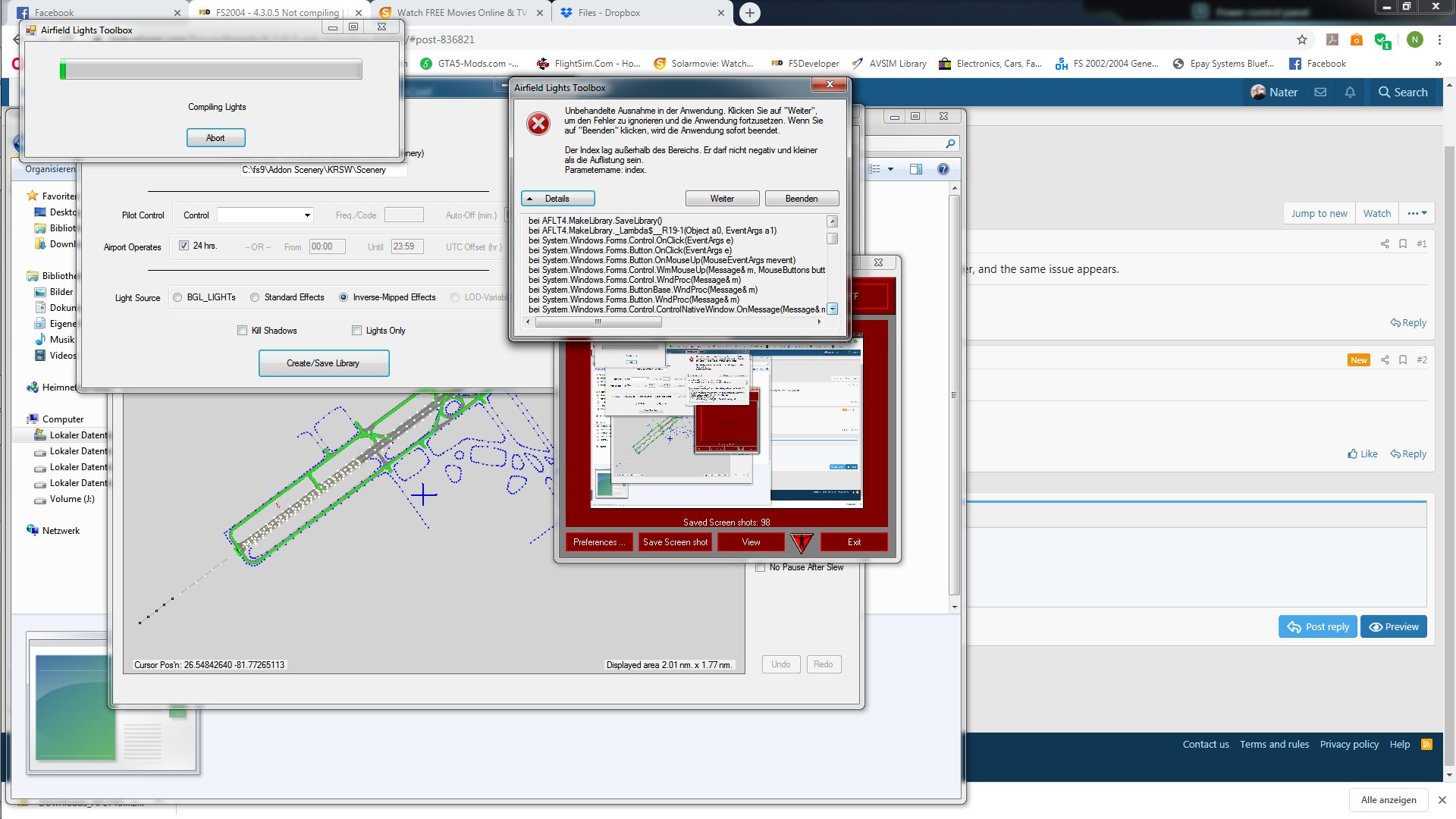
it says the index is out of range...it cannot a negative or be greater than the list....


Dropbox - Error - Simplify your life
www.dropbox.com
it says the index is out of range...it cannot a negative or be greater than the list....

tgibson
Resource contributor
- Messages
- 11,789
- Country

Hi,
He uploaded them in a previous thread.
 www.fsdeveloper.com
When you press the Create/Save Library button, the message that comes up for me is Object Libraries will be Saved to "". This tells me that AFLT is not parsing your path to the scenery folder correctly. This has happened to me on occasion. You have that path listed as C:\fs9\Addon Scenery\KRSW\Scenery. This can be fixed by changing this path to:
KRSW
That's it, nothing else. This however is not the reason for your crash.
After I fix the problem above I get the following problem during compile:
************** Exception Text **************
System.ArgumentOutOfRangeException: Index was out of range. Must be non-negative and less than the size of the collection.
Parameter name: index
at System.ThrowHelper.ThrowArgumentOutOfRangeException(ExceptionArgument argument, ExceptionResource resource)
at System.Collections.Generic.List`1.get_Item(Int32 index)
at AFLT4.MakeLibrary.SaveLibrary()
at AFLT4.MakeLibrary._Lambda$__R19-1(Object a0, EventArgs a1)
at System.Windows.Forms.Control.OnClick(EventArgs e)
at System.Windows.Forms.Button.OnClick(EventArgs e)
at System.Windows.Forms.Button.OnMouseUp(MouseEventArgs mevent)
at System.Windows.Forms.Control.WmMouseUp(Message& m, MouseButtons button, Int32 clicks)
at System.Windows.Forms.Control.WndProc(Message& m)
at System.Windows.Forms.ButtonBase.WndProc(Message& m)
at System.Windows.Forms.Button.WndProc(Message& m)
at System.Windows.Forms.Control.ControlNativeWindow.OnMessage(Message& m)
at System.Windows.Forms.Control.ControlNativeWindow.WndProc(Message& m)
at System.Windows.Forms.NativeWindow.Callback(IntPtr hWnd, Int32 msg, IntPtr wparam, IntPtr lparam)
I tried deleting the strings of approach, runway, and taxiway edge lights but that didn't fix it.
He uploaded them in a previous thread.
FS2004 - inverse mip-map
So I just upgraded to the latest version, and now all of the sudden when I recompile my project, the inverse mips aren't working like they should....It seems as the effects are too big an not showing as if I position myself in the middle of the runway and look towards either end, I can see the...
www.fsdeveloper.com
When you press the Create/Save Library button, the message that comes up for me is Object Libraries will be Saved to "". This tells me that AFLT is not parsing your path to the scenery folder correctly. This has happened to me on occasion. You have that path listed as C:\fs9\Addon Scenery\KRSW\Scenery. This can be fixed by changing this path to:
KRSW
That's it, nothing else. This however is not the reason for your crash.
After I fix the problem above I get the following problem during compile:
************** Exception Text **************
System.ArgumentOutOfRangeException: Index was out of range. Must be non-negative and less than the size of the collection.
Parameter name: index
at System.ThrowHelper.ThrowArgumentOutOfRangeException(ExceptionArgument argument, ExceptionResource resource)
at System.Collections.Generic.List`1.get_Item(Int32 index)
at AFLT4.MakeLibrary.SaveLibrary()
at AFLT4.MakeLibrary._Lambda$__R19-1(Object a0, EventArgs a1)
at System.Windows.Forms.Control.OnClick(EventArgs e)
at System.Windows.Forms.Button.OnClick(EventArgs e)
at System.Windows.Forms.Button.OnMouseUp(MouseEventArgs mevent)
at System.Windows.Forms.Control.WmMouseUp(Message& m, MouseButtons button, Int32 clicks)
at System.Windows.Forms.Control.WndProc(Message& m)
at System.Windows.Forms.ButtonBase.WndProc(Message& m)
at System.Windows.Forms.Button.WndProc(Message& m)
at System.Windows.Forms.Control.ControlNativeWindow.OnMessage(Message& m)
at System.Windows.Forms.Control.ControlNativeWindow.WndProc(Message& m)
at System.Windows.Forms.NativeWindow.Callback(IntPtr hWnd, Int32 msg, IntPtr wparam, IntPtr lparam)
I tried deleting the strings of approach, runway, and taxiway edge lights but that didn't fix it.
tgibson
Resource contributor
- Messages
- 11,789
- Country
The airport BGL file is in the file KRSW_ADE9_nr.zip, in that thread.
I found the apparent reason for the crash. In your Placements.xml file there are numerous instances of sections like this:
<Strip surfaceRef="" type="Single Light" >
<Parameters flags="00000311" config="" modelNames="Edge|" params="|||||||||" >
<Placements>
</Placements>
</Parameters>
</Strip>
Notice that there is nothing between the <Placements> and </Placements> lines (i.e. there are no lights specified). Removing all of these sections allowed the project to compile.
Hope this helps,
I found the apparent reason for the crash. In your Placements.xml file there are numerous instances of sections like this:
<Strip surfaceRef="" type="Single Light" >
<Parameters flags="00000311" config="" modelNames="Edge|" params="|||||||||" >
<Placements>
</Placements>
</Parameters>
</Strip>
Notice that there is nothing between the <Placements> and </Placements> lines (i.e. there are no lights specified). Removing all of these sections allowed the project to compile.
Hope this helps,
Last edited:
Version 4.3.06 just posted to http://stuff4fs.com. Thanks for diagnosing, Tom. Saved me some time. The new release strips out those empty placements. Don't know where they came from. Must be from an earlier release. That's not something we could have anticipated.
Re the difficulty you had with the scenery path Tom. I suspect the issue was that that scenery path did not exist on your system. I found no issue if it was a valid path.
Re the difficulty you had with the scenery path Tom. I suspect the issue was that that scenery path did not exist on your system. I found no issue if it was a valid path.
tgibson
Resource contributor
- Messages
- 11,789
- Country
Hi,
When starting the new version I get an error: Invalid line "Pause After Slew=False" found in file "AFLT.ini". Then this error:
************** Exception Text **************
System.TypeInitializationException: The type initializer for 'AFLT4.Communications' threw an exception. ---> System.IO.FileNotFoundException: Could not load file or assembly 'FSUIPCClient, Version=2.4.4910.2, Culture=neutral, PublicKeyToken=7e7559b53e380b17' or one of its dependencies. The system cannot find the file specified.
at AFLT4.Communications..cctor()
--- End of inner exception stack trace ---
at AFLT4.DisplayData.GetDisplayBounds(Boolean bAPOnly)
at AFLT4.DisplayData.Init_DataView(Boolean bRecalc, Boolean bAP)
at AFLT4.MainPanel.InitPB()
at AFLT4.MainPanel.Form_Load(Object sender, EventArgs e)
at System.EventHandler.Invoke(Object sender, EventArgs e)
at System.Windows.Forms.Form.OnLoad(EventArgs e)
at System.Windows.Forms.Form.OnCreateControl()
at System.Windows.Forms.Control.CreateControl(Boolean fIgnoreVisible)
at System.Windows.Forms.Control.CreateControl()
at System.Windows.Forms.Control.WmShowWindow(Message& m)
at System.Windows.Forms.Control.WndProc(Message& m)
at System.Windows.Forms.ScrollableControl.WndProc(Message& m)
at System.Windows.Forms.Form.WmShowWindow(Message& m)
at System.Windows.Forms.Form.WndProc(Message& m)
at System.Windows.Forms.Control.ControlNativeWindow.OnMessage(Message& m)
at System.Windows.Forms.Control.ControlNativeWindow.WndProc(Message& m)
at System.Windows.Forms.NativeWindow.Callback(IntPtr hWnd, Int32 msg, IntPtr wparam, IntPtr lparam)
When starting the new version I get an error: Invalid line "Pause After Slew=False" found in file "AFLT.ini". Then this error:
************** Exception Text **************
System.TypeInitializationException: The type initializer for 'AFLT4.Communications' threw an exception. ---> System.IO.FileNotFoundException: Could not load file or assembly 'FSUIPCClient, Version=2.4.4910.2, Culture=neutral, PublicKeyToken=7e7559b53e380b17' or one of its dependencies. The system cannot find the file specified.
at AFLT4.Communications..cctor()
--- End of inner exception stack trace ---
at AFLT4.DisplayData.GetDisplayBounds(Boolean bAPOnly)
at AFLT4.DisplayData.Init_DataView(Boolean bRecalc, Boolean bAP)
at AFLT4.MainPanel.InitPB()
at AFLT4.MainPanel.Form_Load(Object sender, EventArgs e)
at System.EventHandler.Invoke(Object sender, EventArgs e)
at System.Windows.Forms.Form.OnLoad(EventArgs e)
at System.Windows.Forms.Form.OnCreateControl()
at System.Windows.Forms.Control.CreateControl(Boolean fIgnoreVisible)
at System.Windows.Forms.Control.CreateControl()
at System.Windows.Forms.Control.WmShowWindow(Message& m)
at System.Windows.Forms.Control.WndProc(Message& m)
at System.Windows.Forms.ScrollableControl.WndProc(Message& m)
at System.Windows.Forms.Form.WmShowWindow(Message& m)
at System.Windows.Forms.Form.WndProc(Message& m)
at System.Windows.Forms.Control.ControlNativeWindow.OnMessage(Message& m)
at System.Windows.Forms.Control.ControlNativeWindow.WndProc(Message& m)
at System.Windows.Forms.NativeWindow.Callback(IntPtr hWnd, Int32 msg, IntPtr wparam, IntPtr lparam)