• Which the release of FS2020 we see an explosition of activity on the forun and of course we are very happy to see this. But having all questions about FS2020 in one forum becomes a bit messy. So therefore we would like to ask you all to use the following guidelines when posting your questions:

    • Tag FS2020 specific questions with the MSFS2020 tag.
    • Questions about making 3D assets can be posted in the 3D asset design forum. Either post them in the subforum of the modelling tool you use or in the general forum if they are general.
    • Questions about aircraft design can be posted in the Aircraft design forum
    • Questions about airport design can be posted in the FS2020 airport design forum. Once airport development tools have been updated for FS2020 you can post tool speciifc questions in the subforums of those tools as well of course.
    • Questions about terrain design can be posted in the FS2020 terrain design forum.
    • Questions about SimConnect can be posted in the SimConnect forum.

    Any other question that is not specific to an aspect of development or tool can be posted in the General chat forum.

    By following these guidelines we make sure that the forums remain easy to read for everybody and also that the right people can find your post to answer it.

P3D v4 A simple BGL problem...or is it!

Messages
463
Country
ca-ontario
I am taking part in an around Scotland helicopter event over at SOH and just to make things look a bit more interesting and realistic in P3D I downloaded a simple BGL scenery item of animated wind turbines at their geographically correct locations that I found on Avsim via a link from a UK scenery site. The scenery BGL is supposedly for FSX but I figured it would work in P3d as I've never had a problem with FSX scenery items in P3D before.

This is the BGL when opened up in MCX.

Turbine.jpg


Just a simple model with stock material colours and no texture mapping or associated texture file.

This is what I see in the sim at one of the turbine farms:
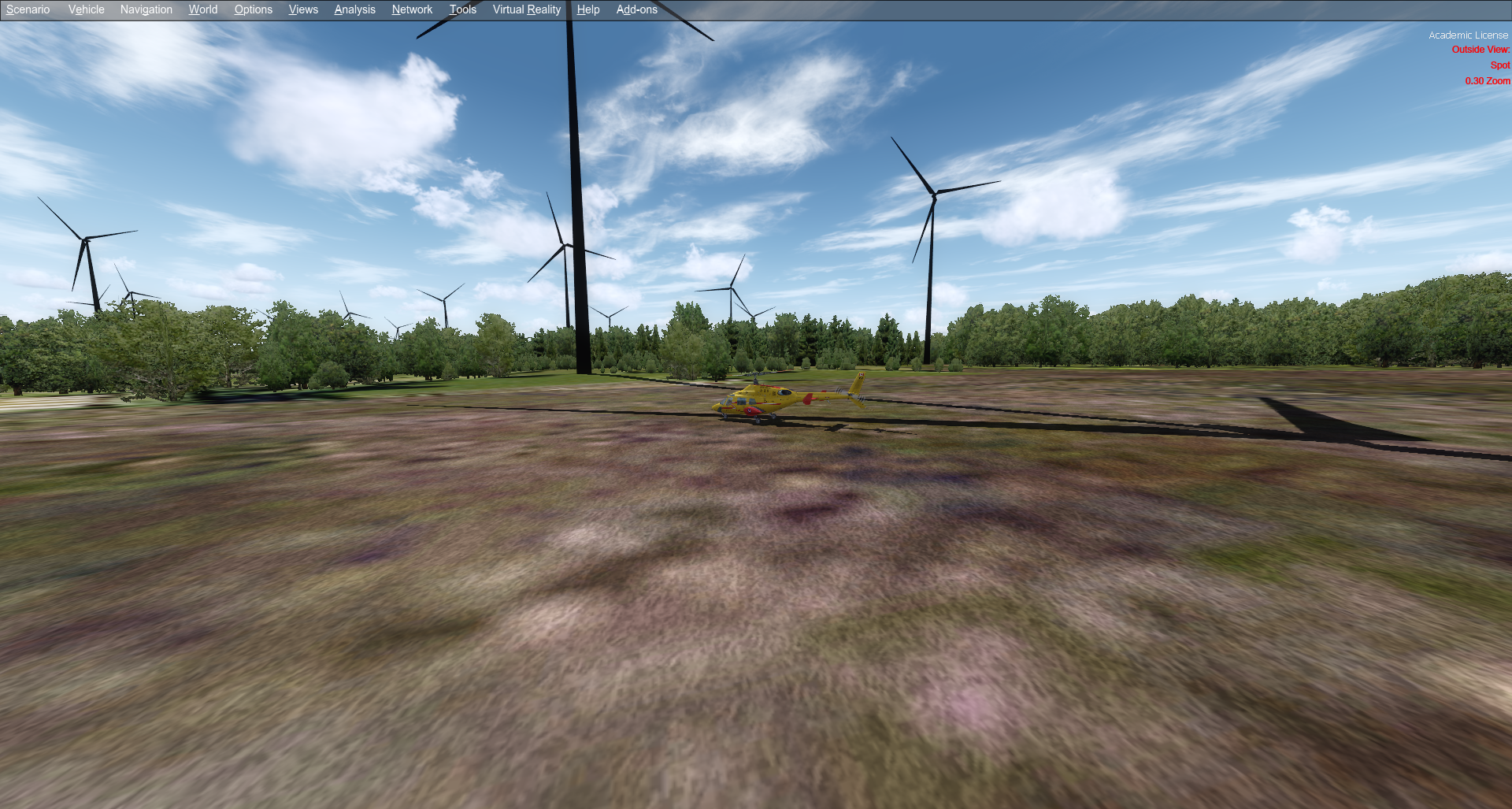
Turbines.png


All of the turbines are pure black which is what you normally see if the texture is missing but there is no texture on the model.

I have imported the model into MCX and exported the BGL again as an FSX BGL and every flavour of P3D available but they still remain totally black no matter what I do.

Has anyone seen anything like this before and is there a fix?
 
Hi,

In ModelConverterX do you see any texture? Maybe just a night texture or so?
 
That can mean that the object is actually in FS9 format. In that case, the solid colors turn black in FSX and later Sims. You could try exporting it into FSX or P3D format?
 
I did and it remained black! This is where I got the BGL from and it states it is compiled for FSX but it only appears as black in P3D v4.5? It's very odd!

 
I wonder if the model is actually a Sketch-up model hence the 'self-colouring'? It would be nice to have them the correct colour as they do add more realism to the hill tops.
 
Last edited:
I had a look at the BGL file, the model is a FSX MDL file and it does indeed only use material colours, no textures.

As far as I know P3D should be able to render such a model.
 
Hmmm odd, they are still black even after a computer re-boot and a re-visit to the location on a different day.
 
I had another look at the moment. The only material setting that I notice is that the blend settings are set for the material that is transparent, while the colour does not have an alpha value. Maybe it helps to run the Set default opaque template on the materials and then export again? I didn't have the time to test in the sim if this makes a difference.
 
I just did as you suggested Arno and opened the original BGL file, selected all the parts, ran the 'set default opaque' template on the materials then exported and placed in the sim and nothing changed (see below).

2026-6-19_13-14-15-363.png
 
Ok, really weird that the colors don't show up. I'm sure there is some material setting that explains this.
 
Back
Top