• Which the release of FS2020 we see an explosition of activity on the forun and of course we are very happy to see this. But having all questions about FS2020 in one forum becomes a bit messy. So therefore we would like to ask you all to use the following guidelines when posting your questions:

    • Tag FS2020 specific questions with the MSFS2020 tag.
    • Questions about making 3D assets can be posted in the 3D asset design forum. Either post them in the subforum of the modelling tool you use or in the general forum if they are general.
    • Questions about aircraft design can be posted in the Aircraft design forum
    • Questions about airport design can be posted in the FS2020 airport design forum. Once airport development tools have been updated for FS2020 you can post tool speciifc questions in the subforums of those tools as well of course.
    • Questions about terrain design can be posted in the FS2020 terrain design forum.
    • Questions about SimConnect can be posted in the SimConnect forum.

    Any other question that is not specific to an aspect of development or tool can be posted in the General chat forum.

    By following these guidelines we make sure that the forums remain easy to read for everybody and also that the right people can find your post to answer it.

Adding Night Textures in MCX

Messages
687
Country
us-texas
Ok, I have read other posts on this and still am not getting it. I have created a model in Sketchup (latest version), saved as a 3D file and added the custom night textures to the 3D folder. I've loaded the 3D file into MCX and the textured model appears in the window. From there, I'm lost. . . .how do I get MCX to recognize the night textures I've loaded? Just to eliminate some questions. . . .yes they have the LM extension and yes they are the same file names. I don't see any option in MCX for attaching the night textures or doing a search to load them manually. I've selected "Add Night Textures" but as I've already read that doesn't load the custom textures. . . .so what am I missing here?
 
Hi,

ModelConverterX will not load the night textures automatically. You will have to make sure that in the material the existing of the night texture is mentioned.

The easiest way to do that is to apply the "Add night texture" template to a material. That will take the day texture (e.g. rooftexture.dds) and assign the corresponding night texture (e.g. rooftexture_LM.dds) as the night texture to the material.

Be aware that it uses the same extension as the day texture. So if you import a SketchUp model with JPG textures, the night texture will be added as JPG as well. So often it is better to first convert textures to DDS/BMP and only then assign the night texture.
 
Thanks Arno.

Well, this is gonna take some time to get my head around this, sorry for the stupidity factor here, but at least for what I thought you meant when you said attach a template to a material. . . .really meant nothing to me once I got into MCX and started trying to do just that. I hi-lited a texture and clicked the "apply" button (with Add Night Texture in the window). Nothing happened. . . .no additional textures were added and I'm already up to 9 drawcalls on a simple terminal building as it is. For now I'm releasing the airport as a daytime only scenery. I'll work on this and eventually figure it out. Thanks for everyone's help.
 
Last edited:
Hi guys.
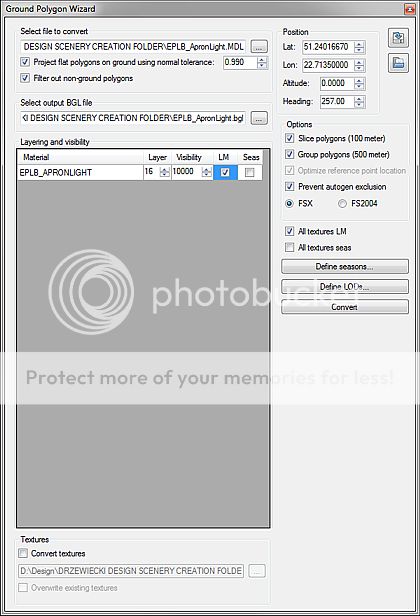
Since Arno is on his well deserved vacations, maybe you can give me some help. The problem is actually related to the issue described above. When exporting FSX ground polygons with checked [LM] box, day textures are properly displayed in the sim, however night textures are missing and my plane ground square is simply grey. Did anyone have this problem or is this just me? :confused:
BTW, those day/night textures works fine as MDL (you can switch between them). It just does not work with ground polygons...
Appreciate your answer.
 
Last edited:
I don't know the answer for you, sorry about that.

I'm not sure that your process and my process is the same. So I'll clarify my process first.

I normally work with ground poly and export with FS2004 gamepack. Then I use MCX to do ground poly. I don't export with FSX gamepack. Load up in MCX with ground poly wizard, then I did the same thing as you describe, checking the box "All textures LM" and make night texture with _lm behind the name. Put them to the Texture Folder. It works just fine with ground poly.

If that happens to you, I think you need to carefully check these:
1. The names are exactly the same as day textures follow with LM.
2. The textures are in correct format, DDS not BMP.
3. The textures are in the right folder. I once made a mistake putting them to another Texture Folder. That can happens. You never know that goofy stuff can happen to you as well....:D

Please try to load those bgl of ground poly again in MCX and see if texture show right in MCX. If that's so, please wait for Arno.:confused:
 
Hello.
Thanks for your answer.
I am doing exactly the same thing (using 3ds Max though, but it doesn't matter).

Triple checked all 3 points you mentioned - they are correct (unfortunately!). Also, if I remove _LM from that night texture name, the texture displays at day properly, so the format is correct (I use DDS DXT3 in this case). It seems, that there is a problem with night _LM only. So, is the format:
XXX.dds
XXX_LM.dds
...in this case? I think it must be this way, no other option. So what I do about LM textures is simply checking 'LM' in the options, converting the file to BGL and preparing day/night textures. Seem to be an awfully simple task... BUT...

apronNO_zps6cadf14c.jpg~original


...the night apron texture is missing. No more ideas! It seems that the file is simply looking for another texture name. BTW, even the MCX preview works fine - no problems switching day/night.

sett_zps53a00bce.jpg~original
 
Last edited:
PS: in my sim, non of LM textures (ground objects and 3D objects as well) are not displayed at night, when those objects are exported in a sdk2k2 method. Day textures are fine though! Do you know, what might be the cause?
 
Last edited:
I'm sorry but I don't know either.
Please try Dxt5 instead of DXT3.dds and see if it helps.
 
Last edited:
What was the problem? Would you mind clarify this?
If we have the same thing, we can know by the old mistake.
 
Sure.
1. Unless Steve publish his DX10 fixes, night textures on ground polygons don't work in this mode
2. Ground polygons can not have "prevent autogen exclusion" option being enabled. This causes shadows to shimmer.
 
Hi,

The flickering shadows is indeed a side effect of the prevent autogen tweak. So the developer has to choose which is more annoying.
 
I'm having a similar problem. But different.

Here is my procedure:

1. create Sketchup model with night textures. I have to manipulated the textures with the position texture tool to get the textures to line up properly. (This is important because it means I can't just reference a texture sheet independent of Sketchup; I have to fiddle with the mapping in Sketchup.)

2. Export to MCX.

3. Convert textures to DXT BMP (I'm using FS9). Save these textures in a separate folder where I will eventually export the mdl. The night texture in question has _LM in the name.

4. In Sketchup, replace the night texture with day texture. (Right now, I am only working on a single poly for a "light beam", which has a flat black sheet for day and a spacial glow texture for night.)

5. Epxort to MCX.

3. Convert textures to DXT BMP again. They are all the same except for the new day texture, which has the same name as the corresponding night texture without the _LM.

4. Go to material editor and select the day texture for my light beam. Enter the night texture name for the nightmap. I actually open the file dialog and select the texture file that was converted with MCX in the last run, so I KNOW it is the right texture.

5. ***PROBLEM***. MCX says, "Failed to load texture: LIGHT_SPLASH_LM.bmp I also tried to load the original JPG file that Sketchup exported with the DAE file. The SAME JPG file that MCX loaded the first time. It chokes on this, too.

6. Variation on a theme: Import DAE file, go to any texture (pre-conversion) and simply reload the exact same texture. For example, my light beam texture, which is loaded and appears in the preview - I simply re-open the EXACT SAME FILE and it fails to load and the preview now shows checkerboard. I haven't tried this post-conversion, but it's pretty clear the problem is not related to texture file format.

So, MCX will not load texture files in the material editor. ???


???
 
Last edited:
Workaround

Found a workaround for the problem where MCX will not load textures in the material editor.

When the original model is imported, MCX loads the textures from the texture folder created by Sketchup just fine.

For example, my export is to a folder called COLLADA_EXORT. Under that, Sketchup creates a subfolder with the model name, which in this case is YPKT.

When I look at the material editor, I notice the textures are listed as "YPKT\[TEXTURE_NAME]"

As stated above, if I reload the exact same texture, it fails and checkerboards.

HOWEVER, if I copy the texture file to the root export folder - COLLADA_EXPORT in this example - voila, they load just fine.

So the problem seems to be that MCX material editor can load texture files from the root export folder, but not the texture subfolder.
 
Hi,

The problem you describe is indeed related to the texture searching logic. It would also work if you add the folder name in front, like SketchUp does. To do that you best not select your night texture in the editor, but just run the material template to assign a night texture. That will make sure any relative path is also kept.

I also don't see the need to export twice from SketchUp, once with and once without night textures. In SketchUp you can just assign the day textures. Then make sure the night textures are in the same folder as the day textures. Run the material editor with the assign night textures template. After that you can convert to textures to DXT/DDS as normal.
 
Hi,

The problem you describe is indeed related to the texture searching logic. It would also work if you add the folder name in front, like SketchUp does. To do that you best not select your night texture in the editor, but just run the material template to assign a night texture. That will make sure any relative path is also kept.

I also don't see the need to export twice from SketchUp, once with and once without night textures. In SketchUp you can just assign the day textures. Then make sure the night textures are in the same folder as the day textures. Run the material editor with the assign night textures template. After that you can convert to textures to DXT/DDS as normal.


I very well may not need to export twice, but the challenge is that the day texture is just a black sheet for pure alpha while the night texture is an actual texture and I don't know how to create it so it scales exactly right. In Sketchup, I have to stretch and move the texture so it fits properly. I'm GUESSING that this mapping information is exported with the DAE file. If I just use the night texture in its generic form, it would most likely tile improperly. It does in SU until I do the stretch and move.

As it turns out, this isn't really a problem - I got it all to work in MCX and the textures show up in proper proportion in the final model in FS.

However, the problem where the material properties are not exporting with mdl is a show stopper. (I posted another thread on that.)
 
Back
Top