• Which the release of FS2020 we see an explosition of activity on the forun and of course we are very happy to see this. But having all questions about FS2020 in one forum becomes a bit messy. So therefore we would like to ask you all to use the following guidelines when posting your questions:

    • Tag FS2020 specific questions with the MSFS2020 tag.
    • Questions about making 3D assets can be posted in the 3D asset design forum. Either post them in the subforum of the modelling tool you use or in the general forum if they are general.
    • Questions about aircraft design can be posted in the Aircraft design forum
    • Questions about airport design can be posted in the FS2020 airport design forum. Once airport development tools have been updated for FS2020 you can post tool speciifc questions in the subforums of those tools as well of course.
    • Questions about terrain design can be posted in the FS2020 terrain design forum.
    • Questions about SimConnect can be posted in the SimConnect forum.

    Any other question that is not specific to an aspect of development or tool can be posted in the General chat forum.

    By following these guidelines we make sure that the forums remain easy to read for everybody and also that the right people can find your post to answer it.

ADE 1.79 ProKey fault

Messages
141
Country
germany
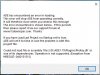
I can not load/install the ProKey in ADE1.79. I have tried importing settings and data using the User Wizard from a previous version and various other methods such as copying but all to no avail, ADE crashes after I receive the following message.
ADE has encountered an error in loading.
This error etc.
Could not load file or assembly 'file:///D:\Plugins\ProKey.dll' or one of its dependencies. Operation is not supported. (Exception from HRESULT: 0x80131515).
Checking ADE Plugins the ProKey.dll is present. After removing the ProKey.dll ADE operates once again ok. Any solutions please.
 

Attachments

  • ADE Prokey error.jpg
    ADE Prokey error.jpg
    64.3 KB · Views: 244

It is a Windows security issue that affects some users. You may need to repeat this for more than one file before ADE opens normally
 
Jon, I have done this several times importing from ADE 1.75 but it is still the same. Wizard tells me the Import is ok, I see in the ADE 1.79 Plugins Folder that ProKey.dll is present but in the Tools drop down menu all of the tools relating to ProKey are greyed out. I am using Win 10 , must I continue to repeat the procedure as I have to delete the Prokey.dll entry each time in the 1.79 Plugins folder. Most frustrating.
 
Sorry I don't understand what you are doing. There is really no need to be importing from 1.75 and in any case that is not part of fixing the error message you reported.

You need to place the two files which you get from the ProKey download but you have them so the easiest thing is to copy prokey.dll and infralution.licensing.dll from your 1.75 installation plugin folder into 1.76 plugin folder. Then follow the instructions in the link I gave you.

Perhaps you can make a screenshot of your 1.79 plugin folder and also the process you are following - so I can understand better
 
After over a dozen times of copy/paste the necessary files i still have the same problem, I will continue trying in the future but in the meantime I have attached a snap of the situation in my 1.79 Plugins folder. I copy then paste, failure, clicked OK on the message, copy once again and overwrite, continue with this procedure until I am out of patience. Tried also deleting the entries and then once again pasting, still the same result. Will not give up until success.
 

Attachments

  • ADE Prokey error.jpg
    ADE Prokey error.jpg
    127.9 KB · Views: 265
Jon, very very sorry. I did not realise that was a link. Did as the link informed and now everything is hunky dory. Please accept my sincere apology
 
Back
Top