• Which the release of FS2020 we see an explosition of activity on the forun and of course we are very happy to see this. But having all questions about FS2020 in one forum becomes a bit messy. So therefore we would like to ask you all to use the following guidelines when posting your questions:

    • Tag FS2020 specific questions with the MSFS2020 tag.
    • Questions about making 3D assets can be posted in the 3D asset design forum. Either post them in the subforum of the modelling tool you use or in the general forum if they are general.
    • Questions about aircraft design can be posted in the Aircraft design forum
    • Questions about airport design can be posted in the FS2020 airport design forum. Once airport development tools have been updated for FS2020 you can post tool speciifc questions in the subforums of those tools as well of course.
    • Questions about terrain design can be posted in the FS2020 terrain design forum.
    • Questions about SimConnect can be posted in the SimConnect forum.

    Any other question that is not specific to an aspect of development or tool can be posted in the General chat forum.

    By following these guidelines we make sure that the forums remain easy to read for everybody and also that the right people can find your post to answer it.

ADE9X Version 1.50 Ready to Release

scruffyduck

Administrator
Staff member
FSDevConf team
Resource contributor
Messages
34,981
Country
unitedkingdom
I have now completed the non installer release package for ADE 150. It is here and I will be propogating it over the next few days to the usual places

link removed :o see below

Thanks for all the feedback :)
 
Last edited:
Please do not download until I place the link again. We left out the supplemental manual and there are a couple of small bugs that just arose. For those who have downloaded the fixes will be available on the online updater shortly

Thanks for your patience
 
Fixed! Txs a lot.
Curious to know if I will be the first to find a new bug. Suggest everyone to get into this race :D.
Jon will have to give away some prizes though ;).
 
Have tried to load old project. If I have JPEG image as a background image, it displayed garbaged. And when I select background image, choose "Edit Object", I'm unable to choose image by pressing "triple dot" button.
Application: 01.50.1
Engine: 04.12.2
 
Select the image and then hit Enter. Make sure that the Image Quality Value is not zero. You can set it to 100.
 
Thanks, it works. And what about image selection?

I am not sure what you mean.

EDIT
OK you mean selecting an image via the '...' That is not an active function we should remove or disable that button. I will add it to the list
 
Last edited:
in dont know what you mean with "..." ^^


Found a problem in my EDDL project, the issue manager tells me that a jetway (A1) is not assigned to a gate (it is!), the foult finder doesnt do that.
When "fix" that, it gets deleted and tells me the next jetway(A2) is not assigend. This keeps repeating.

(Maybe because i changed the jetway model, via Raw data view some time ago)
 
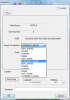
I noticed that for jetways, the scenery complexity box has the list of options twice. Not a big deal, just thought I'd let yall know ;)
 

Attachments

  • dialog.png
    dialog.png
    51.1 KB · Views: 391
in dont know what you mean with "..." ^^


Found a problem in my EDDL project, the issue manager tells me that a jetway (A1) is not assigned to a gate (it is!), the foult finder doesnt do that.
When "fix" that, it gets deleted and tells me the next jetway(A2) is not assigend. This keeps repeating.

(Maybe because i changed the jetway model, via Raw data view some time ago)

As mentioned already the issue manager is only works for fatal compiler errors. While the beta did try and use non fatal checking this is not ready for use so I would not expect it to work yet.
 
I noticed that for jetways, the scenery complexity box has the list of options twice. Not a big deal, just thought I'd let yall know ;)

Thanks Michael I will add that to the list of things to fix
 
One more thing- It's hard to do the selection by dragging the rectangle when there is a background image. When you click, it selects the background image, rather than creating a rectangle. Perhaps a "freeze" option would work as an extension to the lock function. It would disable all clicking, rather than just disabling moving and/or editing.
 
That is a good point. I will add that to the list of things to do. ADE thinks there is something there so it will select the image rather than start a rubber band. In the meantime I think you would need to hide the image to use the rubber band.
 
Back
Top