Hi Gary
I have an ASUS board, so I will look what AI Tweaker can do for me. I tried it before an was not convinced.
Dan
P.S.
Off topic:
It is still the same. AI Automatic Tuning will lead to BSODs and Windows damages without finding a successful clock rate and RAM speed setting. The AI software does not recognize the coolers of my housing, only the cpu cooling, a vaio pump is found but since this only worked on the CPU fan plug, it is interpreted as fan, which is not optimal.
MCX:
I set my clockrate to 49 and with this can load the "74K Mobile Mooring Platform without BSOD" observing a cpu temperature increase to 85°C. I guess it peaked 100°, when I was at 50 clock rate. So hardware related, I get too hot.
Software related, this should't be. I can load Prepar3D at 53 to 59°C. I don´t get why MCX goes up like crazy for a simple file operation? It´s the ultimate stress test for a system ;-). I think only Arno knows, what the program does loading a mdl file. I think it´s more than just reading the disk.
Dan
Hi,
MCX doesn't do anything directly with your CPU. So I don't understand why the clock speed would matter for the BSOD. On slower machines it just runs slower.
One might wonder whether MCX, which IIRC does
not use multiple cores (but is coded to run on either 32-Bit or 64-Bit Windows aka "AnyCPU"), ...may still trigger the internal "turbo boost" mechanism in multi-core CPUs when loading complex 3D models.
AFAIK, an increasingly frequent issue with recent multi-core CPUs is overheating under load as all cores (...
even unused ones ! ) are internally and automatically boosted (by firmware in BIOS or via hardware drivers ?) to a higher clock rate, independent from any user-initiated overclock.
This quickly overheats the CPU case and contents, (should) trigger the internal temperature probe, and if the CPU does not promptly throttle to back off of the internal (automatic) turbo boost, this may subsequently cause a BSOD.
While this reportedly does happen with other recent CPU dies, there are numerous such 'MCE' reports with I7 9700K CPUs on Windows 10.

Also, be aware of the potentially over-looked (...and/or unwanted ?) Turbo Boost activity discussed in these threads:
https://www.google.com/search?q=I7+(9700K+Turbo+Boost+Intel+SpeedStep&ei=hzihYLW4K4a4tQaqgI_ICw&oq=I7+(9700K+Turbo+Boost+Intel+SpeedStep&gs_lcp=Cgdnd3Mtd2l6EAwyBQgAEM0CMgUIABDNAjIFCAAQzQI6BwgAEEcQsANQjhpYjhpgvyloAXACeACAAaMBiAGDApIBAzEuMZgBAKABAaoBB2d3cy13aXrIAQjAAQE&sclient=gws-wiz&ved=0ahUKEwj1l9PGwM7wAhUGXM0KHSrAA7kQ4dUDCA0
Reportedly, this scenario contributes to higher base CPU core temperatures, and 'may' occur depending on what Windows Power Profile is used.
I am seeking an answer with no Overclocking in mind. Enhanced Intel SpeedStep® Technology http://www.intel.com/cd/channel/reseller/asmo-na/eng/203838.htm/ Intel® Turbo Boost Technology http://www.intel.com/content/www/us/en/architecture-and-technology/turbo-boost/turbo-boost-technology.html...

forums.tomshardware.com
"...workloads that
are naturally lower in
power or lightly threaded
may take advantage of headroom in the form of increased
core frequency."
https://etd.auburn.edu/bitstream/handle/10415/4985/Thesis_Pavan, Uppu.pdf?sequence=2&isAllowed=y
"Intel® Turbo Boost technology provides the Core i7 the capability of maximizing core frequency while ensuring that the processor does not go above the upper-limits of temperature, power, and current. When lower power-consuming applications execute on a subset of active cores (cores in core C0 or core C1) with inactive cores (cores in core C3 or core C6) present in the package, the applications may take advantage of the additional power headroom provided by the inactive cores in the form of increased core frequency."
"Power Consumption and thermal emergencies in multi-core processors are now a major bottleneck due to increased heat dissipation caused by running intensive programs on densely integrated systems. High temperatures lead to unreliable and short lifespan of electronic devices. Currently, mechanisms are already in place so that whenever CPU reaches a cut-off temperature, the BIOS increases fan speed and conducts thermal throttling (adjusts the clock duty cycle and/or reduces the operating frequency/voltage). The problem of thermal control is exacerbated with the new Intel turbo boost, which opportunistically raises frequency leading to temperature spikes. Thus, there is increased need to control temperature at a set point via dynamic voltage and frequency scaling. Fortunately, modern CPUs provide P-States to operate it at various voltage-frequency pairs"
When overclocking, is it still necessary to disable all power saving features (SpeedStep, C1E, C-States), as well as, Turbo Boost and Hyper-threading?
www.masterslair.com
"Power Saving Features: SpeedStep and C1E
SpeedStep and C1E work to lower your CPU voltage and multiplier when the system isn't busy. This lowers your power usage, and therefore, the heat that your processor produces.
However, when you're overclocked, you're running at higher speeds than default, which usually requires more voltage, so if your voltage is dropped too low for the speed it's running at, this could cause your system to become unstable."
So to start off I'm not really experienced in this and I'm just looking for some advice and help regarding my speeds on my CPU (i7 9700k) So the 9700k has a base clock speed of 3.6, however mine seems to always run at 4.6 no matter what. It'll have little to no load while idling and it'll never...
forums.tomshardware.com
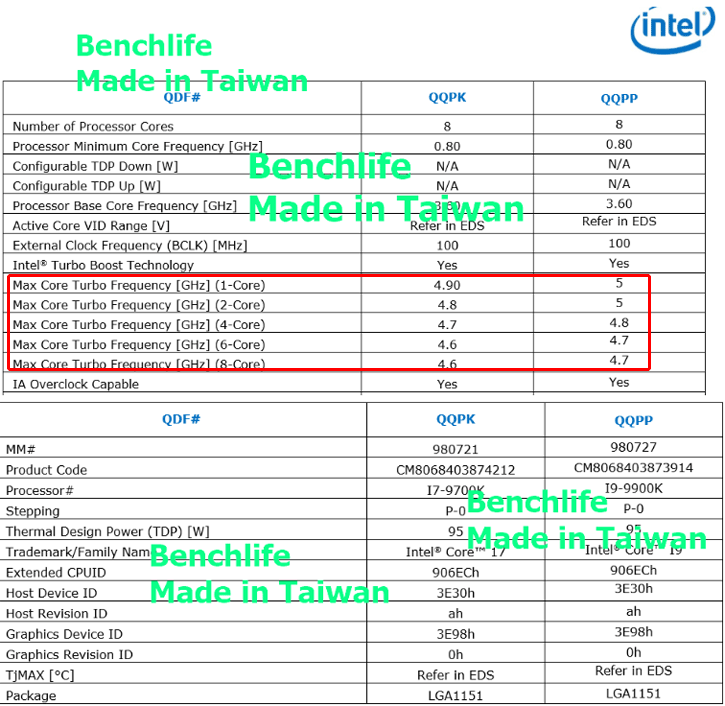
"With turbo boost /speed step, etc., engaged, 4.6 GHz would be the clock speed achieved under an all-core tasking load....(4.7 GHz for 5-6 cores loaded, 4.8 GHz for 3 or 4 cores loaded, and 4.9 GHz for one or two cores at peak tasking/clock speed)
In
Balanced power mode within Windows Power Management, and all chipset drivers installed, during periods of very low CPU load such as loafing at the browser, playing solitaire, etc., most will see clock speeds of as low as 800-1200 MHz to conserve power, and careful observation (in HWMonitor or CPU-Z display) will show clock speeds boosting to 2000, 2300, 3500, or even 4900 MHz, and subsequently reducing back down to as low as 800 MHz, many times over the course of a minute or two....and all perfectly normal...
If your mainboard has an MCE (Multi Core Enhancement), then all 8 cores will scale as high as 4.9 GHz even under a heavy load, at the expense of increased power draw and warmer temps...; but, in Balanced Power mode, you should it bounce around in clock speeds similarly as described earlier."
Intel SpeedStep is 'supposed' to down-clock when task load is low, or the CPU is otherwise "Idle" ...to keep CPU temperatures in a specified range.

Ideally, if all is working as intended, it will be like 'Curly' of the 3 Stooges used to say: "
I'm trying to think, but nothing happens !"
 http://www.mediafire.com/file/5pklznovrya8fm9/Curly.wav/file
http://www.mediafire.com/file/k25qyglqmfwm9it/Curly-Nyuk.WAV/file
FYI
http://www.mediafire.com/file/5pklznovrya8fm9/Curly.wav/file
http://www.mediafire.com/file/k25qyglqmfwm9it/Curly-Nyuk.WAV/file
FYI: This is how I prefer to "manage" my computer's self-serving BIOS routines, as well as that of Microsoft's 'agenda' via Windows 10:
 Assuming one
:
* is using 4-pin PWM fans instead of 3-pin 'case' (aka "housing") fans
* is not using a water cooling unit attached to the motherboard pin header
instead of fans
* has enabled BIOS fan
and temperature monitoring
* has checked this Asus Fan detection issue:
...if unable to resolve fan issues via a menu /<F6> key in the BIOS as documented on Pages 11 and 12 in what, IIUC, is your motherboard BIOS manual:
...until one finds a utility that allows total control over
all case / CPU / chipset cooling fans,
and works '
properly' with Windows 10 Power Profiles,
rather than globally disabling Turbo Boost (which is purportedly internally and automatically factored into any manual under / over -clocking):
From the System Utilities screen, select System Configuration > BIOS/Platform Configuration (RBSU) > Performance Options > Intel (R) Turbo Boost Technology and press Enter . Select a setting and press ...
techlibrary.hpe.com
Intel® Core™ i7-9700K Processor (12M Cache, up to 4.90 GHz) quick reference with specifications, features, and technologies.

ark.intel.com
Some Intel documentation surfaced on the pending Core i9 9900K and i7 9700K, while most information was already publicly available, the slides also show the various turbo clock frequencies, and they c...

www.guru3d.com
"The Core i7 9700K is an eight-core and eight-thread processor (that's right no Hyper threading) with a boost up to 4.9 GHz on
one single-core. However, it can turbo at 4.6 GHz maximum on
all cores."
Intel's Core i7-9700K is a proficient mainstream CPU for gaming enthusiasts, but AMD's Ryzen 7 3700X offers better value and better performance on many computing tasks.

www.pcmag.com
...one may have to choose which CPU core on which to run- or
NOT to run- ...MCX.

If MCX is still only a (
1) CPU core application, one may try to set a profile for it using
ex: Process Lasso to assign CPU priority to
only (
1) core.

One may also set a profile for MCX using
ex: Process Lasso to enforce a lower 'limit' to its CPU priority on the only (
1) assigned CPU core.
Real-Time CPU Optimization and Automation. Keep your PC responsive during high CPU loads and automate process settings with rules. Apps run YOUR WAY!

bitsum.com
PS: Arno, is MCX assigning CPU 'Affinity Mask' to
all available CPU cores ...as a result of your recent performance enhancement coding ?

GaryGB






 . Yes of course AIO. I gave it a try today, connected the AIO to the AIO connector and the BIOS refused to boot, since it missed the CPU cooler.