• Which the release of FS2020 we see an explosition of activity on the forun and of course we are very happy to see this. But having all questions about FS2020 in one forum becomes a bit messy. So therefore we would like to ask you all to use the following guidelines when posting your questions:

    • Tag FS2020 specific questions with the MSFS2020 tag.
    • Questions about making 3D assets can be posted in the 3D asset design forum. Either post them in the subforum of the modelling tool you use or in the general forum if they are general.
    • Questions about aircraft design can be posted in the Aircraft design forum
    • Questions about airport design can be posted in the FS2020 airport design forum. Once airport development tools have been updated for FS2020 you can post tool speciifc questions in the subforums of those tools as well of course.
    • Questions about terrain design can be posted in the FS2020 terrain design forum.
    • Questions about SimConnect can be posted in the SimConnect forum.

    Any other question that is not specific to an aspect of development or tool can be posted in the General chat forum.

    By following these guidelines we make sure that the forums remain easy to read for everybody and also that the right people can find your post to answer it.

aircraft carrier Lights on flightdeck

Messages
83
Country
italy
Hi guys,
may be something close to my problem has been written.....but I didnt find a complete solution
so who can explain me how to add "lights" on a flightdeck to have a real flightdeck for my carrier?
I designed this ship with 3dmax v.9, yesterday you explained to me how to export , I know how to add simple effects using MCX, but now it is to design a complete set of lights including RWY C.L. and all around ...like a big apron and so on.....
waiting for a great help
best regards
Cobby
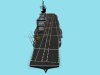
 

Attachments

  • garib134.jpg
    garib134.jpg
    212 KB · Views: 590
All you should need to do is create a small plane where you want each light and then use the attach point tool from the ACES menu. This will let you attach effects to the planes, just select a suitable one, select the plane and click Add Effect. Then repeat until you're done, you shouldn't clone the planes once the effect is attached as the effect doesn't get renumbered which will cause an error later on. You can also add a visibility effect at the same time so they only show up at night etc.
The planes, or anything else with an effect attached, won't show up in game as they're replaced with the effect.
 
Ok , If I have understood well these are my steps:
1.create a Plane (my rwylight)
2.use attach point from aces menu
3.select the effect
4.add the effect to the plane
5. repeat al for an other plane.

question which effect I have to add?
regards
 
what I have to do is add green lights along the flightdeck perimeter
I'm attaching a shot of a part of my flight deck....
consider in the Night time we have to see only green lights so the white lines will be deleted or with a low opacity in LM texture
which method I have to use
show me step by step how add a single green light and I'll do all
I confirm I'm using 3dmax and I have ace tool
regards
 

Attachments

  • deck_DD copia.jpg
    deck_DD copia.jpg
    120.9 KB · Views: 1,109
Okay in the screenshot you'll see I've selected the plane and opened the Attach Point Tool.
I've then selected Effect and Visibility in the tick boxes which opens up the two drop downs below.
In those I've selected fx_navgre, which will give me a green light, there's also red and white available from the standard FSX effects in various strengths or you could add your own.
In visibility I've selected visible_Night, this is so it only appears between dusk and dawn, otherwise it would be on all the time.

That isn't a standard visibility option so you'll have to edit your modeldef.xml file to add it.
The file is located in: H:\Program Files (x86)\Microsoft Games\Microsoft Flight Simulator X SDK\SDK\Environment Kit\Modeling SDK\bin
where H is the drive you've installed things on. You can edit it with notepad or the text editor of your choice.

The code you need is below, copy and paste it to the main part of the file, i.e below all the Animation name= and AnimationGroup stuff at the start.

Code:
       <PartInfo>
        <Name>visible_Night</Name>
        <Visibility>
            <Parameter>
                <Code>
         (E:TIME OF DAY, Enum) 1 !=
         if{
            1
          }
         els{ 0 }
                </Code>
            </Parameter>
        </Visibility>
    </PartInfo>

Hope that helps!
 

Attachments

  • AttachPoint.jpg
    AttachPoint.jpg
    126.9 KB · Views: 573
thank you
I have understood as follows:
1. create a plane on the flightdeck
2.select the plane and open Attach point tool
3.follow your instructions (using fx_navgre as effect)
5.edit modeldef.xml file adding the code as you show me... below all the Animation name= and AnimationGroup stuff at the start
are they right steps?
question: is it possible to create All Planes , attach them as a single polygon and use the attach point tool?
what I have to do is in the image you see:
179395d1381609446-modelli-finiti-lavori-di-ammodernamento-nave-garibaldi-03-05-2013-023.jpg
so pls tell me which effects I have to use
best regards
Cobby
 
You'll want to edit the modeldef.xml first so that the visible_Night option shows up when you open the tool.
As far as I know you have to have a plane at each point you want an effect, basically the plane gets removed with the effect placed at what was its pivot point.
The easiest thing to do would be make a plane and then clone it to where you want all the lights of one colour. Then use the Attach Point Tool to work through them in turn adding the effect you want.
Repeat for the other colour lights.
For the ship in your picture fx_navgre should work for the deck edge lights. fx_navwhi should work for the lift edge lights. fx_navred may work for the runway centreline ones or you may want to make a new more yellow effect.
For that copy the fx_navred and rename it fx_navyel and then play around with the R,G,B values in it, again you can use a text editor or the fx tool that comes with the SDK.
 
here you have my modeldef.xml
I have edited the xml and I Put a <--visibility--> green note where I add your code
can you check pls?
 

Attachments

Last edited:
Yes it works: see attached file
Now I have to create all the deck lights and for each have I to add the effect?
or is possible to create all lights first than attach them so we have a single entity than add attach the effect in single operation?
this is my first question
second : can I see how the effect works, I would like to see a preview if possible
third : may I have your Nav effects if these are well used for a deck?
may I send you a PM ?

all my best
 

Attachments

  • my_AttachPoint.jpg
    my_AttachPoint.jpg
    148.9 KB · Views: 563
As far as I know you have to do each effect individually. Each effect is numbered, the tool automatically increases the number every time you apply one. If you did them all at once they'd all have the same number which causes the compiler to crash when you make the MDL.
To see the effects I think Arno has written an effect viewer tool which is somewhere on this site.

Drop me a PM and I'll see what effects I have.
 
FXeditor you mean, I suppose
I have it but when I loaded fx_navgre effect I do not see any on the preview
why?
 
hi guys,
I decided to follow a tutorial:
How to do your Taxi Edge Light by Jirayu Tanabodee

to design a Taxi-light.

as you see I followed the first steps of the tutorial but I do not know if I did well since now.
I made several planes and I used 2 side material for taxi_light01 and taxi_light02 with a texture: taxi_light.tga that has an alphachannel
the same with base_taxi_light using base luce. tga with alpha channel
and I did the taxi-light
Now I do not know which use had the two triangles and which texture I have to use with; Idem for the main base taxi-light
than there is a box.....which material have I to use and if which texture?
I use 3ds max 9
Can you help
 

Attachments

  • taxilight.zip
    taxilight.zip
    95.1 KB · Views: 363
  • wip02.jpg
    wip02.jpg
    217.2 KB · Views: 559
  • wip01.jpg
    wip01.jpg
    216.6 KB · Views: 574
ok mates,
I did finally the lights;
but which angle Have I to use?
x=0; y=0 z=-155 ?
a vasi has 3 degree if I remember but for an aircraft carrier?
regards
 

Attachments

  • wiplight04.jpg
    wiplight04.jpg
    270.9 KB · Views: 498
  • wiplight03.jpg
    wiplight03.jpg
    156.7 KB · Views: 558
Back
Top