
-
Which the release of FS2020 we see an explosition of activity on the forun and of course we are very happy to see this. But having all questions about FS2020 in one forum becomes a bit messy. So therefore we would like to ask you all to use the following guidelines when posting your questions:
- Tag FS2020 specific questions with the MSFS2020 tag.
- Questions about making 3D assets can be posted in the 3D asset design forum. Either post them in the subforum of the modelling tool you use or in the general forum if they are general.
- Questions about aircraft design can be posted in the Aircraft design forum
- Questions about airport design can be posted in the FS2020 airport design forum. Once airport development tools have been updated for FS2020 you can post tool speciifc questions in the subforums of those tools as well of course.
- Questions about terrain design can be posted in the FS2020 terrain design forum.
- Questions about SimConnect can be posted in the SimConnect forum.
Any other question that is not specific to an aspect of development or tool can be posted in the General chat forum.
By following these guidelines we make sure that the forums remain easy to read for everybody and also that the right people can find your post to answer it.
You are using an out of date browser. It may not display this or other websites correctly.
You should upgrade or use an alternative browser.
You should upgrade or use an alternative browser.
Airplane DAMAGE CRASH 3D model
- Thread starter tonaz
- Start date

Ronald
Resource contributor
- Messages
- 974

What happens inside your flightsimulator when you turn on
- Crashes and damage --------------
- Detect crashes and damage -> ON
- [x] Aircraft stress caused damage
- [x] Allow collision with other aircraft
To be able to detect a crash and therefor trigger the display of a different outside model file?
Add you "your crash MDL" to any given aircraft
- Take off with it,
- climb into the air
- fly for a while
and then deliberately allow it to crash your aircraft into the ground? another object?

=rk=
Resource contributor
- Messages
- 4,702
- Country

Please provide a link or quote, because on this page:From SDK Learning Center:
in model.cfg you can put "crash=your crash MDL" 3D model
http://www.prepar3d.com/SDKv2/LearningCenter/general/sdk_overview.html#SDK
I can find only this information, which is consistent with crash detection in FSX and does not include a crash state model:
In Prepar3D.cfg, in the [Realism] section, the following settings determine what happens when the user aircraft crashes. Care should be taken in multiplayer scenarios, particularly using the shared-cockpit, that the settings are identical on all computers -- otherwise there will be unpredictable behavior.
CrashDetection True=Detect user aircraft crashes and respond according to the setting of OnCrashAction, False=ignore all crashes by "bouncing" the aircraft back into a safe flying state.
OnCrashAction In single player mode: 0=reset the flight from the beginning (the default), 1=end the flight, 2=leave the user aircraft in the crashed position. In multiplayer mode for options 0 and 1 a client will simply be returned to the briefing room, and the host will be left either in the crashed state (for missions), or the flight will be reset (for free flight). Option 2 works the same as for single player mode -- the user aircraft for both host and client will be left in the crashed position.
Ronald you are replying to a question about Prepar3d, using images from FSX, without substantiating the procedure to be identical.What happens inside your flightsimulator when you turn on
- Crashes and damage --------------
- Detect crashes and damage -> ON

- Messages
- 206
- Country

?!?!?
I am talking about P3D infact.
In their latest SDK they say you can add a "crash.mdl" to make a plane crash animation.
...
It's legacy...
Same for FSX / P3D. The items in the SDK should pretty much cover it. But I'm sure some experimentation will have to be done. And the model itself will need to have some special display functions too.
- Joseph
Ronald
Resource contributor
- Messages
- 974
A - Sorry Tonaz, I completely overlooked the fact that this message was posted in the Prepared section of the forum!I am talking about P3D infact
I need to better look before I try to help and solve somebody elses challenge next time, thanks for the feedback!
Ronald you are replying to a question about Prepar3d, using images from FSX, without substantiating the procedure to be identical

Here you go Rick, the relevant P3D Settings screen for you
 To me they look rather similar don't you think?
 So how about the handling code behind the screens it?
Would that be functioning like ESP/FSX too? or has this been totally re-written inside P3D??
B - Since (as fas as I know yet!) P3D builds - for a greater part - on the legacy_code of ESP/FSX.
The point of my first posting is that your flightsim needs an internal "crash_trigger" to be:
- set in order to work and
- activated by you crashing your aircraft into something crash-able (ground, mountain, other plane, buildings).
so P3D "knows" internally to start displaying the "crashed.mdl" file through its display-engine.
How else can the P3D flightsim user see the crashed model on screen?
Last edited:
=rk=
Resource contributor
- Messages
- 4,702
- Country
Microsoft made flight simulators, not crash simulators and I see no evidence that LM has abandoned that standard. I have searched extensively, without result, for any reference to user model crashing in P3D, plane crashing in P3D and tonaz has not replied to the request to corroborate his claim. So everyone is speculating and proving how to trigger a condition that very likely does not exist.
Ronald
Resource contributor
- Messages
- 974
Inside the ESP/FSX SDK I found this line:
Aircraft.cfg:
Within each [fltsim.n] section are parameters that define the details of that particular configuration set:
- visual_damage: Setting this flag to 1 enables visual damage (e.g. parts breaking off) to be seen when crashing the aircraft into the scenery.
- Note: visual damage will only work if it is built into the aircrafts .mdl file.
Reference: https://msdn.microsoft.com/en-us/library/cc526949.aspx
Inside the Prepar3d SDK I found this - almost exactly the same - line:
Aircraft.cfg:
Within each [fltsim.n] section are parameters that define the details of that particular configuration set:
- visual_damage: Setting this flag to 1 enables visual damage (e.g. parts breaking off) to be seen when crashing the aircraft into the scenery.
- Note: visual damage will only work if it is built into the aircrafts .mdl file.
Reference: http://www.prepar3d.com/SDK/SimObject Creation Kit/SimObject Container SDK/Aircraft Configuration Files.htm
Inside the Prepar3d SDK I found another line:
Model.cfg:
The model.cfg file is located in an aircraft's Model folder, and specifies which visual models (.mdl files), exterior and interior,
to render during normal flight and optionally after a crash:
- crash: 3D model used if aircraft crashes. No examples of crash models are available.
Reference: http://www.prepar3d.com/SDKv2/LearningCenter/simobjects/aircraft_configuration_files.html
And along the way I've found some unanswered questions about the same topic:
- https://a2asimulations.com/forum/viewtopic.php?f=121&t=48203
- http://www.prepar3d.com/forum/viewtopic.php?t=116361
- http://www.prepar3d.com/forum/viewtopic.php?t=123855
only an argument that states "this behaviour has been removed after 9/11" without any reference to any relative background resource.
This makes me wonder then, why this "crash" feature still is documented in the latest p3D SDK in 2017?
So - I guess - the best place for Tonaz to get a correct answer, straight from the source (the members of the P3D SDK-development team) is to ask this question at the P3D forum. I've seen that he already did just that over here: http://www.prepar3d.com/forum/viewtopic.php?t=123850
Aircraft.cfg:
Within each [fltsim.n] section are parameters that define the details of that particular configuration set:
- visual_damage: Setting this flag to 1 enables visual damage (e.g. parts breaking off) to be seen when crashing the aircraft into the scenery.
- Note: visual damage will only work if it is built into the aircrafts .mdl file.
Reference: https://msdn.microsoft.com/en-us/library/cc526949.aspx
Inside the Prepar3d SDK I found this - almost exactly the same - line:
Aircraft.cfg:
Within each [fltsim.n] section are parameters that define the details of that particular configuration set:
- visual_damage: Setting this flag to 1 enables visual damage (e.g. parts breaking off) to be seen when crashing the aircraft into the scenery.
- Note: visual damage will only work if it is built into the aircrafts .mdl file.
Reference: http://www.prepar3d.com/SDK/SimObject Creation Kit/SimObject Container SDK/Aircraft Configuration Files.htm
Inside the Prepar3d SDK I found another line:
Model.cfg:
The model.cfg file is located in an aircraft's Model folder, and specifies which visual models (.mdl files), exterior and interior,
to render during normal flight and optionally after a crash:
- crash: 3D model used if aircraft crashes. No examples of crash models are available.
Reference: http://www.prepar3d.com/SDKv2/LearningCenter/simobjects/aircraft_configuration_files.html
And along the way I've found some unanswered questions about the same topic:
- https://a2asimulations.com/forum/viewtopic.php?f=121&t=48203
- http://www.prepar3d.com/forum/viewtopic.php?t=116361
- http://www.prepar3d.com/forum/viewtopic.php?t=123855
only an argument that states "this behaviour has been removed after 9/11" without any reference to any relative background resource.
This makes me wonder then, why this "crash" feature still is documented in the latest p3D SDK in 2017?
So - I guess - the best place for Tonaz to get a correct answer, straight from the source (the members of the P3D SDK-development team) is to ask this question at the P3D forum. I've seen that he already did just that over here: http://www.prepar3d.com/forum/viewtopic.php?t=123850
Last edited:

hairyspin
Resource contributor
- Messages
- 3,253
- Country

Microsoft made flight simulators, not crash simulators
Microsoft made three simulators which supported crashed/damaged models: Combat Flight Simulator 1, 2 and 3. Not many building for these now, but there are a few. Maybe an answer will be forthcoming from LM about P3D after the weekend, maybe not.
only an argument that states "this behaviour has been removed after 9/11" without any reference to any relative background resource.
There are many things in the history of FS which are not officially documented. I wasn't simming 16 years ago, so depend on the memories of those who were, especially those with inside information from the original developers. There's not a lot of official FS information from back then still on the Web.
Last edited:
Again the most granted and boring answer ever.Microsoft made flight simulators not crash simulators
If in the SDK i read "put crash.mld to have crash anim... bla bla" i suppose that if i put a crash mdl, i DO HAVE a crash animation... Quite straight.
Which request?!and tonaz has not replied to the request to corroborate his claim.
=rk=
Resource contributor
- Messages
- 4,702
- Country
From SDK Learning Center:
in model.cfg you can put "crash=your crash MDL" 3D model
Please provide a link or quote, because on this page:
http://www.prepar3d.com/SDKv2/LearningCenter/general/sdk_overview.html#SDK
I can find only this information, which is consistent with crash detection in FSX and does not include a crash state model:
In Prepar3D.cfg, in the [Realism] section, the following settings determine what happens when the user aircraft crashes. Care should be taken in multiplayer scenarios, particularly using the shared-cockpit, that the settings are identical on all computers -- otherwise there will be unpredictable behavior.
CrashDetection True=Detect user aircraft crashes and respond according to the setting of OnCrashAction, False=ignore all crashes by "bouncing" the aircraft back into a safe flying state.
OnCrashAction In single player mode: 0=reset the flight from the beginning (the default), 1=end the flight, 2=leave the user aircraft in the crashed position. In multiplayer mode for options 0 and 1 a client will simply be returned to the briefing room, and the host will be left either in the crashed state (for missions), or the flight will be reset (for free flight). Option 2 works the same as for single player mode -- the user aircraft for both host and client will be left in the crashed position.
Actually, you can not put "crash your model." There is no link or quote, because there is no crash model supported, there is only the one simobject model; you are not able to corroborate your claim. The truth may be boring, but a fixation with disaster is truly jejune.
From SDKv3
( http://www.prepar3d.com/SDKv3/LearningCenter/simobjects/aircraft_configuration_files.html )

And "no examples available" do not mean "there is no crash possibility, just quit it", or "yeah we are trolling you...".
To me the line in the table means "Crash=... is the 3D model used if aircraft chrashes."
Quite straight isn't it?
As i said in the op, this table from SDK is not true couse i've tested quite a lot with several operations and settings.
Goodbye and have a nice day!
( http://www.prepar3d.com/SDKv3/LearningCenter/simobjects/aircraft_configuration_files.html )
And "no examples available" do not mean "there is no crash possibility, just quit it", or "yeah we are trolling you...".
To me the line in the table means "Crash=... is the 3D model used if aircraft chrashes."
Quite straight isn't it?
As i said in the op, this table from SDK is not true couse i've tested quite a lot with several operations and settings.
Goodbye and have a nice day!
Last edited:
=rk=
Resource contributor
- Messages
- 4,702
- Country
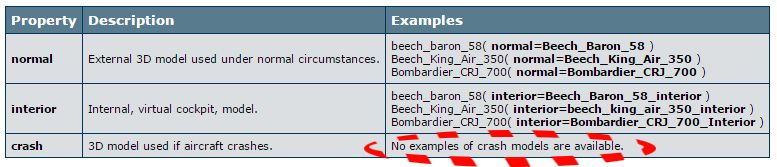
They are not available because they are not supported. This table and the related information imply an intention to implement crash modelling only - or maybe to generate spurious conversations. You can place as many .mdl files into the model folder as you like, but the only ones that will be triggered are the normal and interior ones. This has all been discussed before and it would be naive to assume otherwise. As Tom implies in regard to our collective ignorance, your mission is clear: photograph and document and eventually reproduce this elusive crash model.
I am not english mothertongue, but assuiming i am a newbie in p3d development (which i am not) so it is like i read Prepar3d SDK for the first time and i do not even know what it talks about, and assuming i can read and understand the meaning of a sentence (i think i can do it)... From the table i understand that normal is the external 3d, interior is the virtual cockpit, and crash is the 3d model of the plane crashing. Said this, there are samples of the first two, taken from some default aircrafts. There are no examples for the third, because in the default planes that comes with P3D there are no crash 3d models.
This do not necessarly means that P3D do not support crash mdls.
I do not read nowhere "CRASH MODELS ARE NOT SUPPORTED", or "WE HAVE THE INTENTION TO IMPLEMENT THIS IN THE FUTURE", as you would like to intend.
Why are you pushing this so much? You do not have to take parts of LM.
And about your last sentence, "reproduce this elusive crash model"?!?!
I think i am not understanding you. And i am quite sure you are not understanding me: in the original post i wrote that i read this table, i tried to do what LM says, and it did not worked. So i asked if someone did it, or LM is just trolling.
I really miss the whole sense of your argumentation, a part from it looks like you are thightly defending LM or whoever wrote that table, for whatever reason, giving to the table a very very personal meaning.
The fact that we know there is life only on Earth, do not implies the fact that Earth is the only place that hosts life...
So what is the meaning of putting that third line?
Imagine, NASA says "Hey people, there is life in the Universe outside Earth." We would ask for sure "Where? Where??". They reply "We still do not know"...
Sensless.
This do not necessarly means that P3D do not support crash mdls.
I do not read nowhere "CRASH MODELS ARE NOT SUPPORTED", or "WE HAVE THE INTENTION TO IMPLEMENT THIS IN THE FUTURE", as you would like to intend.
Why are you pushing this so much? You do not have to take parts of LM.
And about your last sentence, "reproduce this elusive crash model"?!?!
I think i am not understanding you. And i am quite sure you are not understanding me: in the original post i wrote that i read this table, i tried to do what LM says, and it did not worked. So i asked if someone did it, or LM is just trolling.
I really miss the whole sense of your argumentation, a part from it looks like you are thightly defending LM or whoever wrote that table, for whatever reason, giving to the table a very very personal meaning.
The fact that we know there is life only on Earth, do not implies the fact that Earth is the only place that hosts life...
So what is the meaning of putting that third line?
Imagine, NASA says "Hey people, there is life in the Universe outside Earth." We would ask for sure "Where? Where??". They reply "We still do not know"...
Sensless.
Last edited: