• Which the release of FS2020 we see an explosition of activity on the forun and of course we are very happy to see this. But having all questions about FS2020 in one forum becomes a bit messy. So therefore we would like to ask you all to use the following guidelines when posting your questions:

    • Tag FS2020 specific questions with the MSFS2020 tag.
    • Questions about making 3D assets can be posted in the 3D asset design forum. Either post them in the subforum of the modelling tool you use or in the general forum if they are general.
    • Questions about aircraft design can be posted in the Aircraft design forum
    • Questions about airport design can be posted in the FS2020 airport design forum. Once airport development tools have been updated for FS2020 you can post tool speciifc questions in the subforums of those tools as well of course.
    • Questions about terrain design can be posted in the FS2020 terrain design forum.
    • Questions about SimConnect can be posted in the SimConnect forum.

    Any other question that is not specific to an aspect of development or tool can be posted in the General chat forum.

    By following these guidelines we make sure that the forums remain easy to read for everybody and also that the right people can find your post to answer it.

Airplane DAMAGE CRASH 3D model

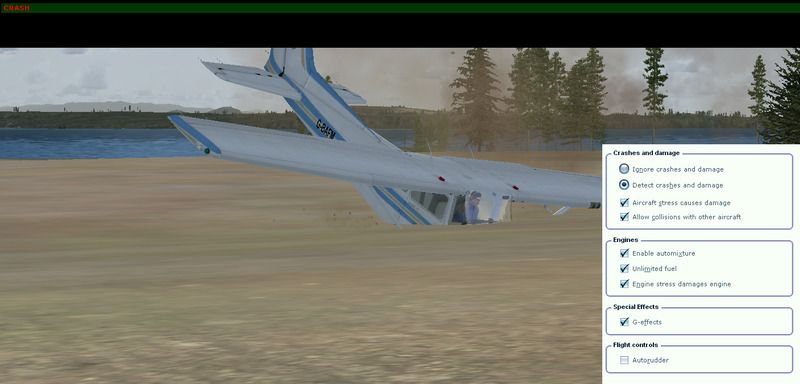
Well, I've said what we know of the history of crash features in FS which were withdrawn or disabled after the 9/11 tragedy. If LM have reintroduced this then they have to explain how it's done. Maybe the SDK is wrong, maybe the feature will be enabled in the future. We don't know at the moment.
 
Exactly.
And what i wanted to mean is just that P3D SDK is misleading. That's all.
And i am not going to ask them because i do not expect any answer.
I just reported on LM forums that SDK contains an error.
 
Wasn't this removed from FS after 9/11?
No. Microsoft removed the visual damage line from all default aircraft.cfgs upon release. Restoring them enabled the crash models:

FS8737.JPG

(I can't believe I actually was persuaded by any problem of any sort to fly the abortion that is the default FS8 737 - the only solace to my poor injured eyes was, ironically, crashing it!)

If I remember correctly, the "endcap" parts define where parts break. I don't recall the functionality ever being removed, but I also never felt like expending the effort to make my models breakable. Also, it looked incredibly cheesy. Better to spend the time optimizing instead, I think.

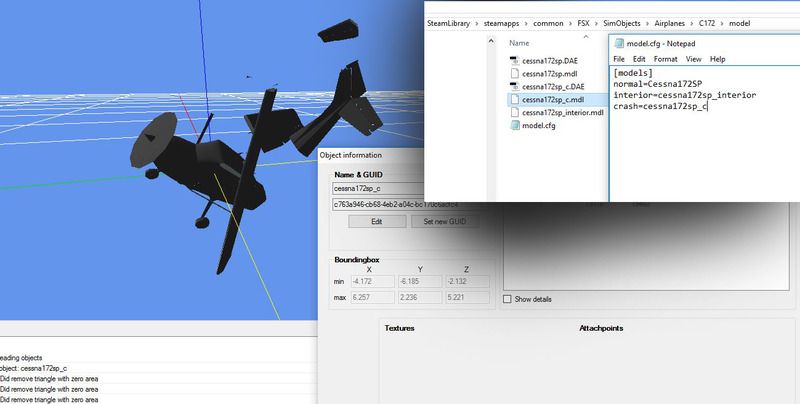
They are not available because they are not supported. This table and the related information imply an intention to implement crash modelling only - or maybe to generate spurious conversations. You can place as many .mdl files into the model folder as you like, but the only ones that will be triggered are the normal and interior ones. This has all been discussed before and it would be naive to assume otherwise. As Tom implies in regard to our collective ignorance, your mission is clear: photograph and document and eventually reproduce this elusive crash model.

To be blunt, you have no idea what you're talking about. The crash model line does not signify intent for a future feature, rather, it's a legacy item from the pre-FS2000 days when crash models were separate from the main model:

FS98crash.JPG

When FS2000 came out, the "crash" model became part of the main model (with the break points defined with the obscure "endcap" part names) and the crash model entry became a vestige for the purposes of back-compatibility that never went away. Since FS2002 came out shortly after the aforementioned Great Calamity of 2001(TM), Microsoft felt it prudent to remove the aircraft.cfg line that enabled visual damage. Re-inserting it enabled crash models because they did not recompile the models with different part names.

I would advise hairyspin's care with word choices when making bold assertions around people who were around and building models back then. :D
 
Last edited:
Thanks god, finally a meaningful post.
The fact that LM still write that on their SDK still remain. And still is an error.
Have a nice day Erick
 
More trivia:

-FS2002 was delayed because of the Great Calamity (TM). They had to remove the towers.
-Functional VCs were possible in FS2000, but arrived very late.
-Because FS2002 was delayed, there was a big debate over whether or not FS2004 would come out on time. Michi S. was supposed to tap dance down the streets of Chicago in nothing but clogs on the release date if it came out on time (she was convinced it would be delayed), but that never happened.
 
Funny :D
about first thing.... a delay to remove 2 lines from a bgl file?... ahahah MS always reliable XD
 
To be blunt, you have no idea what you're talking about. The crash model line does not signify intent for a future feature, rather, it's a legacy item from the pre-FS2000 days when crash models were separate from the main model
Actually, I do know what I am talking about and I've even verified it:

cessna.jpg

cessna%20crash.jpg


The whole point of the thread was functionality of crash models in P3D, please refer to the thread topic and relate your insults more on topic. We all know - thank you for re-educating us, that legacy versions of the sim supported crash simulation. Whether the functionality in P3D was implied due to future intentions, a cruel joke, or just plain laziness - or any number of other possible implications, is moot imo, but way to beat a dead horse.
 
Thanks for the wonderful explanation and background story ErickC, As always it look great, the way you explaining things and teach us here


QUESTION: Has there already been "any form of official reply" from the Lockheed Martin SDK_people on this subject? (on their own forum, anywhere?)
 
Actually, I do know what I am talking about and I've even verified it:

cessna.jpg

cessna%20crash.jpg


The whole point of the thread was functionality of crash models in P3D, please refer to the thread topic and relate your insults more on topic. We all know - thank you for re-educating us, that legacy versions of the sim supported crash simulation. Whether the functionality in P3D was implied due to future intentions, a cruel joke, or just plain laziness - or any number of other possible implications, is moot imo, but way to beat a dead horse.

I will admit to being wrong about one thing: the crash model slot in model.cfg is not a back-compatibility feature, as separate crash models have been completely unsupported since FS2002. More on that in a bit. And, while it was not my intention to be insulting, my statement about your certainty being inversely proportional to your knowledge still stands: the reference to crash models reflects an older functionality from FS7 and previous (which used a separate crash model), and the text in the SDK was simply never removed. This is something that I can easily prove. Firstly, the exact language in that particular section of the aircraft container SDK has been present since at least the FS7 SDK. Perhaps it was absent from a previous P3D SDK, but it is present in the SDKs for FS7, FS8, FS9, and ESP.

Secondly, The crash model slot has been irrelevant since FS8, because FS7 was the last sim to support a separate crash model:

FS8182.JPG


This is the default FS7 C182S, copied into FS8, and crashed into a building. This aircraft has, by default, a separate crash model file:

FS81722.JPG


Which worked just fine in FS2000. Notice that it does not work as intended in FS2002. This is absolutely applicable to the topic of this thread, as it answers the initial poster's question: Specifying a separate crash model in any sim after FS2000 will not accomplish anything, because separate crash models have been unsupported since FS2002, even though the language of the SDK has not changed. This applies to FSX, and most definitely also P3D. This brings us to the third part of our proof: the P3D SDK makes it very plain in a separate section that the only way to enable visual damage is to have it built into the visual model and enter visual_damage=1 into the fltsim.x section of the aircraft configuration file. This was already directly quoted from the SDK in a previous post.

Aircraft built with the FS8 and FS9 SDK, with detachable "crash parts" specified and visual damage enabled in aircraft.cfg, will break apart in games built on the ESP platform (read: FSX, P3D) just fine:

FS8737FSX.JPG


The default aircraft in FSX appear to not fall apart, even with visual damage enabled in aircraft.cfg. I have created a simple test aircraft, and when parts are named according to the following list (from the FS9 SDK), exported as an FS9 model, they will fall off:

partnames.JPG


testcrash.JPG


But there appears to be no way to tag these parts for detach-ability with an ESP-native model.

This means that, with respect to simulations based on the ESP platform, crash effects are fully supported when visual damage is enabled in an aircraft.cfg that has a corresponding model with detachable parts. It appears that only the FS8 and FS9 compilers can export such a model.

Again, my intentions are neither to be insulting nor combative, but I feel that your statements in this thread have been both inaccurate and arrogant.
 
Last edited:
QUESTION: Has there already been "any form of official reply" from the Lockheed Martin SDK_people on this subject? (on their own forum, anywhere?)
There has been absolutely no reply by LM on the subject whatsoever. It's almost spooky. LM purchased the rights in order to produce a training platform, arguably for military applications and - militarily - seem to be no more interested in building a crash simulator than was post 9/11 M$.

Many of the statements offered here are opinions and I think a problem starts when we use the word "you". People are allowed to draw whatever implications they see fit, crash models in a chart imply (to me) an opportunity to learn. Opinions can be inaccurate and could even be arrogant. "You" makes it personal.
 
I just figured out for native FSX/P3D models one could still code animations and visibility tags (e.g. parts missing after crash, explosion effect attached etc) from
(A:CRASH SEQUENCE, enum) and (A:CRASH FLAG, enum)

works independently from the visual_damage parameter in the aircraft.cfg.
 
I got an answer from LM:

"Thanks, that was an oversight in the documentation. We will remove this from the SDK in the next release.
Regards,
Rob McCarthy"


http://www.prepar3d.com/forum/viewtopic.php?f=6311&t=124060

So, i was right, there is an error in the SDK docs, and finally i can quit the thread.
Have a nice day.

Been following.

You weren't right. Eric was. The guys at LM don't know any different.

But none of that is really relevant. What's more disconcerting is that it really matters that much to you? It's a Flight Simulator. Mostly used for entertainment. Why would we want to crash stuff? I can understand dog-fighting and such, but I still believe that belongs in a Combat Flight Sim such as DCS. I've been around too many fatal real-world accidents. Accidents where you're friends body parts are collected in ziploc bags. There's nothing entertaining to me to witness my crash on the simulator. Red letters saying "Crash" and a re-start are enough for me.

There's lots of ways with .xml to trick the simulator into displaying broken objects, gears, bent props, crumpled wings. Stuff like that. Probably more fun and more useful than a full blown crash anyway. Maybe you should pursue that avenue, for whichever project this relates to?

- Joseph
 
Thanks ErickC for showing how "crash-model-related-things" can be done, You definitely know your stuff. The way you show things is very inspiring to investigate deeper.

There's lots of ways with .xml to trick the simulator into displaying broken objects, gears, bent props, crumpled wings. Stuff like that. Probably more fun and more useful than a full blown crash anyway. Maybe you should pursue that avenue, for whichever project this relates to?
I did not know this fsxar177. Do you have any working examples of this XML magic to share with the rest of us?
Or can you past any links, references to (FSX/P3D) SDK materials / online tutorials? for where I can how to do this learn this too?
 
Well essentially the idea is you make an animation containing whatever you want, say, a bent prop. You'd have to make some custom code that would detect the proper conditions, depending on what do you want to do. Something like "if on ground and pitch is less than -10 (more nose down pitch), set prop to bent, set engine to siezed"
 
Back
Top